4
Quick-Start Guide
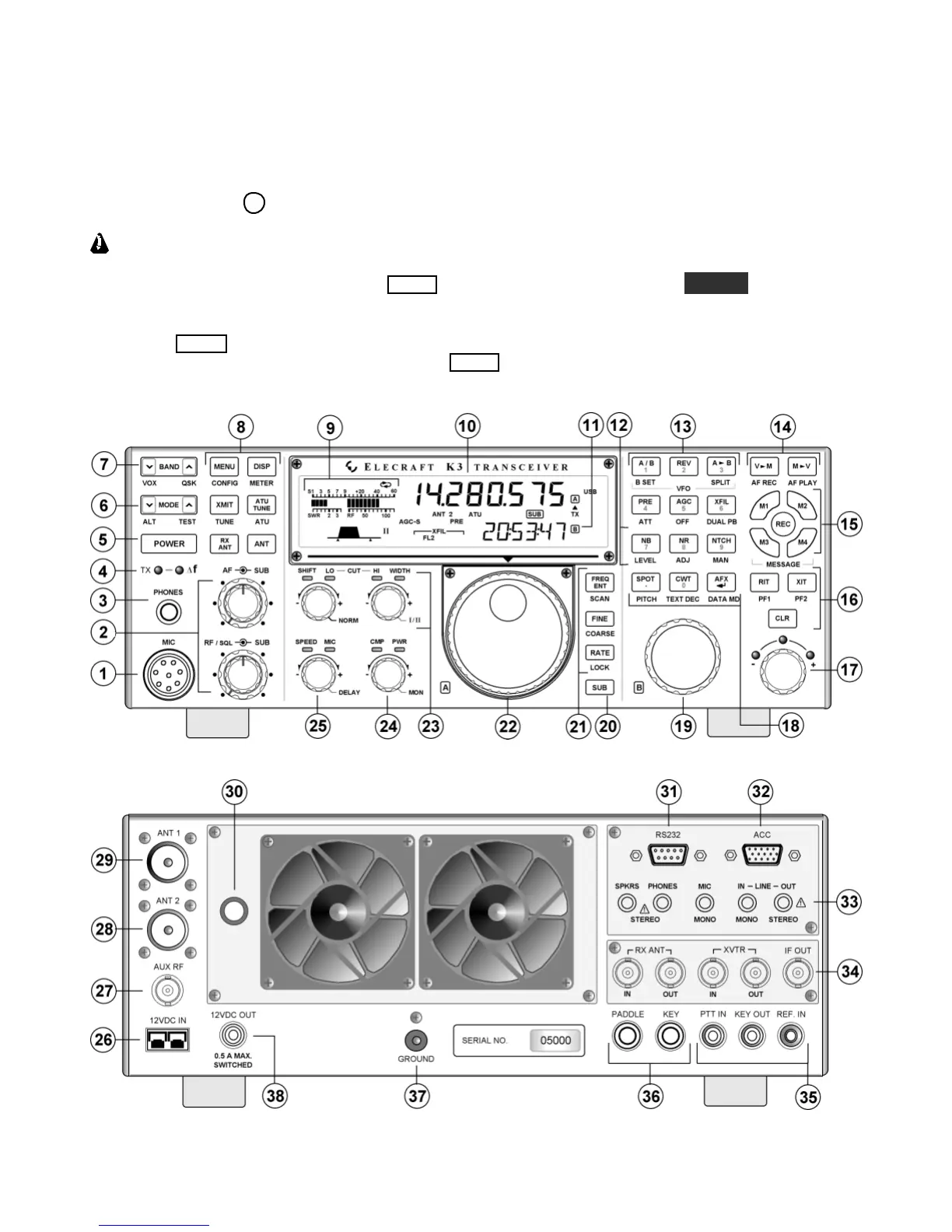
To get started using your K3 right away, please readthispage andthe two that follow, trying each of the
controls. The text uses braces to referto numbered elements in the front- and rear-panel illustrations below. For
example, {1}refers to
1
, the mic jack. Later sections provide greater detail on all aspectsof K3 operation.
The first thing you need to know about the K3 isthat most switches have two functions. Tap (press
briefly) to activatethe function labeled on a switch. Hold to activatethe function labeled below the switch. In
the text, tap functions are shown like this: MEN U . An example of a hold function is CONFI G . Additional
typographical conventions are shown on the previous page.
Try tapping MENU {8}. This brings up the MAIN menu. Rotating VFO B {19} selects menu entries, while
rotating VFO A {22} changes their parameters. Tap MENU againto exit the menu.





 To Next Page