RS232 / P3 Panadapter Port (RJ45)
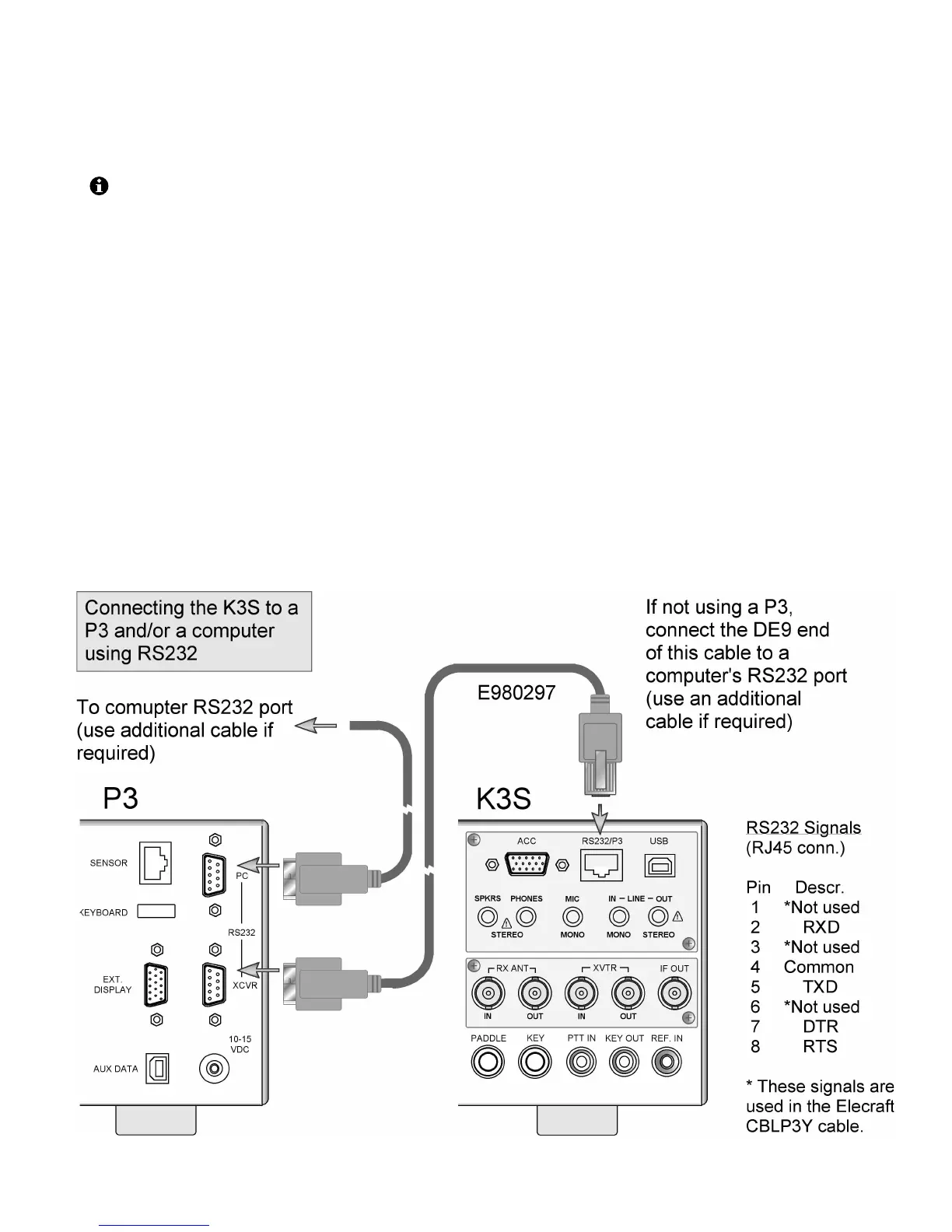
The RS232/P3 port can be used with an Elecraft P3
Panadapter, or with a computer’s RS232 interface.
In most cases it is preferable to connect the
computer to the transceiver’s USB port as described
on pg. 18. However, RS232-only installations can
also be used, as discussed on this page.
An adapter cable to convert RJ45 to DE9 (RS232
standard, female) is supplied with the K3S (Elecraft
#E980297). This adapter allows you to connect the
K3S to a P3, or to a computer via a user-supplied
RS232 cable, as shown below. The adapter cable’s
DE9 connections are shown on the next page. RJ45
jack connections are shown below.
If you plan to use the RJ45 jack for PTT or keying
from the computer, see PTT and Keying (pg. 20).
Typically such connections would be made at the
DE9 end of the supplied adapter, rather than
directly at the RJ45 jack.
To connect a P3 Panadapter to the K3S, and
optionally connect a computer to the P3 (via
RS232):
• Use the supplied Elecraft #E980297 cable to
connect the P3 to the K3S as shown (see
illustration below). At the K3S end, the cable
is connected to the RS232/P3 jack. At the P3,
the cable connects to the XCVR jack.
• A computer can optionally be connected via
RS232 to the P3’s PC jack as shown. The cable
is user-supplied. (See DE9 signals, next page.)
• Set CONFIG:RS232 to 38400.
To connect a computer to the K3S via RS232,
without a P3 Panadapter:
• Connect the RJ45 end of cable # E980297 to
the K3S as shown below. Connect the DE9 end
to a computer, using an additional user-supplied
cable if required.
• Set CONFIG:RS232 to the desired baud rate.





 To Next Page