30
SERVICE & DISASSEMBLY
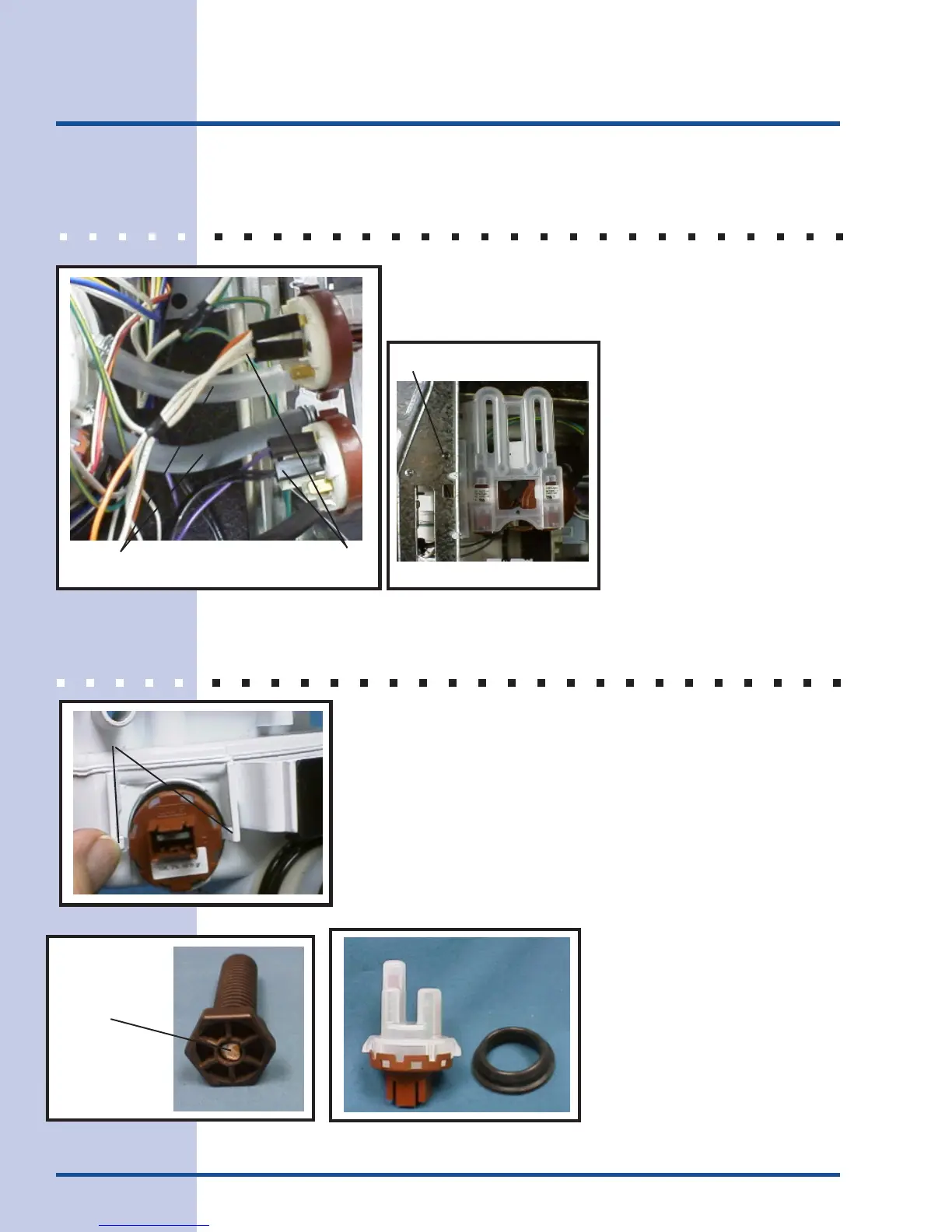
PRESSURE SWITCH ASSEMBLY
1. Remove dishwasher cabinet. See CABINET
REMOVAL for detailed instructions.
2. Remove hoses and electrical connections to switches.
(See Figure 40)
3. Remove screw that
mounts assembly to
side frame. (See Figure
41)
4. Reverse procedure for
reinstallation.
THERMISTOR/SOIL SENSOR
1. Disconnect dishwasher from power and water supplies.
Remove drain line.
2. Remove dishwasher from countertop.
3. Lay dishwasher on its back on a protective pad.
4. Remove wire plug from sensor by lifting lock to release plug.
5. Push retainers away from sensor and remove sensor from
sump. (See Figure 42)
6. To reinstall, apply lubricant to sensor seal. Line up location
tab with appropriate slot in
sump and lock in place.
7. Complete installation by
reversing procedure.
Mounting Screw
Figure 41
Sensor & Seal
Figure 43
Bottom of leg
with reinforcement
rod
Figure 44
Hoses
Electric Leads
Figure 40
Locking tabs
Figure 42



 To Next Page