-10-
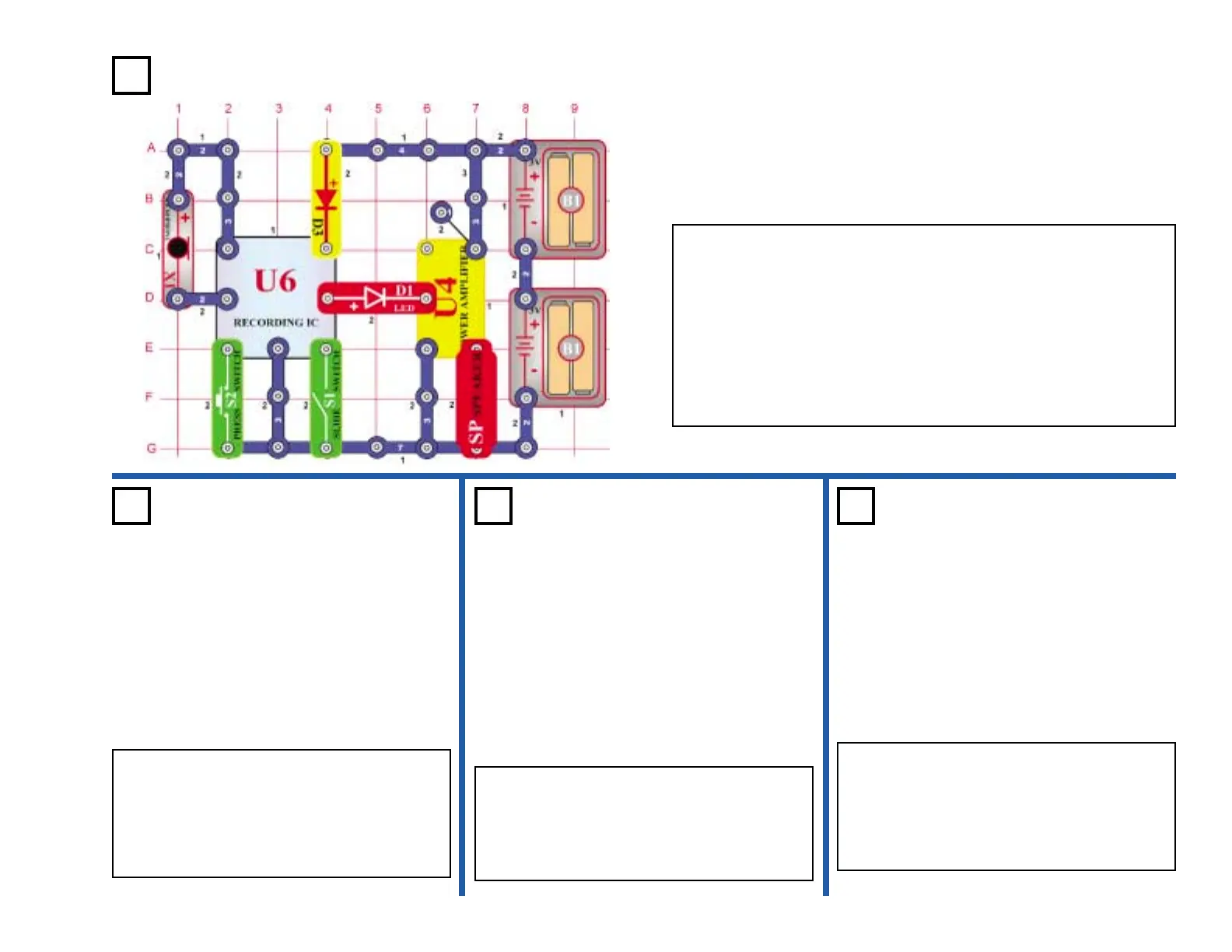
Project #312
Connecting the power amp IC (U4) to the output of the recording IC
(U6), you can make much louder music than project 308.
Turn on the switch (S1), you hear a beep signaling that you may begin
recording. Talk into the microphone up to 8 seconds, and then turn
open the switch (it also beeps after the 8 seconds expires).
Press the switch (S2) for playback. It plays the recording you made
followed by one of three songs. If you press switch (S2) before the
song is over, music will stop. You may press the switch (S2) several
times to play all three songs.
Power Amplified
Playing Music
OBJECTIVE: To build a circuit that amplifies the recording IC.
OBJECTIVE: To amplify the output of the
recording IC.
Use the circuit in project 312. Turn on the
switch (S1), then press the switch (S2) to start
the first song. When the music stops, press
the switch (S2) again to hear the second
song. When the second song stops, press the
switch (S2) again, the third song plays.
Power
Playback &
Record
Project #313
OBJECTIVE: Show variations of project 312.
Power Light-
Controlled
Music
Project #314
OBJECTIVE: Show variations of project 312.
Power Touch-
Controlled
Music
Project #315
Use the circuit in project 312. Replace the
switch (S2) with the photo resistor (RP), then
turn on the switch (S1). Turn the music on
and off by waving your hand over photo
resistor.
Use the circuit in project 312. Replace the
switch (S2) with the PNP transistor (Q1) and
then turn on the switch (S1). Turn the music
on and off by touching the base and collector
at the same time. You may need to wet your
fingers.











 To Next Page