-31-
Project #384
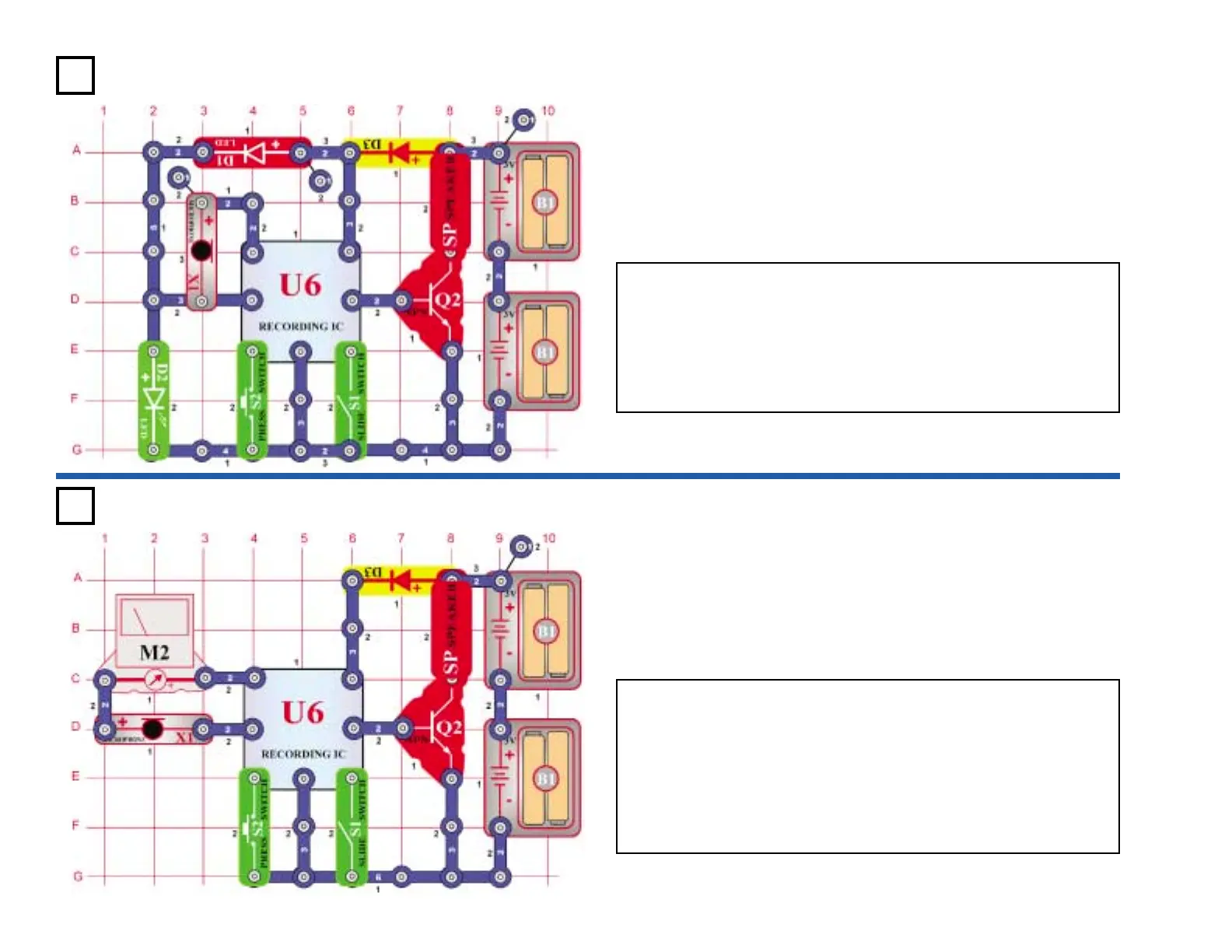
OBJECTIVE: To build a circuit that lights an LED to indicate
the recording mode.
The circuit uses sound (beep) and light (LED) to indicate that you are
recording. Build the circuit; the red (D1) and green (D2) LEDs should
light. Now turn on switch (S1). You hear one beep and the green LED
turns off. Speak into the microphone (X1) to record a message. When
you turn off switch (S1), or the circuit beeps twice (indicating the
recording is finished), the green LED turns on again. Press the switch
(S2) to hear your recording.
Recording LED
Indicator
Project #385
OBJECTIVE: To add a volt meter to the playback and record
circuit.
When recording, if the input signal into the microphone (X1) is too
high, distortion can occur. To monitor the level, a meter (M2) is placed
in series with the microphone.
Turn on the switch (S1) and the meter defects to the right. As you
speak into the microphone, the meter indicates the change in voltage.
Turn the switch off and then on to record again, but this time speak
louder. You will find that the louder you speak, the more the meter
deflects.
Playback & Record
with Meter











 To Next Page