-39-
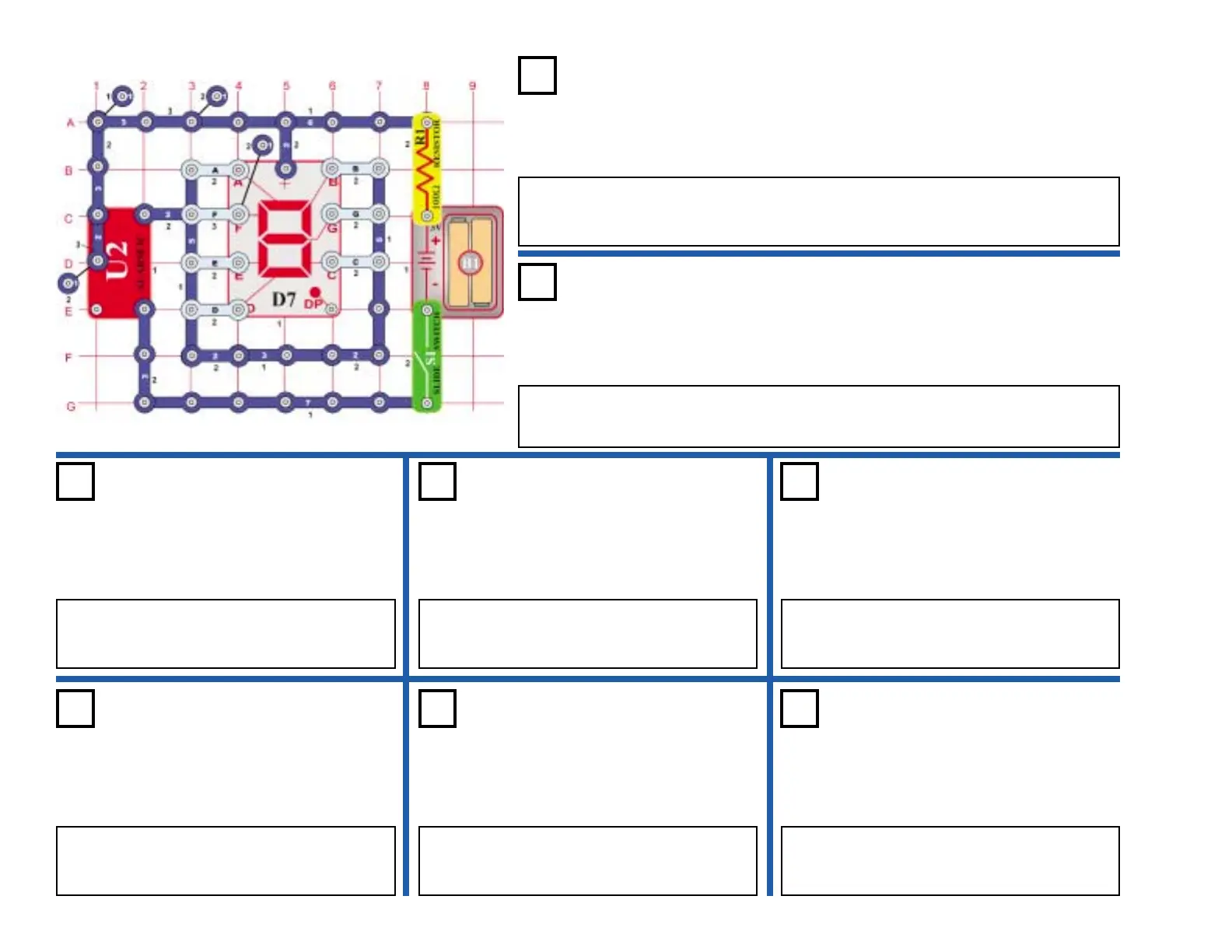
OBJECTIVE: To construct a light controlled display for capital letters.
Connect segments A, D, E & F to the circuit. Turn on the switch (S1), the display
should be off. Place your hand over the photo resistor (RP), now the capital letter C
lights.
Automatic Display Capital Letter “C”
Project #411
OBJECTIVE: To light the capital letter “E” using a light controlled display.
Use the circuit from project 411. Connect A, D, E, F, & G to the circuit. Turn on the switch
(S1), the display should be off. Place your hand over the photo resistor (RP), now the capital
letter E lights.
Automatic Display Capital Letter “E”
Project #412
Project #413
OBJECTIVE: To light the capital letter “F” using a light controlled display.
Use the circuit from project 411. Connect A, E, F, & G to
the circuit. Turn on the switch (S1), the display should be
off. Place your hand over the photo resistor (RP), now the
capital letter F lights.
Automatic Display
Capital Letter “F”
Project #414
OBJECTIVE: To light the capital letter “H” using a light controlled display.
Use the circuit from project 411. Connect B, C, D, E , &
F to the circuit. Turn on the switch (S1), the display
should be off. Place your hand over the photo resistor
(RP), now the capital letter H lights.
Automatic Display
Capital Letter “H”
Project #415
OBJECTIVE: To light the capital letter “P” using a light controlled display.
Use the circuit from project 411. Connect A, B, E, F, & G
to the circuit. Turn on the switch (S1), the display should
be off. Place your hand over the photo resistor (RP), now
the capital letter P lights.
Automatic Display
Capital Letter “P”
Project #416
OBJECTIVE: To light the capital letter “S” using a light controlled display.
Use the circuit from project 411. Connect A, F, G, C, & D
to the circuit. Turn on the switch (S1), the display should
be off. Place your hand over the photo resistor (RP), now
the capital letter S lights.
Automatic Display
Capital Letter “S”
Project #417
OBJECTIVE: To light the capital letter “U” using a light controlled display.
Use the circuit from project 411. Connect B, C, D, E, & F
to the circuit. Turn on the switch (S1), the display should
be off. Place your hand over the photo resistor (RP), now
the capital letter U lights.
Automatic Display
Capital Letter “U”
Project #418
OBJECTIVE: To light the capital letter “L” using a light controlled display.
Use the circuit from project 411. Connect D, E, & F to the
circuit. Turn on the switch (S1), the display should be off.
Place your hand over the photo resistor (RP), now the
capital letter L lights.
Automatic Display
Capital Letter “L”











 To Next Page