-41-
Project #425
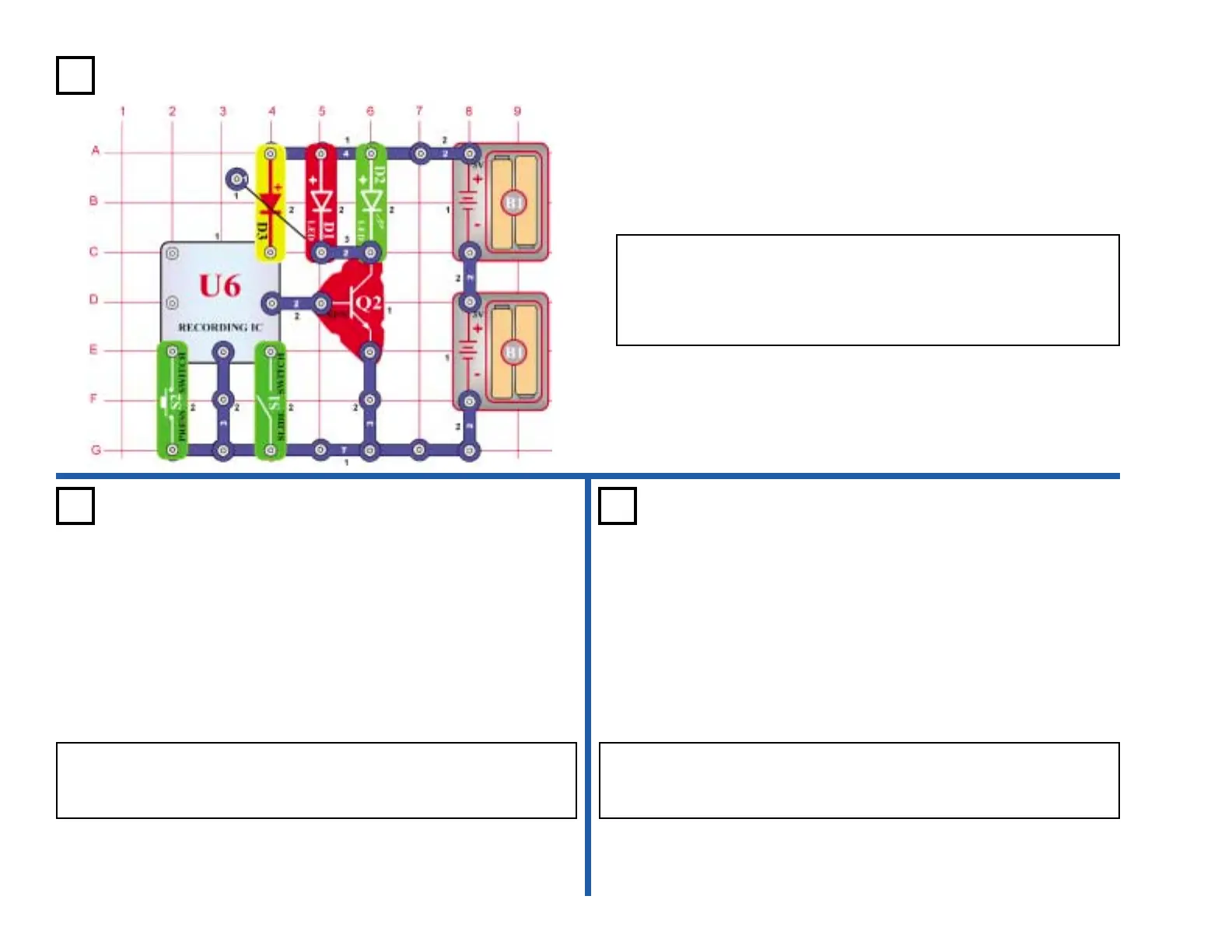
OBJECTIVE: To light the LEDs using the recording IC.
The recording IC (U6) lights the LEDs (D1 & D2) instead of driving the
speaker (SP). Press the switch (S2) once. The LEDs light and then
turn off after a while. Press the switch (S2) again and see how long
the second song plays. When the second song stops, press the
switch (S2) again to play the third song.
LED Music
Project #426 Project #427
OBJECTIVE: Show variations of project 425.
Light-Controlled LED
Time Delay
OBJECTIVE: Show variations of project 425.
Touch-Controlled LED
Time Delay
Use the circuit in project 425. Replace the press switch (S2) with the
photo resistor (RP). Turn the LEDs on and off by waving your hand over
the photo resistor.
Use the circuit in project 425. Replace the press switch (S2) with the
PNP transistor (Q1). Turn the LEDs on and off by touching the base and
collector at the same time. You may need to wet your fingers.











 To Next Page