-45-
Project #435
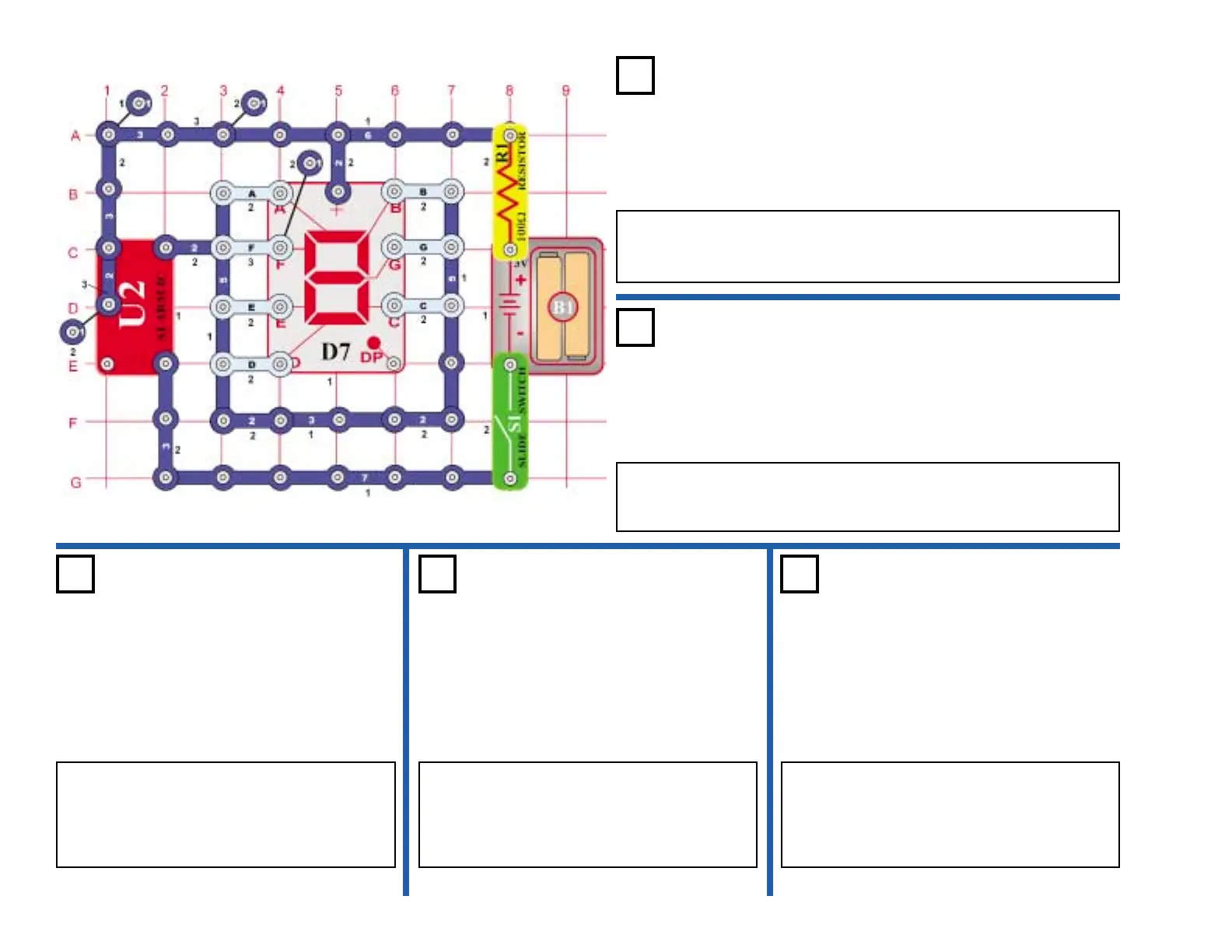
OBJECTIVE: Use the Alarm IC as a switch to flash the numbers
“1 & 2”.
Connect segments B & C to the circuit. Turn on the switch (S1) and the
number “1” should be flashing. Now, connect A, B, G, E, & D to flash
the number “2”.
Flashing “1 & 2”
Project #436
OBJECTIVE: Use the Alarm IC as a switch to flash the numbers
“3 & 4”.
Use the circuit in project 435. Connect A, B, G, C, & D to the circuit.
Turn on the switch (S1) and the number “3” should be flashing. Now,
connect C, B, G & F to flash the number “4”.
Flashing “3 & 4”
Project #437
OBJECTIVE: Use the Alarm IC as a
switch to flash the numbers “5 & 6”.
Use the circuit in project 435. Connect A, F,
G, C & D to the circuit. Turn on the switch
(S1) and the number “5” should be flashing.
Now, connect A, C, D, E, F & G to flash the
number “6”.
Flashing
“5 & 6”
Project #438
OBJECTIVE: Use the Alarm IC as a
switch to flash the numbers “7 & 8”.
Use the circuit in project 435. Connect A, B,
& C to the circuit. Turn on the switch (S1) and
the number “7” should be flashing. Now,
connect A, B, C, D, E, F & G to flash the
number “8”.
Flashing
“7 & 8”
Project #439
OBJECTIVE: Use the Alarm IC as a
switch to flash the numbers “9 & 0”.
Use the circuit in project 435. Connect A, B,
C, D, F, & G to the circuit. Turn on the switch
(S1) and the number “9” should be flashing.
Now, connect A, B, C, D, E, & F to flash the
number “0”.
Flashing
“9 & 0”











 To Next Page