Operation and Maintenance
UFM Series 6
Q.Sonic-plus
7.3 Basic Display
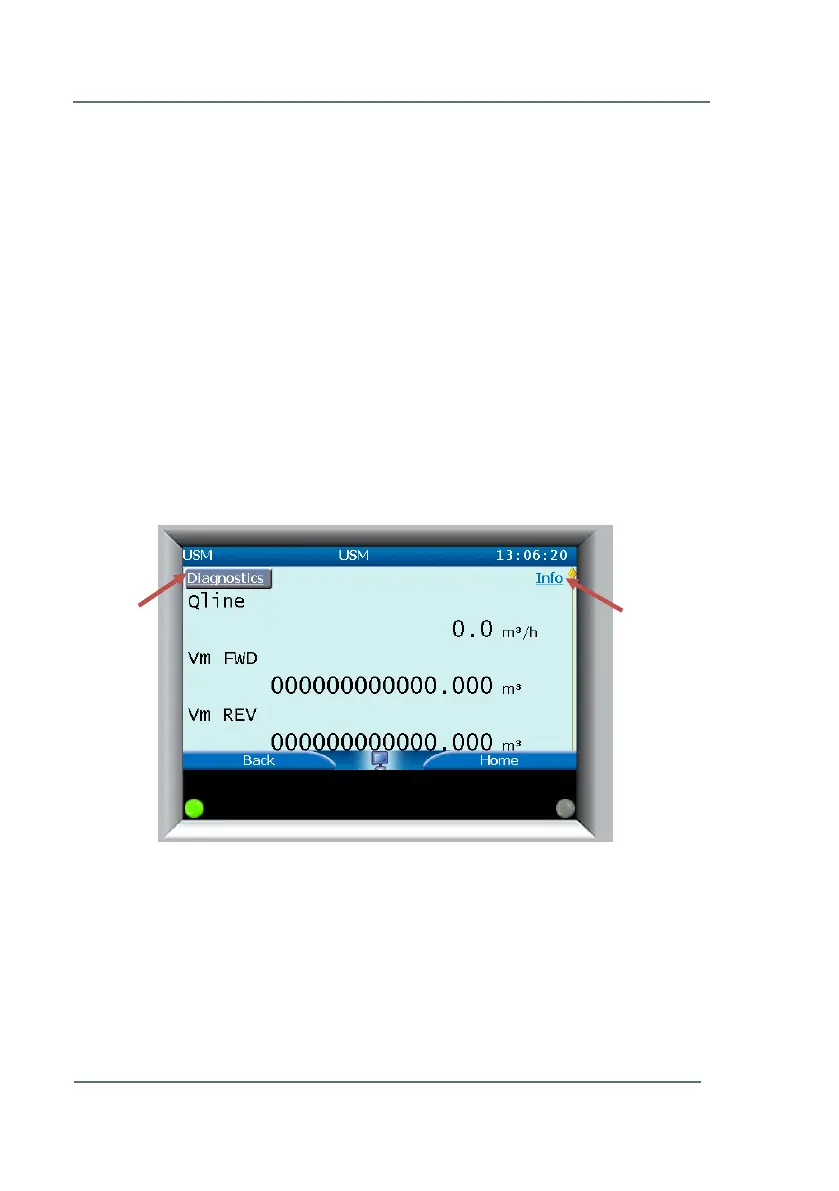
The basic display is shown below in Figure 7-3 and displays the following
values:
Qline - Gas line flow running through the meter in m
3
/h.
Vm FWD (Volume Forward) - Total amount of gas volume passed
through the meter in the positive direction.
Vm REV (Volume Reverse) - Total amount of gas volume passed
through the meter in the negative direction.
Vline - Speed of the gas running through the meter. (Scroll down
on the meter display to view)
Touch one of the 7 touch areas (as seen above in Figure 7-2) and use the
arrow buttons on the right to navigate up and down.
Along the top of the basic display page you will see the sub-menus
Diagnostics and Info marked with red arrows in Figure 7-3. You have to
scroll to the top of the page to view or select these sub-menus. For more
information on Diagnostics, as well as the two submenus from this screen,
please see Chapters 7.5 Diagnostics (p.42) and 7.6 Info (p.48),
respectively.
Figure 7-3: Basic Display/USM



 To Next Page