Verifying Software Versions
UFM Series 6
Q.Sonic-plus
Operation and Maintenance
9.3 Display Test
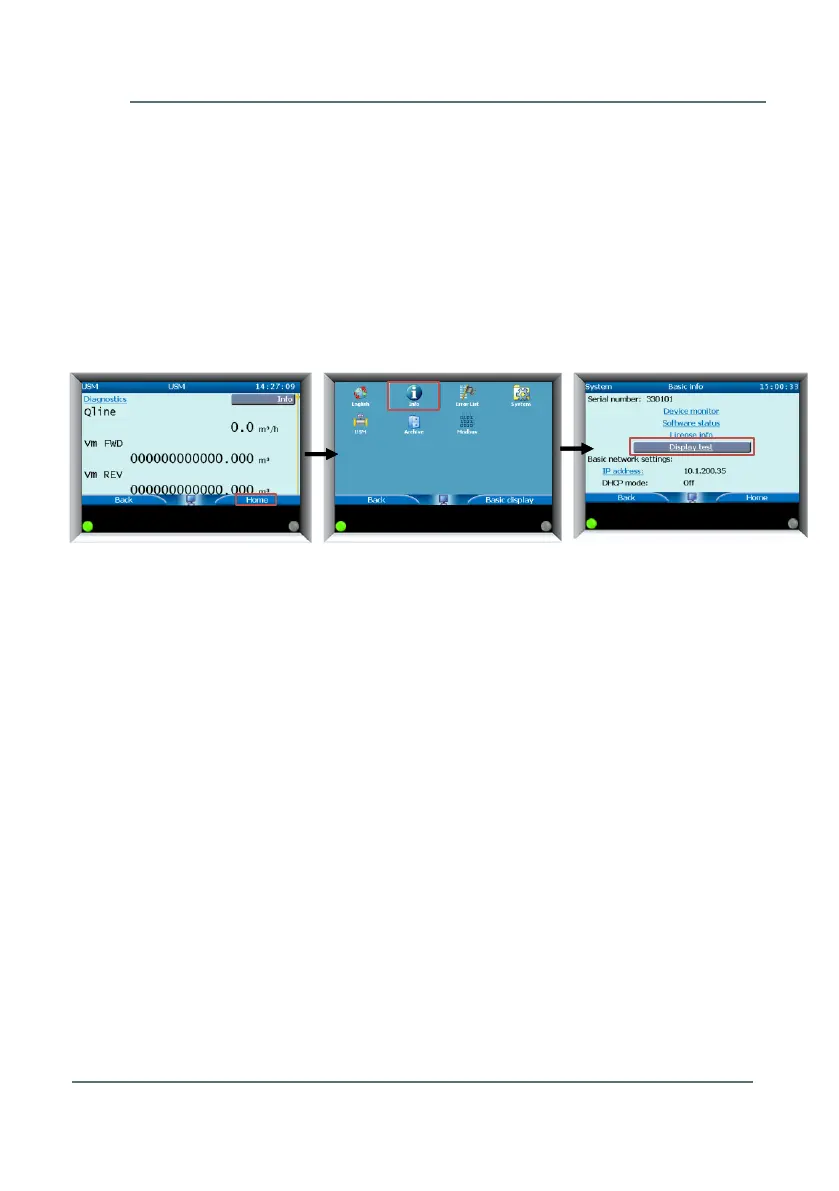
Display test of the screen can be carried out as follows:
► If you are at the front panel, go to the Home page
► Choose Info
► Go to Display Test
The display will alternate between black and white. Press any button to
stop the test.
9.4 Checking Errors and Warnings
The status LED on the display shows when a warning or error has taken
place ( see Chapter 7.1 LED at Display [p.33]). Through the front panel it
is possible to get more information on the errors/warnings (see Figure 9-4). It
is also possible to ‘accept’ the errors/warnings. Hereby it will be written in the
Logbook of the meter and will no longer influence the status LED on the
meter.
► Go to the Home page
► Choose Error List
A list of the errors is displayed



 To Next Page