Verifying Software Versions
UFM Series 6
Q.Sonic-plus
Operation and Maintenance
9 Verifying Software Versions
It’s possible to verify the software version with checksum for all components.
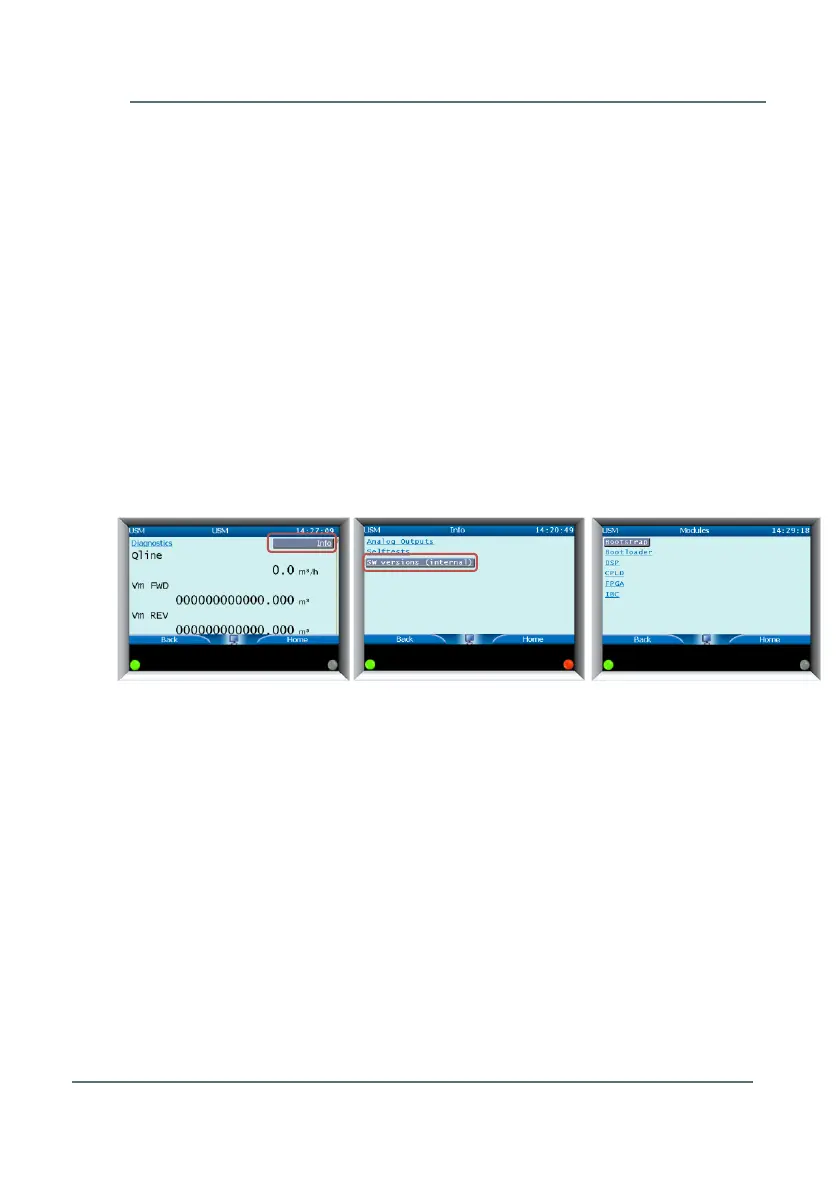
This should be done with two different methods. Figure 9-1 and Figure 9-2
show the steps to complete this process.
9.1 Verifying the Components with their Checksums
► Start from the Front Panel (main display)
► Highlight and select Info (you may need to scroll to the top of the page
using the up arrow in order to highlight the button)
► Go to SW Versions (Internal)
A list of all components is displayed. Choose the one which needs to be
verified. (Bootstrap, Bootleader, DSP, etc.)
Figure 9-1: Checking Software Versions



 To Next Page