28743-0-0711Page 30
START UP AND ADJUSTMENTS
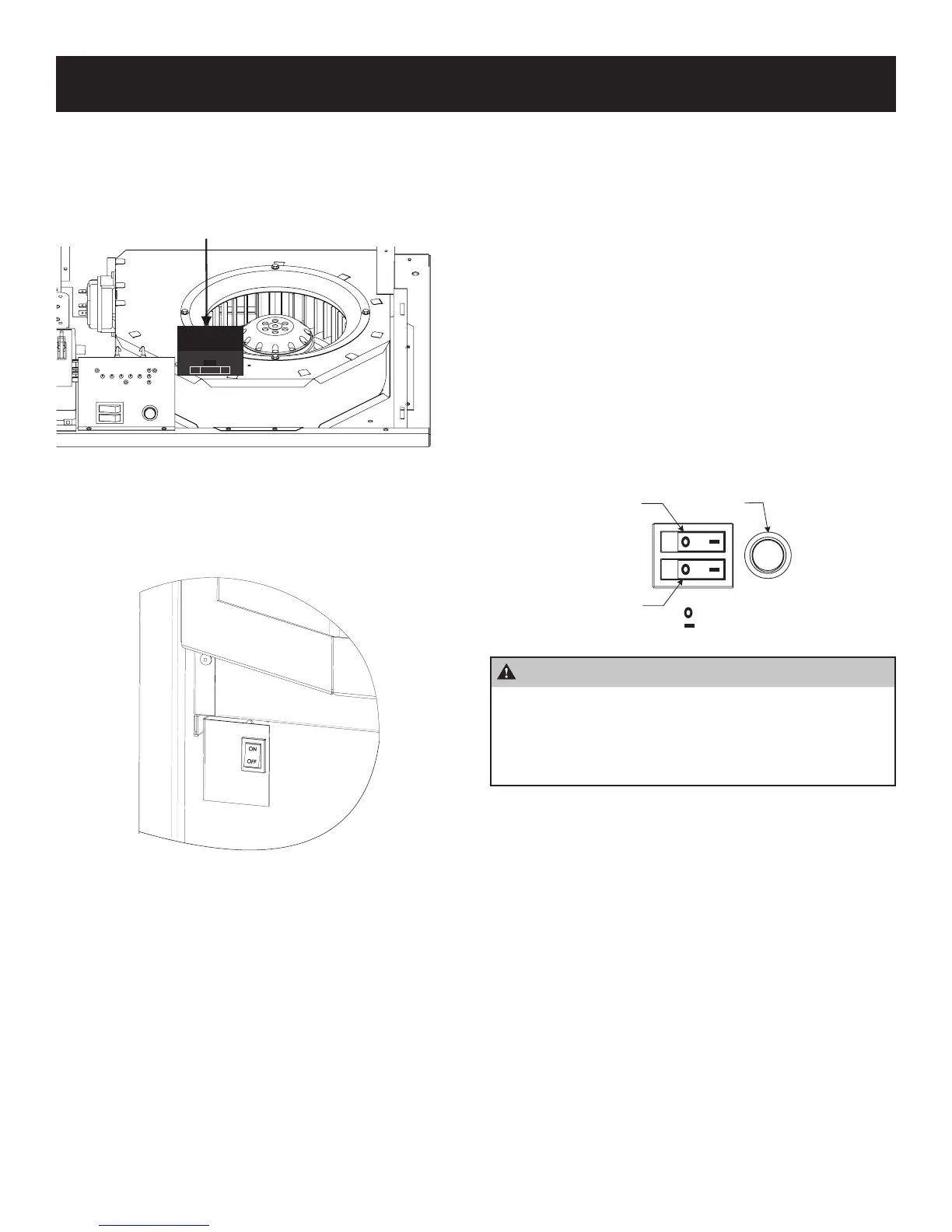
A. With main electrical power to the heater turned off, install 4
AA sized 1.5V batteries into the remote receiver. The remote
receiver is located inside the heater, mounted to the top of the
blower housing and secured with hook and loop tape. See
Figure 54. Set up receiver and remote per instructions on
pages 32 - 37.
RECEIVER LOCATION
ADJ. LEARN
REMOTE ONOFF
Figure 54
B. Turn on the main electrical power to the heater and turn the
main burner switch to the ON position. See Figure 55. Verify
power is on by checking if there is power to the circuit board.
If the unit has power, the power light will be illuminated.
Figure 55
C. Turn on the main gas supply.
D. Turn both burner switches on to ignite both the front and rear
burners. Burner switches must remain in the ON position for
the remote to function. See Figure 56.
E. The Display Panel board should be energized, and the power
light will be illuminated.
Sequence of Operations – Front and Back Burners
1. The Display Panel will be energized, and the lights for the
front burner and back burner will ash.
2. The inducer will activate immediately and will prove the pres-
sure switch within 16 seconds. This will initiate the ignition
sequence.
3. The rear igniter (HSI) will energize and start to glow red.
4. Within 3 to 5 seconds, the gas valve will open and ignite the
rear burner. The ame sensor will verify the ame is present
within 2 to 5 seconds.
5. The igniter for the front burner will energize 5 to 7 seconds
after the ame is established on the rear burner.
6. The gas valve will open to ignite the front burner within 3 to
5 seconds. The ame sensor will verify the ame is present
within 2 to 5 seconds.
7. As the Mantis warms up, the circulating blower will activate,
starting on Low speed. The Low Blower L.E.D. will light when
the blower turns on.
8. As the Mantis continues to operate, the speed of the circulat-
ing blower will increase, and the L.E.D. for Medium and High
will appear.
FRONT
BURNER
SWITCH
REAR
BURNER
SWITCH
ECONOMY
DISPLAY
BUTTON
= OFF
=ON
Figure 56
CAUTION
When switching from one burner to the other burner,
be sure to rst turn “ON” the desired burner before
turning “OFF” the burner that is operating. Failure to
follow this sequence may result in the heater needing
to be reset. See page 40 - Resetting the Heater.




 To Next Page