28743-0-0711 Page 39
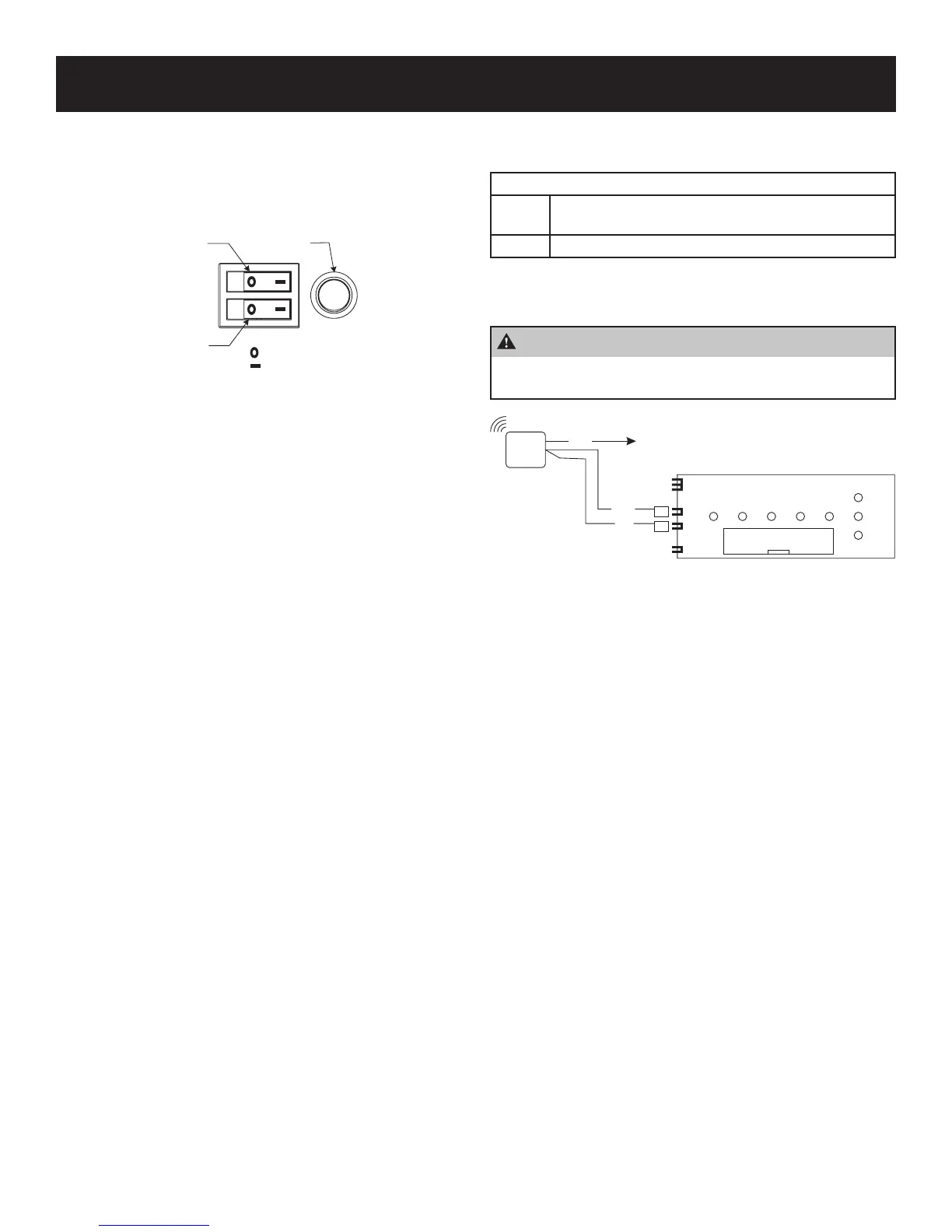
Economy Mode (Red Button Operation)
To utilize this feature, a programmable control or thermostat must
be connected to the heater. A red button is located next to the
burner switches on the front control panel. See Figure 59. This is
called the economy mode.
FRONT
BURNER
SWITCH
REAR
BURNER
SWITCH
ECONOMY
DISPLAY
BUTTON
= OFF
=ON
Figure 59
To use this feature, both burner switches need to be in the “ON”
position, and the red button must be pressed so it is illuminated.
This will ignite the front burner. The front burner will remain on
when the red button is illuminated, and the back burner will cycle
with the thermostat. The red button acts only as an override for the
front burner.
To Deactivate
Press the red button so it is not illuminated, then the heater will
return to normal operation.
Battery Operated Controls
This unit is equipped with a factory installed wireless remote.
All Remote Controls are all battery operated devices.
Optional Battery Operated Control
FRBTP Battery Operated Remote with Programmable Ther-
mostat
TRW Battery Operated Wireless Remote Wall Thermostat
These optional controls will work with the factory installed
receiver.
CAUTION
Before connecting any controller, disconnect power
to the appliance.
REMOTE
CONTROL
RECEIVER
14 WAY RIBBON TO
CONTROL MODULE
P1
T1
T2
P2
BLUE
TRANSFORMER
RED
BLACK
Figure 60
Adjust the remote from the instructions provided with the remote
control.
Note: If the heater will not be used for long periods of time,
turn the burner switches to the “OFF” position and turn the
power off at the power source.
OPTIONAL CONTROLS




 To Next Page