28743-0-0711Page 32
FRBTC REMOTE INSTRUCTIONS
INTRODUCTION
This remote control system was developed to provide a safe, reliable and user-friendly remote control system for gas
heating appliances. This all battery system operates independently of household current. The system operates on radio
frequencies with a non-directional signals. The SYSTEM’s operating range is approximately 20 feet range. The system
operates on one of 1,048,576 security codes that are programmed into the transmitter at the factory; the remote receiver’s
code must be matched to that of the transmitter prior to initial use.
Review COMMUNICATION SAFETY SECTION under TRANSMITTER section and THERMO SAFETY SECTION
under REMOTE RECEIVER section. These signal/temperature safety features shut down the replace system when a
potentially unsafe condition exists.
This remote control SYSTEM offers the user a battery-operated remote control
that operates most millivolt gas valves used in some heater rated gas logs, gas
replaces and other gas heating appliances.
The transmitter operates on (2) 1.5V AAA batteries.
It is recommended that ALKALINE batteries always be used for longer battery
life and maximum operational performance.
Before using the transmitter, install the (2) AAA transmitter batteries into the
battery compartment. (Use caution that batteries are installed in the proper
direction)
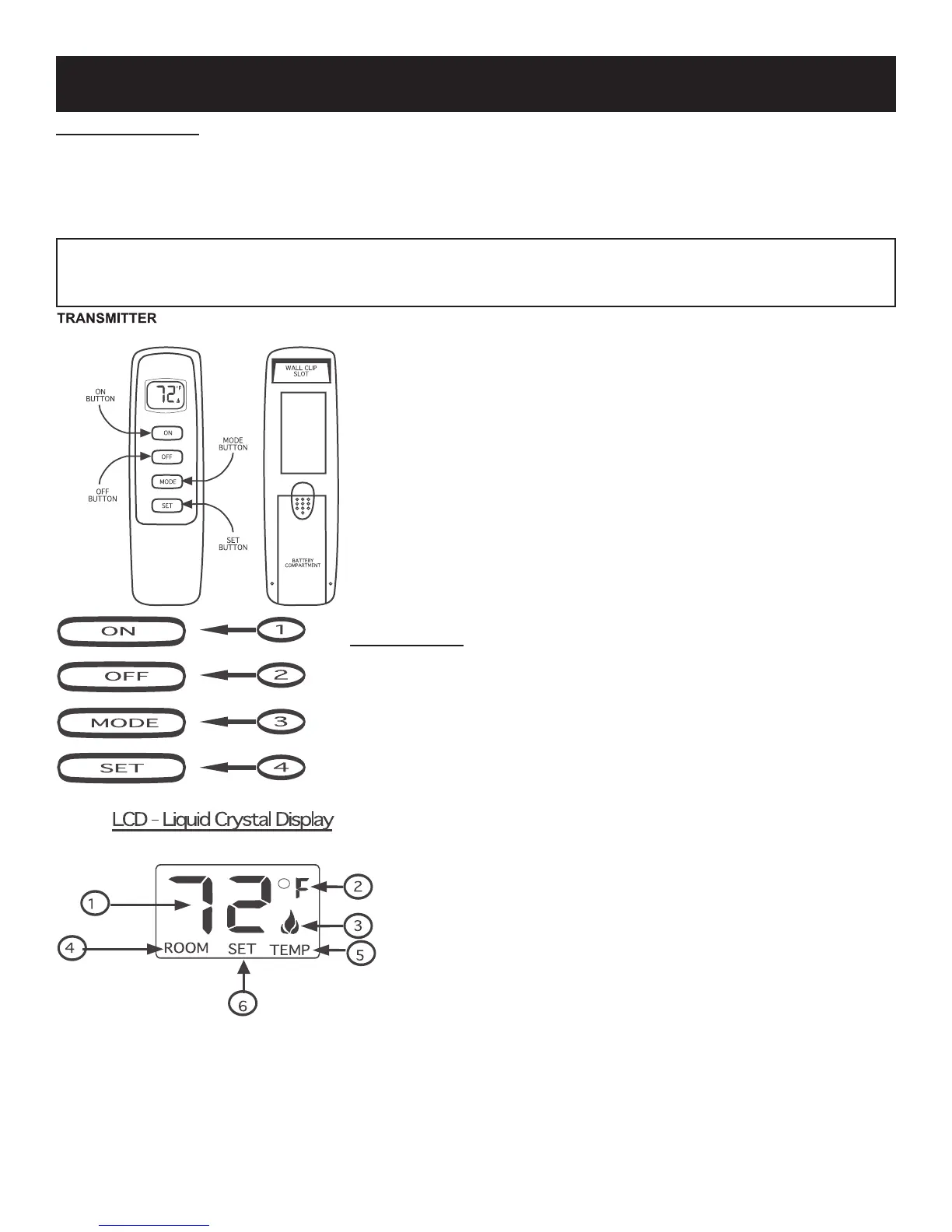
KEY SETTINGS
• ON - Operates unit to on position, Manually ON.
• OFF - Operates unit to off position, Manually OFF.
• MODE - Changes unit from manual mode to thermo mode.
• SET - Sets temperature in thermo mode.
1. DISPLAY Indicates CURRENT room temperature .
2. °F OR °C Indicates degrees Fahrenheit or Celsius.
3. FLAME Indicates burner/valve in operation.
4. ROOM Indicates remote is in THERMO operation.
5. TEMP Appears during manual operation.
6. SET Appears during time the of setting the desired tem-
perature in the thermo operation.




 To Next Page