28743-0-0711 Page 33
SETTING °F / °C SCALE
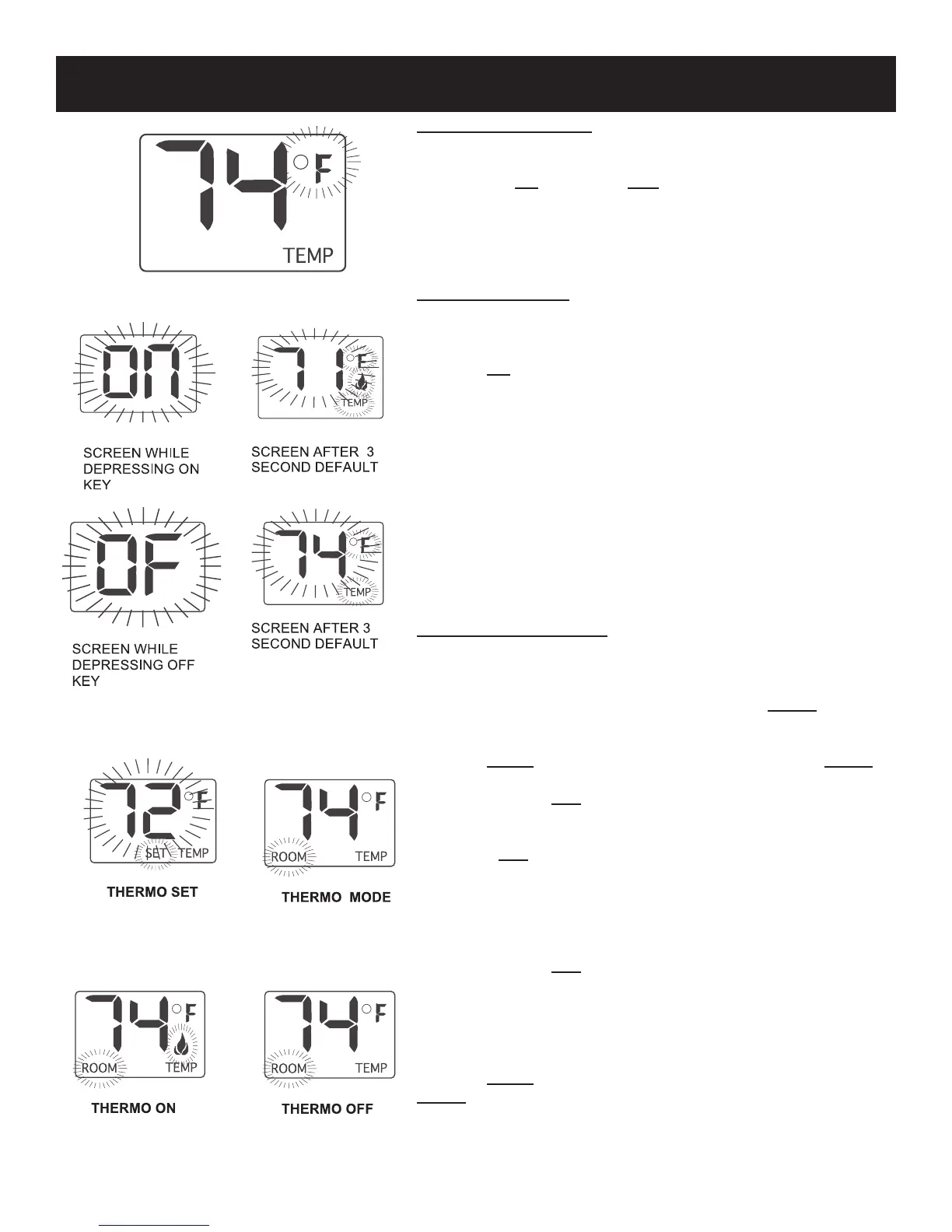
The factory setting for temperature is °F. To change this setting to °C,
rst
• Press the ON key and the OFF key on the transmitter at the
same time this will change from °F to °C. Follow this same proce-
dure to change from °C back to °F.
MANUAL FUNCTION
To operate the system in the manual “MODE” does the following.
ON OPERATION
Press the ON key the appliance ame will come on. During this time
the LCD screen will show ON, after 3 seconds the LCD screen will
default to display room temperature and the word TEMP will show.
(Flame icon will appear on LCD screen in on mode)
OFF OPERATION
Press the OFF key the appliance ame will shut off. During this time
the LCD screen will show OF, after 3 seconds the LCD screen will
default to display room temperature and the word “TEMP” will also
show on the screen.
THERMOSTAT FUNCTION
SETTING DESIRED ROOM TEMPERATURE
This remote control system can be thermostatically controlled when
the transmitter is in the THERMO mode (The word ROOM must be
displayed on the screen). To set the THERMO MODE and DE-
SIRED room temperature,
Press the MODE key until the LCD screen shows the word ROOM,
then the remote is in the thermostatic mode.
Press and hold the SET key until the desired set temperature is
reached. (By pressing and holding the set key the LCD screen set
numbers will increase from 45° to 99° then restart over at 45°) Next
release the SET key. The LCD screen will display the set temperature
for 3 seconds and the LCD screen will ash the set temperature for 3
seconds, then the LCD screen will default to display the room tem-
perature.
TO CHANGE THE SET TEMPERATURE
Press and hold the SET key until the desired set temperature is
reached. (By pressing and holding the set key the LCD screen set
numbers will increase from 45° to 99° then restart over at 45° ) Next
release the SET key. The LCD screen will display the set temperature
for 3 seconds, then will ash the set temperature for 3 seconds, then
the LCD screen will default to display the room temperature.
Press the MODE key to disengage the thermo mode. The word
ROOM on the LCD screen will not show when the thermo is not in
operation.
NOTE: The highest SET temperature is 99° Fahrenheit (32° Cel-
sius) and the lowest temperature is (45° Fahrenheit (6° Celsius).
FRBTC REMOTE INSTRUCTIONS




 To Next Page