Setpoints
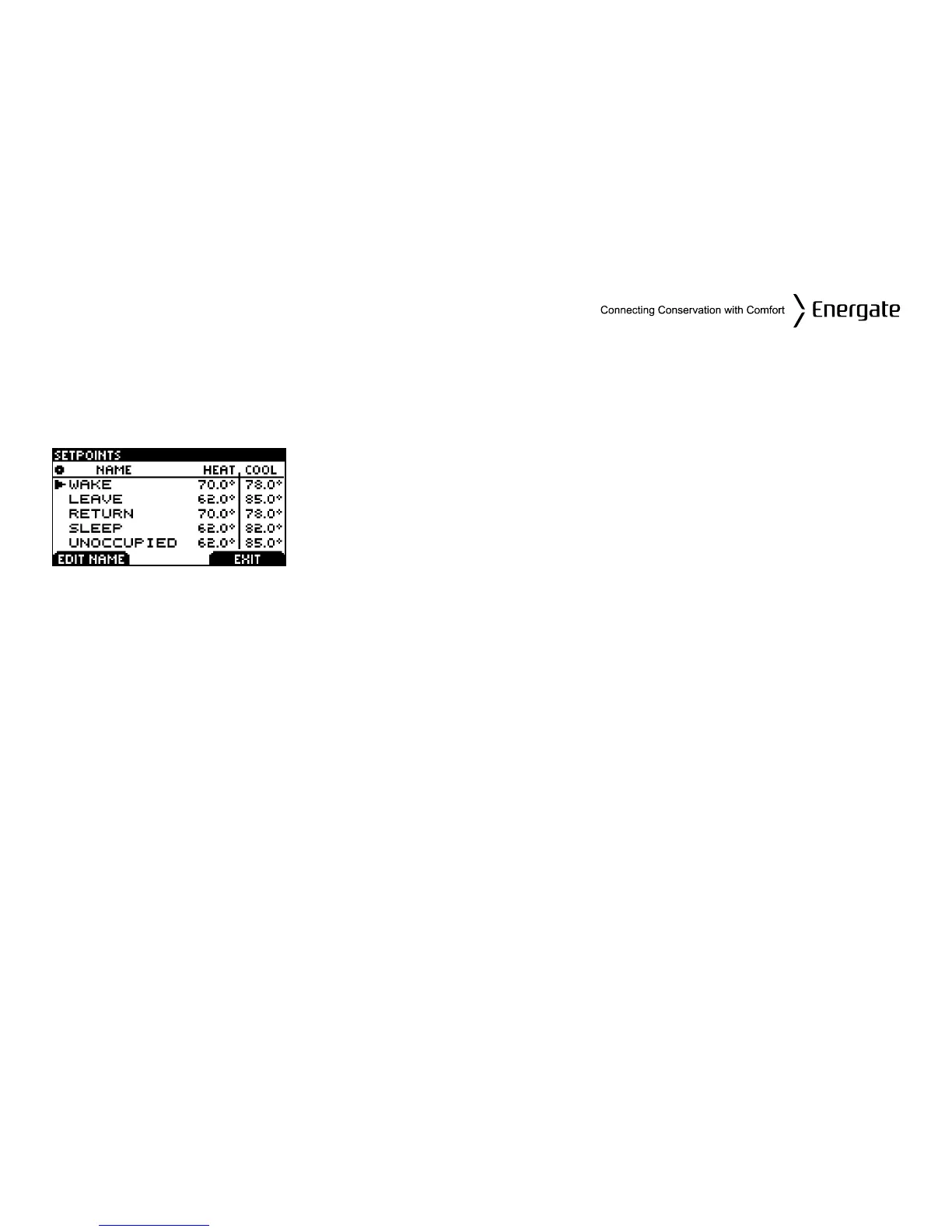
The SETPOINTS screen shows on the left the list of names of the different SETPOINTS
programmed in your thermostat and on the right the corresponding heating (in winter) and cooling
(in summer) target temperatures.
To change the HEAT and COOL temperature settings, SCROLL to
the SETPOINT you want to change and press the MENU / SELECT
button. SCROLL to change the temperature, or press again the
MENU / SELECT button to move between the HEAT and COOL
settings. As soon as you start changing a temperature, the LEFT
TAB will show SAVE CHANGES. Press this TAB if you want to save
them or cancel them by pressing the RIGHT TAB (CANCEL).
You can also modify the name of the SETPOINTS, by scrolling to
the SETPOINT you want to change and pressing EDIT NAME. You
can change one letter at a time by SCROLLING through the
alphabet until you get to the desired letter, then pressing MENU /
SELECT to move to the next letter of the name. Once done, press
SAVE CHANGES.
Page 21


 To Next Page