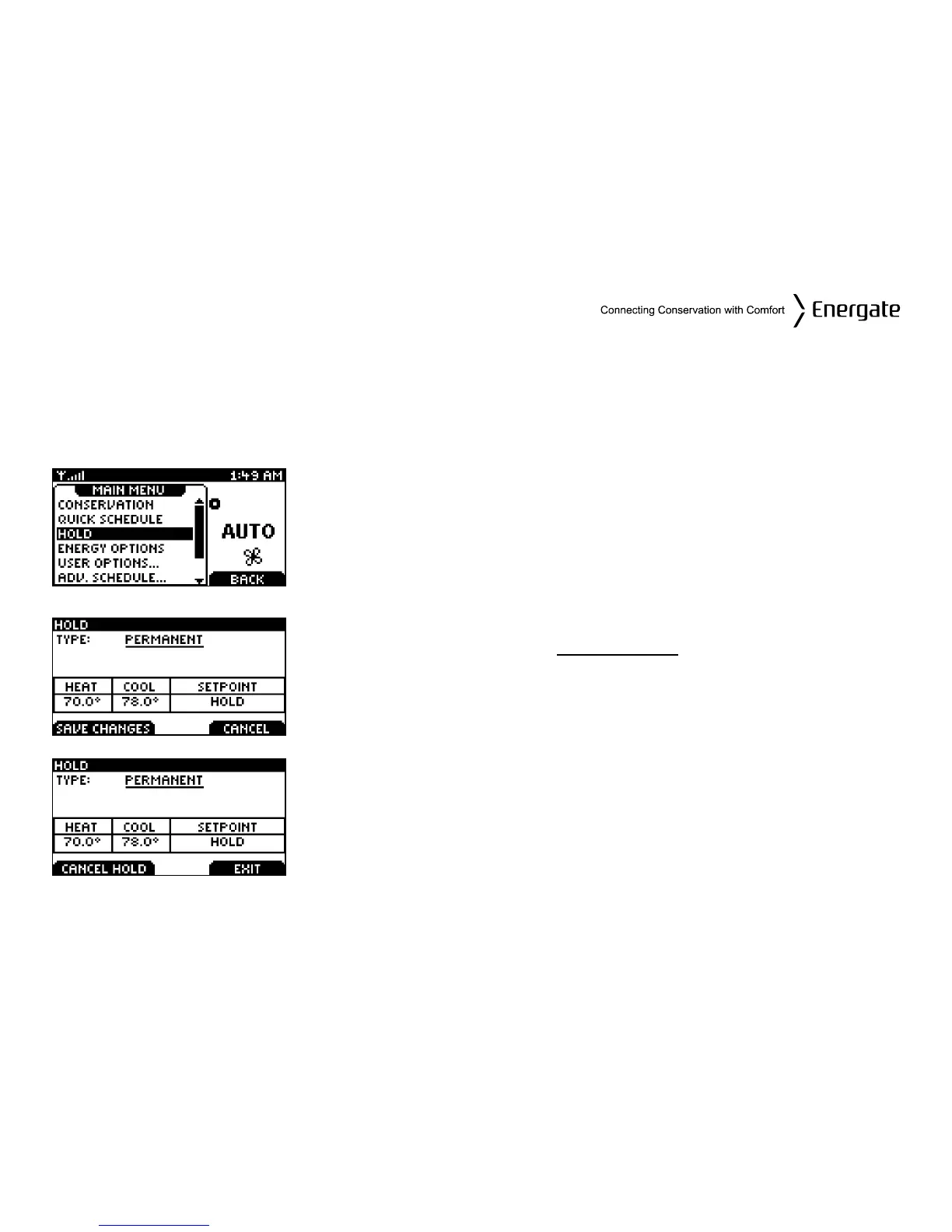
Hold Screen - Permanent, Timed, and Temporary Holds
The SCHEDULE can be overridden to maintain a desired SETPOINT through either a:
• Permanent Hold (hold until cancelled)
• Timed Hold
• Temporary Hold (hold until the next scheduled SETPOINT)
Choose HOLD from the Main Menu. Once in the HOLD screen, use
the SCROLL buttons to choose the HOLD Type.
Permanent Hold
To choose a Permanent Hold, use the SCROLL buttons in the
HOLD screen until you see PERMANENT
underlined next to
TYPE. If you want to change the HEAT and/or COOL temperatures,
you can do so by pressing the MENU / SELECT key and then the
SCROLL buttons to increase or decrease the temperatures.
You can also change the SETPOINT name from HOLD to another
one, by pressing again the MENU/SELECT key and then scrolling
though the different SETPOINT names. The Heat and Cool
temperatures will change accordingly. (Only the HOLD SETPOINT
allows the temperatures to be independently set). Press SAVE
CHANGES to accept the new settings and initiate the Hold.
To cancel the Hold, return to the HOLD screen and press the
CANCEL HOLD tab.
Page 23



 To Next Page