DocNo.FM0805issueAPage4
OPTIONAL
REMOTECONTROL
STEADYGREEN=LOCKRELEASED
FLASHINGGREEN=DOOROPEN
FLASHINGAMBER=SPEAKMODE
STEADYAMBER=LISTENMODE
PRIVACY
BUTTON
FLASHING WHITE = REMOTE
CONTROL BATTERY LOW
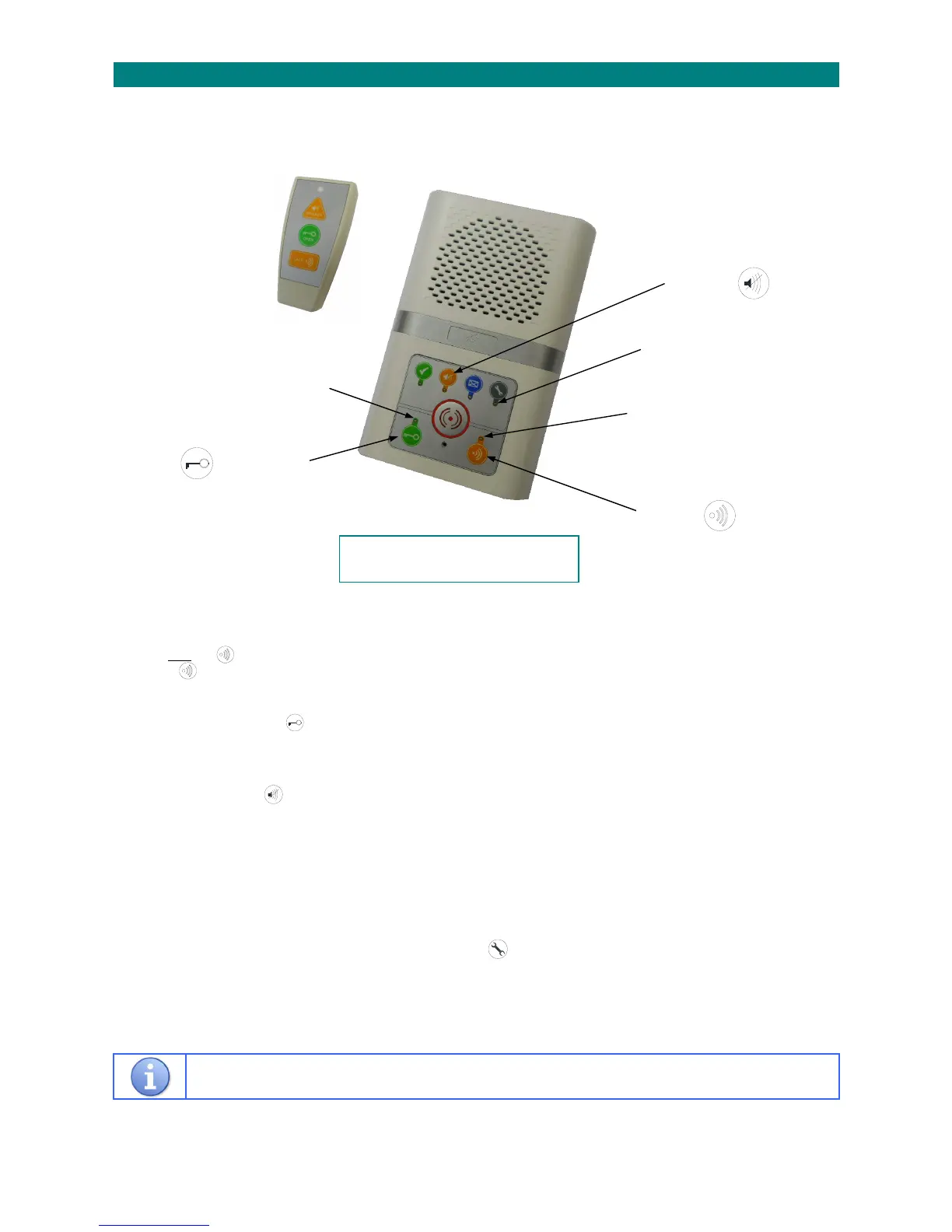
2.COMBINEDINTERCOMUNIT
Yourschememaybefittedwithcombinedwardencall&doorentryintercomunits.Thesehaveallthesamefunctionsasstandard
intercomsplus2additionalbuttonsfordoorentryfunctions(insteadofa separatedoorentrytelephone).
TALK BUTTON
Whentheintercomiscalledfromthedoorentrysystemaringtonewillsound.
Pressandholdthetalkbuttontoanswerthecall,theindicatorlightwillbeFLASHINGAMBERduringspeechtothedoor.
Releasethetalkbuttontolisten,theindicatorlightwillbeSTEADYAMBERduringlistenmode.
DOOR OPEN BUTTON
Toallowthevisitorinpresstheopenbutton,theindicatorwilllightSTEADYGREENfor5seconds.
IftheindicatorlightisFLASHINGGREENthedoorhasbeenleftopen.
PRIVACY BUTTON
Duringadoorentrycalltheprivacybuttoncanbepressedtoendthecallwithoutlettingthevisitorin.
OPTIONAL REMOTE CONTROL
DuringadoorentrycalltheremotecontrolTALK/OPEN/PRIVACYbuttonsoperateasdescribedabove.
WithnodoorentrycallinprogresstheTALKbuttoncanbeusedtoacknowledge “I’mOK”orplaya“MessageWaiting”.
WithnodoorentrycallinprogressthePRIVACYbuttonwilltoggleprivacymodeon/off.
Note:changingtheprivacymodealsoacknowledges“I’mOK”asitisseenasresidentactivity.
REMOTE CONTROL LOW BATTERY WARNING
IfthebatteryintheremotecontrolisrunninglowthelightbelowthebuttonwillbeFLASHING WHITE.
Replacethebatteryandpressanybuttonontheremotecontroltocleartheflashingwhitelight.
Allotherbuttonsandfeaturesarethesameasthestandardintercomonthepreviouspage.
TALK
BUTTON
DOOROPEN
BUTTON
Apictorialuserguideisalsoavailable;
requestTynetecDocNo.FM0730



 To Next Page