Step 1: Register the System
Register the Envoy at the beginning of the
PV installation.
a. Use your previously issued username
and password to log in to in Enlighten.
If you haven’t registered, go to
www.enphase.com and click Enlighten
Login.
b. At the installer dashboard, click Add a
New System.
If you have already registered the site,
find the system under Installations in
Progress.
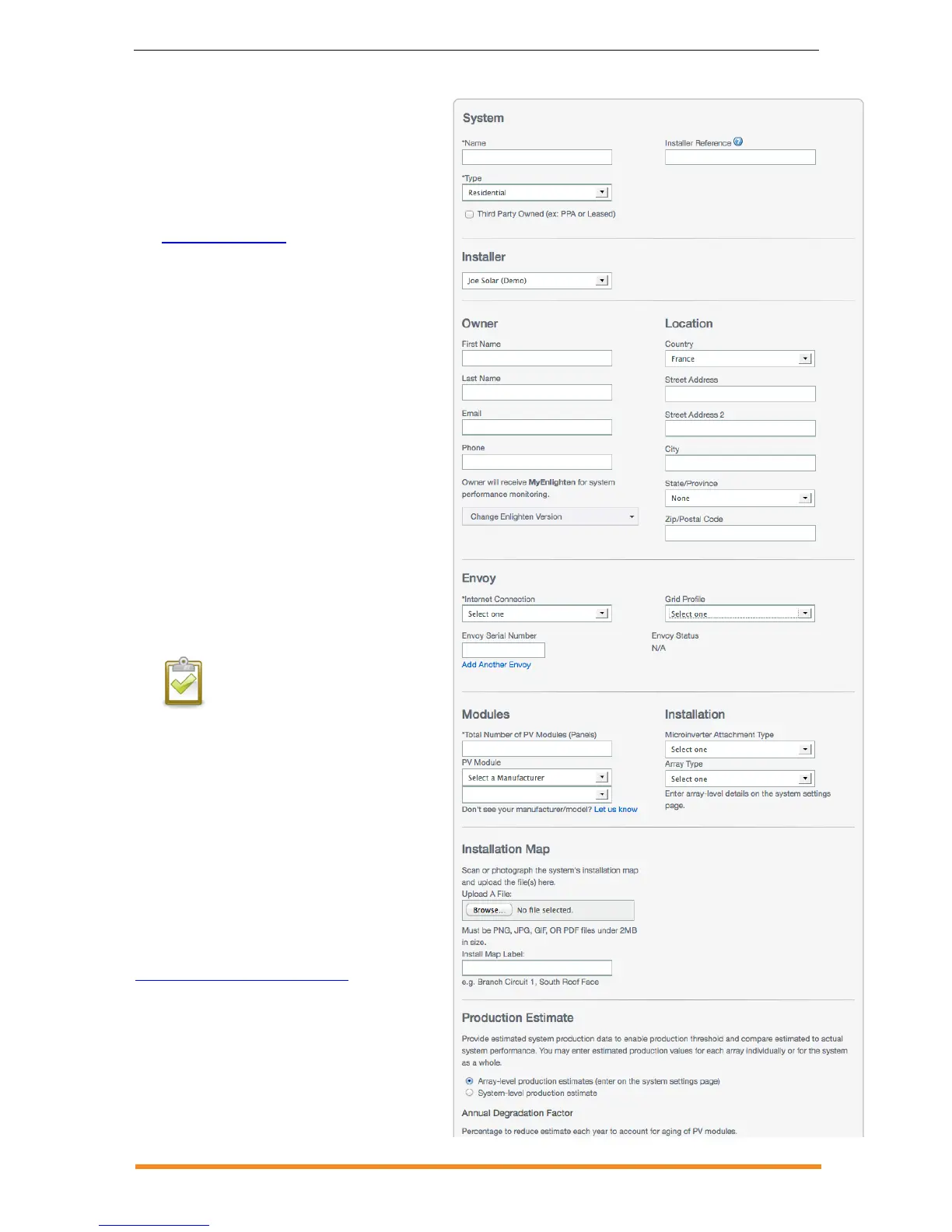
c. Under System, enter the system Name,
Type and Installer Reference (optional).
d. Enter Installer information.
e. Under Owner, enter the Name, Email,
and Phone.
f. Under Location, enter the Country and
address information.
g. Under Envoy, select the Internet
Connection type and enter the Envoy
Serial Number.
h. Select the appropriate profile from the
Grid Profile menu.
NOTE: Some microinverters will
not export power until the Envoy
is installed and detects all the
microinverters at the site. The
grid profile must also be set and
propagated to the microinverters.
i. Under Modules, enter total number of
modules, type, etc.
j. Click Save to submit the form. You will
receive a confirmation message:
“Activation Created Successfully.”
For more information on Grid Profiles or if
you need to change the grid profile
subsequent to this initial procedure, see the
Envoy Communications Gateway
Installation and Operation Manual at:
http://www.enphase.com/support.



 To Next Page