Setup Wizard
1110
Setup Wizard
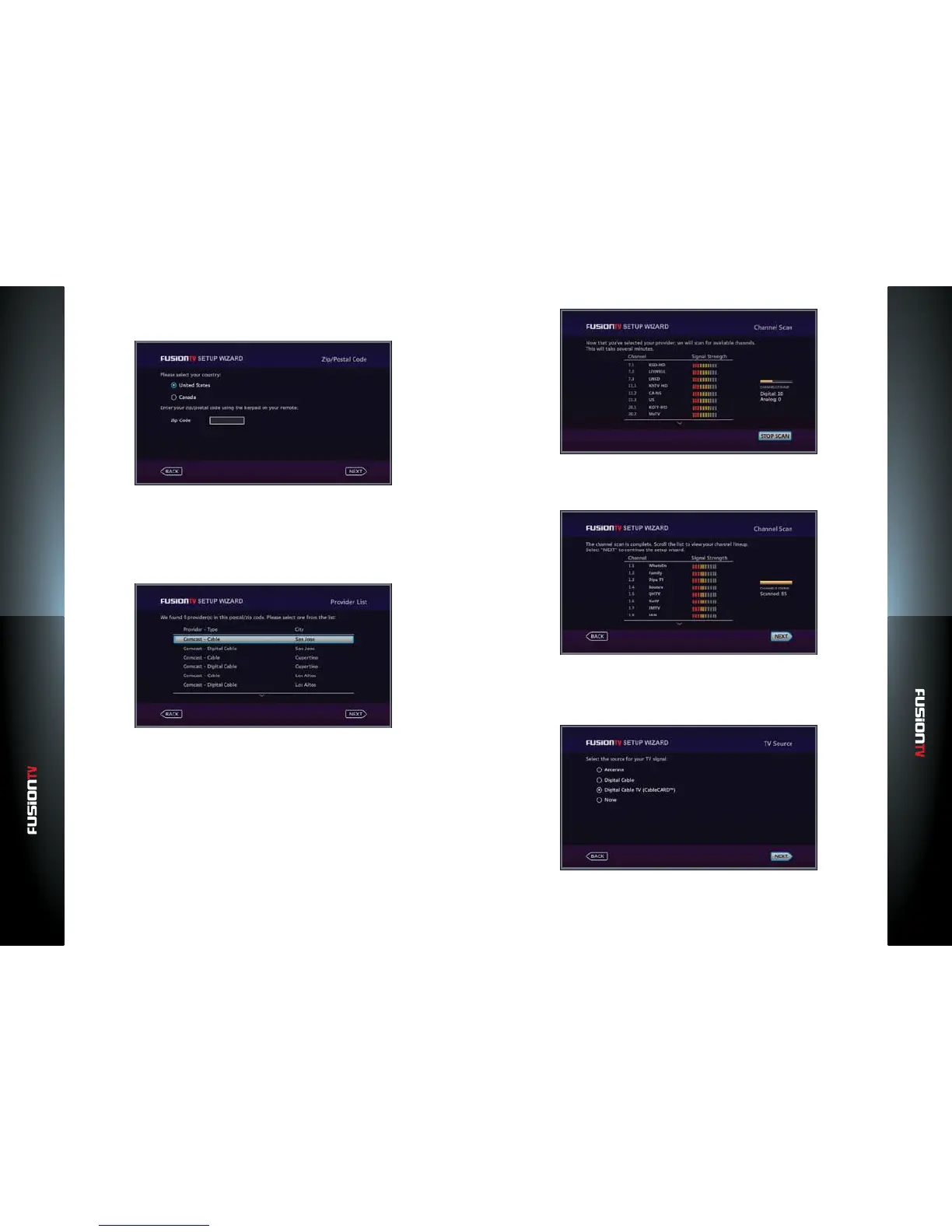
3. Select your country and enter your zip code using the NUMBER KEYS.
Use the LEFT ARROW to delete numbers.
4. Press OK to continue.
5. Depending on the TV source you selected, you will be presented with
a list of providers for your area. Select the local provider for your TV
programming that you subscribe to and press OK to select it.
6. Press OK to continue.
7. The Setup Wizard will now scan for available channels based on your TV
source and selected service provider. This process may take some time so to
prevent any interruptions during the scan process, please do not press any
key or button. On the right side of the screen, you will notice the number
of channels (Digital and Analog) that have been scanned. Selecting “STOP
SCAN” will stop the scanning process and you will have an incomplete
channel line-up. If you accidentally selected “STOP SCAN“, go “BACK” to
re-scan your channels.
8. Once the channel scan is complete, press OK to complete your setup. If only
a few channels or no channels are found, select “BACK“ and perform the
channel scan again using a dierent channel line-up choice (if available).
Setup using CableCARD™
1. Select “Digital Cable“ and press OK.
2. Press OK to continue.



 To Next Page