34
When a wristband is disconnected or an emergency stop is performed, the stop
command of other wristbands will not work until it returns to the normal state.
5.6 Pairing Evo Control System with the Outboard
Before use please pair control system with the outboard. Evo Tiller will automatically
pair with the outboard after mounting on the outboard properly. There are two meth-
ods to pair the remote control with the outboard. Please choose one of the two meth-
ods and follow the steps to build new communication.
Method 1. Pairing without Communication Cable
Step1: Switch off system power and hold the remote control within 0.5m of the out-
board.
Step2: Press and hold the “ ” button to switch on the remote control.
Step3: Ensure the wireless indicator is shown constantly on the home page.
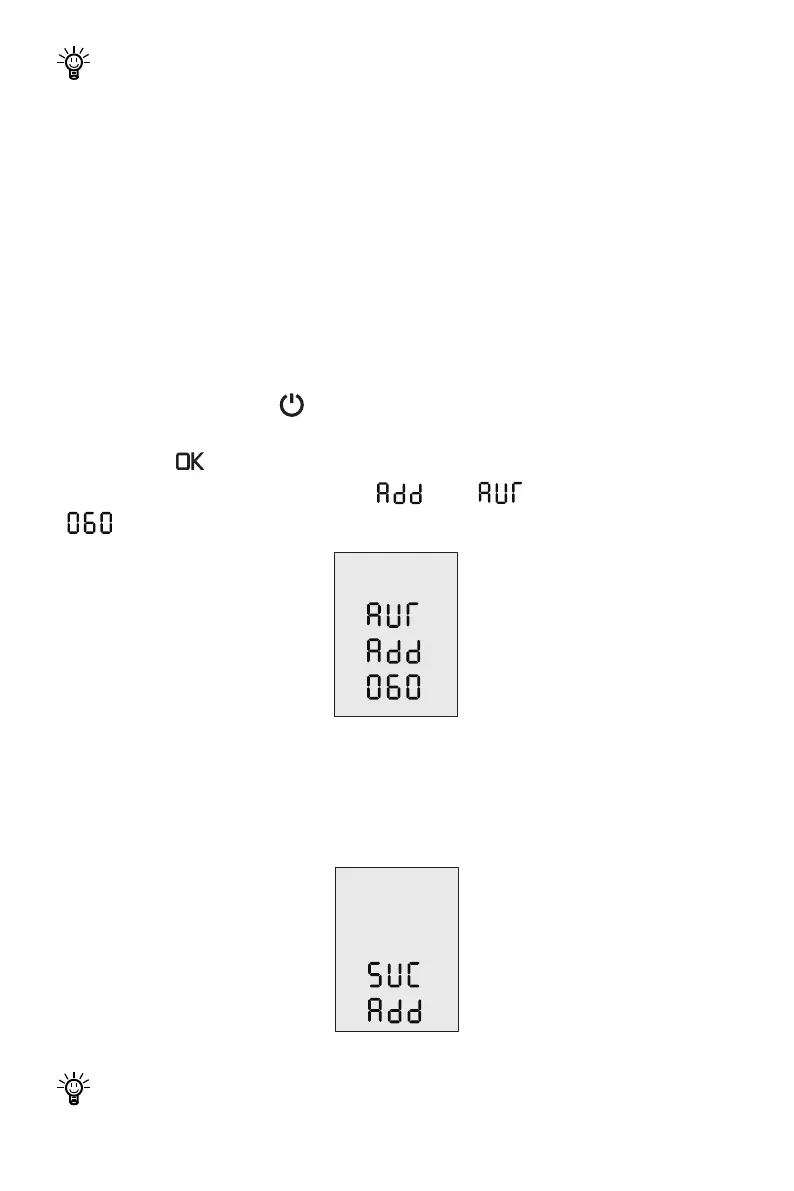
Step4: Press “ ” button and hold 5s to enter the pairing setting page (Figure 6-9).
On this page, you can nd the blinking “ ” and “ ” , and a countdown timer
“ ” (60s).
Figure 5-10
Step5: Switch on system power. Wait for them to get paired in seconds.
Step6: After pairing, the LCD panel will display as Figure 6-10 for 5s, then returning to
home page automatically.
Figure 5-11
If pairing fails within 60s, go back to Step4 and try again.


 To Next Page