EasyManua.ls Logo

Epson PP 803 - How to Save Settings

Epson PP 803
284 pages
Print Icon
To Next Page IconTo Next Page
To Previous Page IconTo Previous Page
Loading...
Printer Operating
2-12
2.4.3
How to Save Settings
The settings selected and confirmed are only active until the printer is switched
off. In order to prevent from losing your new settings you can save them using
the Main Function
SAVE MENU
.
KEY
Display
[OFFLINE]
LOCAL
1 ELQ
[MENU]
TEST MODES
[UP]
SAVE MENU
[ENTER]
SAVING NOW
U
(display is flashing)
[ONLINE]
READY
1 ELQ
Note:
The values of the "current settings" and the macro contents can be
printed using the function
PRINT OUT
.
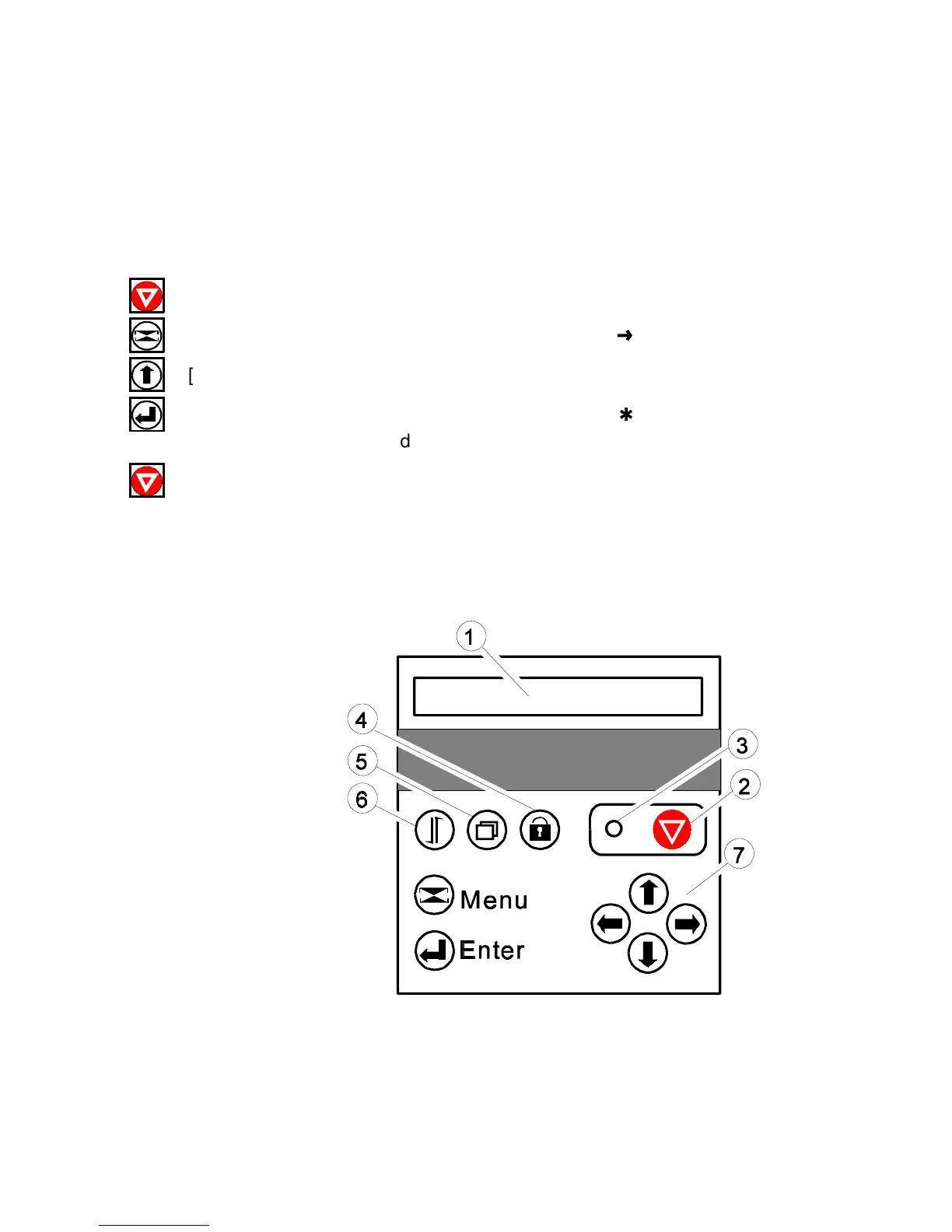
1
LCD Display
2
Online / Offline
3
LED
4
Lock / Unlock Cover
Lock/ Unlock Print Head
5
Macro Selection
6
Form Feed
7
Curser Keys for Navigation
in the Menu Mode

Table of Contents

Related product manuals