18. Flow-chart
RX8130CE Jump to Top / Bottom
ETM50E-07 Seiko Epson Corporation 56
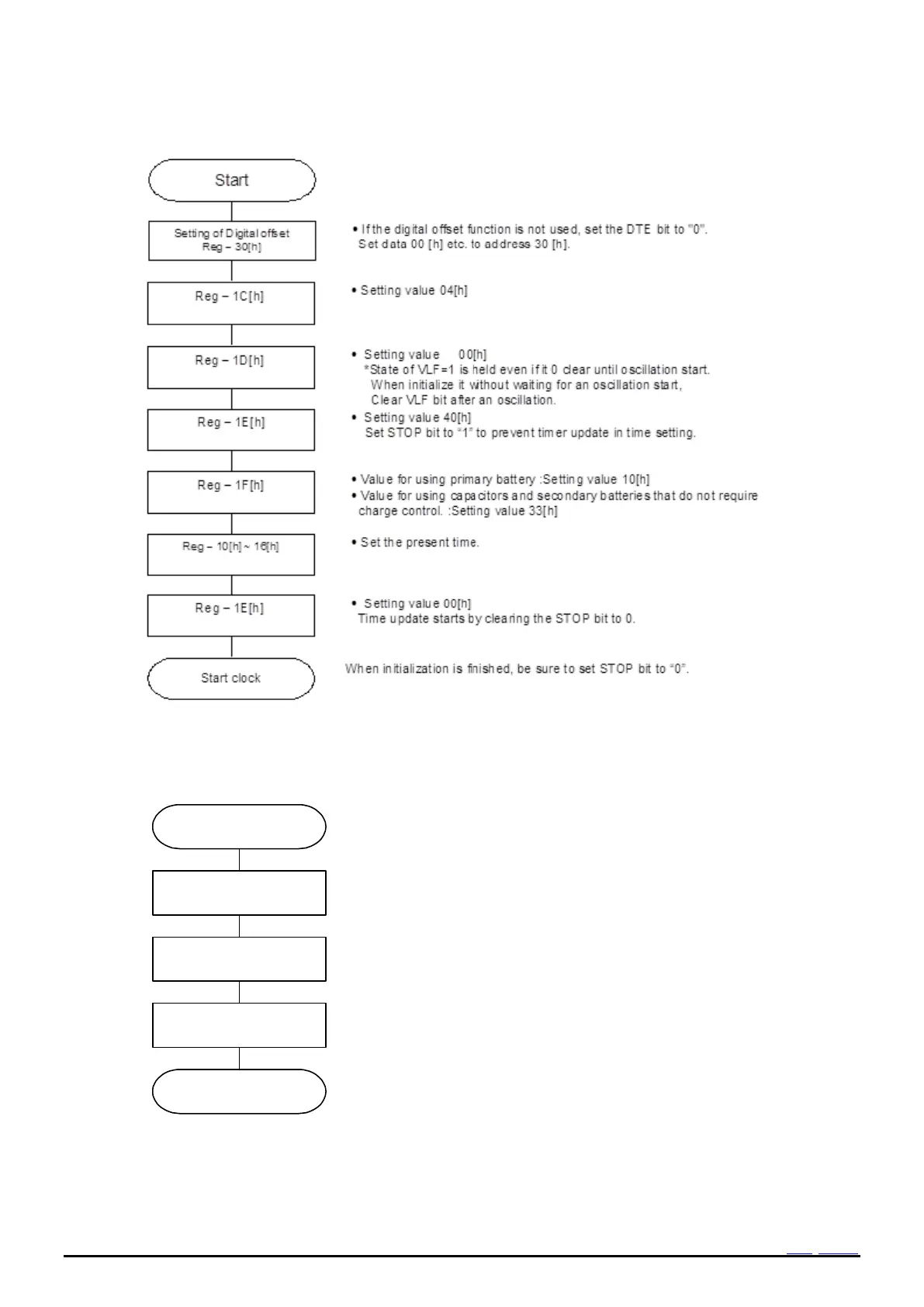
18.4 Example of Initialization routine (only clock usage)
Figure 42 Example flow (initialization only clock usage)
18.5 The setting of the clock and calendar
Set STOP bit to “1” to prevent timer update in time setting.
Write information of[year/month/date[day of the week]hour:
minute: second] which is necessary to set (or reset).
In case of initialization, please initialize all data.
Write 0 to STOP-bit for restart clock updating.
Clock is started at the time.
It is able to set time even if not combined use of STOP bit.
Please note that [ clock is started at the time of writing [second ] ] in case
STOP bit is not used.
While STOP = 1, please be aware that the functions such as the voltage
detection function stop.
Figure 43 Example flow (Clock, calendar setting)



 To Next Page