A
LAN port Connects a LAN cable.
B
USB port Connects a USB cable.
C
LINE port Connects a phone line.
D
EXT. port Connects external phone devices.
E
AC inlet Connects the power cord.
F
Rear Cover (D) Open when removing jammed paper.
G
Rear Cover (E) Open when removing jammed paper.
H
Maintenance box cover (H) Open when replacing the maintenance box.
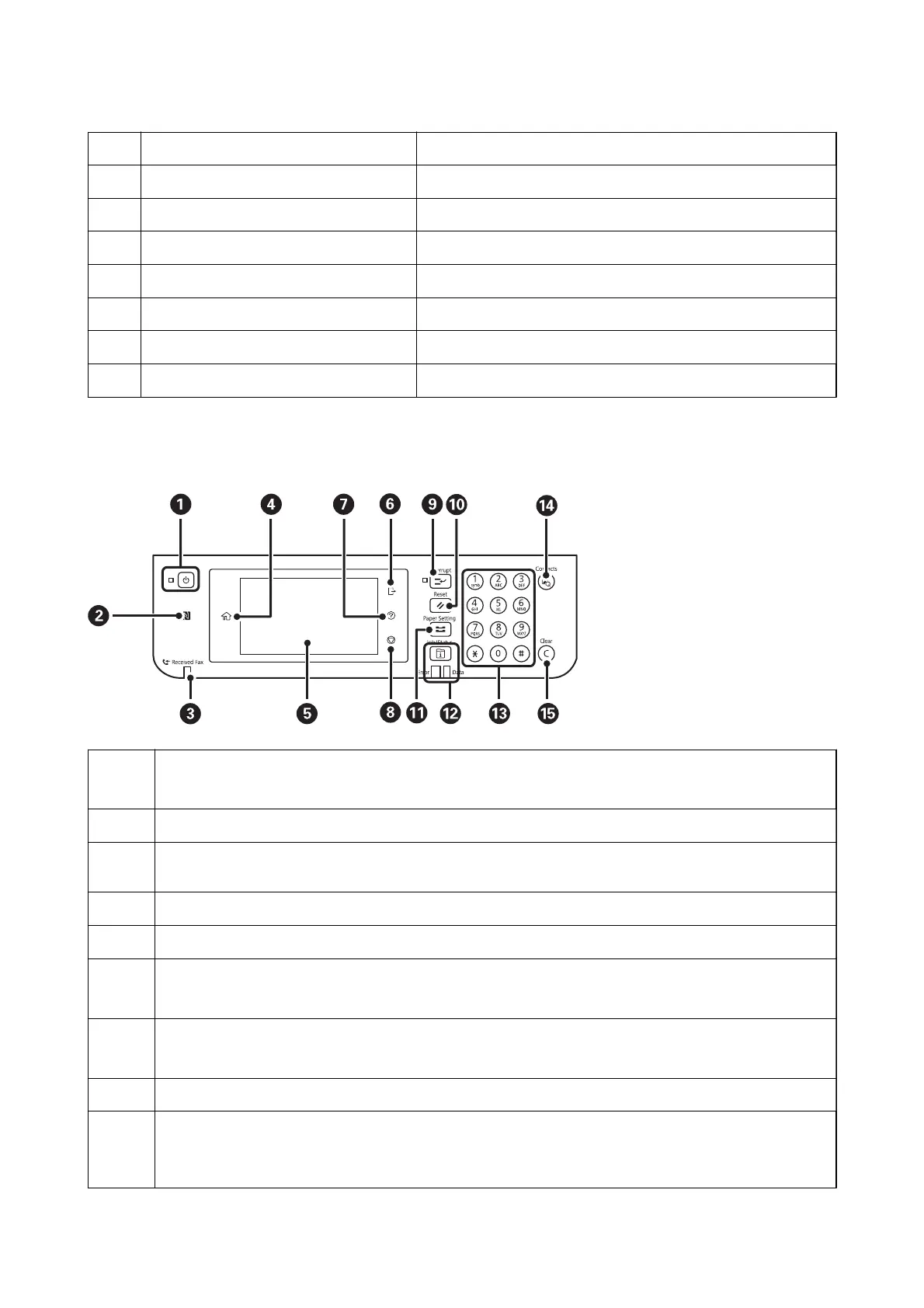
Control Panel
A
Turns the printer on or o.
Unplug the power cord when the power light is o.
B
Pass a smart device over this mark to print or scan from the smart device directly.
C
Turns on when received documents that have not yet been read, printed, or saved, are stored in the printer's
memory.
D
Displays the home screen.
E
Displays menus and messages.
F
Logs o from the printer when Access Control is enabled.
When Access Control is disabled, this is also disabled.
G
Displays the Help screen.
You can check solutions to problems from here.
H
Stops the current operation.
I
Pauses the current printing job and allows you to interrupt another job. However, you cannot interrupt a new job
from the computer.
Press this button again to restart a paused job.
User's Guide
Printer Basics
19



 To Next Page
 Loading...










