Manual
Setup
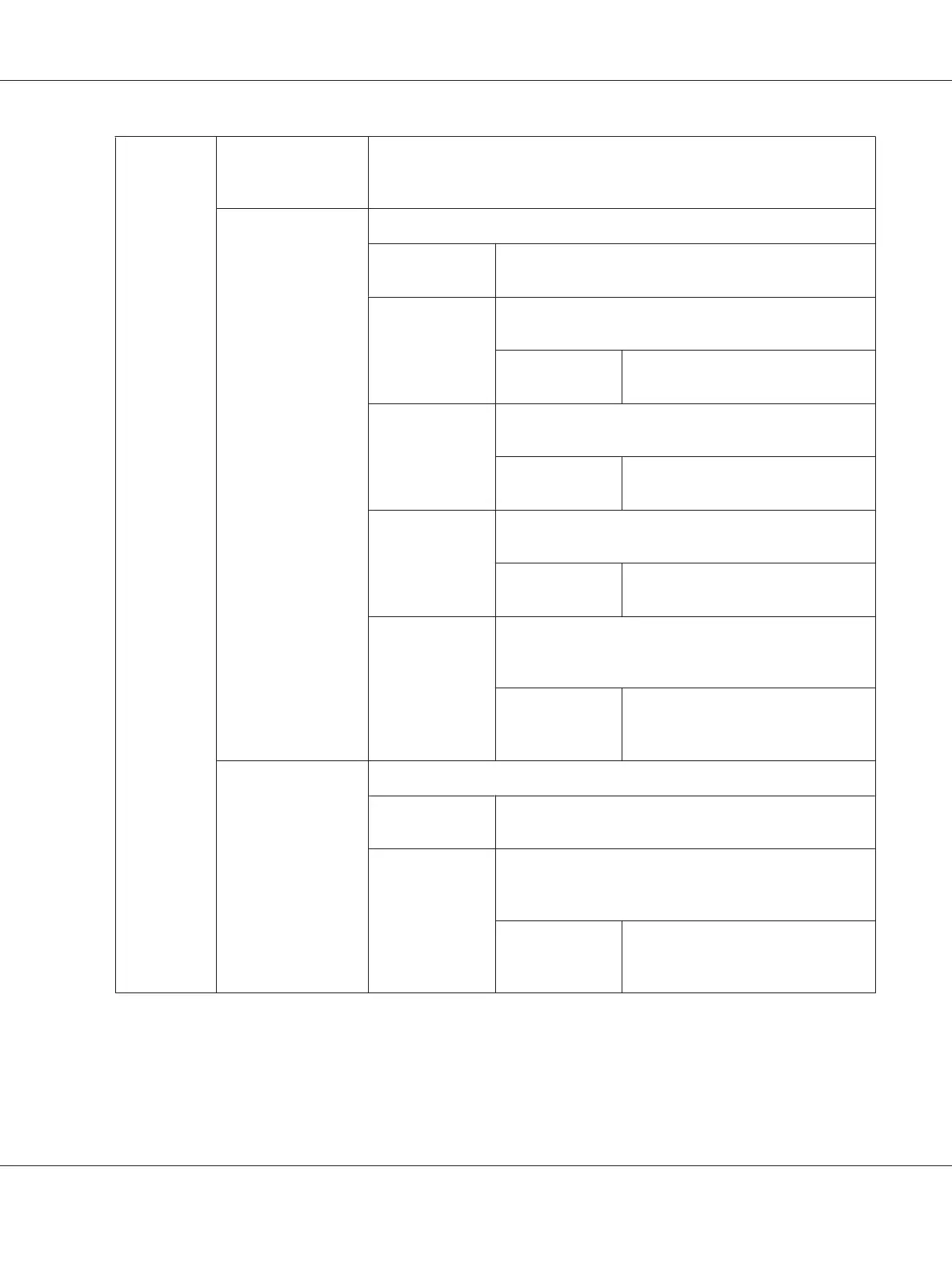
Enter Network
(SSID)
Enter a name of up to 32 alphanumeric characters to identify the wireless
network. As the factory default menu setting, wireless_device is specified in
advance.
Infrastructure
Configures a wireless network with access points.
No Security
*
Configures a wireless network without security encryp‐
tion.
Mixed Mode
PSK
Configures a wireless network with the WPA-PSK-TKIP,
WPA-PSK-AES and WPA2-PSK-AES encryptions.
PassPhrase
Entry
Enter a passphrase of 8 to 63
alphanumeric characters.
WPA-PSK-TKIP
Configures a wireless network with the WPA-PSK-TKIP en‐
cryption.
PassPhrase
Entry
Enter a passphrase of 8 to 63
alphanumeric characters.
WPA2-PSK-AES
Configures a wireless network with the WPA2-PSK-AES
encryption.
PassPhrase
Entry
Enter a passphrase of 8 to 63
alphanumeric characters.
WEP
Configures a wireless network with the WEP encryption
and specify a WEP key of 5 or 13 ASCII characters; or 10 or
26 hexadecimal characters.
Transmit Key Select the transmit key from Auto,
WEP Key 1, WEP Key 2, WEP Key 3,
and WEP Key 4.
Ad-hoc
Configures a wireless network without access points.
No Security
*
Configures a wireless network without security encryp‐
tion.
WEP
Configures a wireless network with the WEP encryption
and specify a WEP key of 5 or 13 ASCII characters; or 10 or
26 hexadecimal characters.
Transmit Key Select the transmit key from WEP Key
1, WEP Key 2, WEP Key 3, and WEP
Key 4.
*
Factory default menu setting
Note:
This menu item appears only when the printer is connected to a wireless network.
AL-M200 Series User’s Guide
Using the Operator Panel Menus 146











 To Next Page