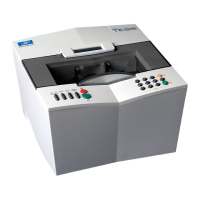
Essilor E-Tess Tracer
9 3- Check Pro
2.2.
C
ONNECTIONS
Depending on your configuration, your Essilor e-Tess tracer can be connected to either a PC or an
Essilor Delta T edger.
Connection to a PC
1. Connect the RS232C cable to the tracer socket (5) and to an RS232C serial port on the PC. (see
above figure),
or
Connect the RJ45 cable to the tracer socket (2) and to the Ethernet RJ45 port on the PC. (see above
figure).
N.B. Before any Ethernet connection, it is essential to know the structure of the network to which your
tracer will be connected.
Connection to an edger:
IMPORTANT
Before connecting the tracer to the edger, switch both machines off.
The voltage indicated on your machines (tracer, power supply) must correspond to
the mains voltage.
Avoid using extension cords or intermediary multiple-socket connectors which might
result in poor contact.
Make sure that the cables are not routed near electrical equipment that may produce
interference: electric motor, fluorescent lighting tube, radio, etc.
1. Connect the dedicated cable supplied with your edger: refer to the identification labels on the side
and connect the tracer port (4) to the edger RS232 port,


 To Next Page