Appendix A-- Instructions for the Water and Methanol Extraction Feature
(Syringe Option Only)
A.1 Water/Soil Prep Mode
The Centurion is capable of running a water sample in soil mode. To perform a water
“extraction” follow the instructions below.
1. Write the water/soil preparation sample method. <click> on the Methods Screen tab on
the left hand side of the Centurion software screen.
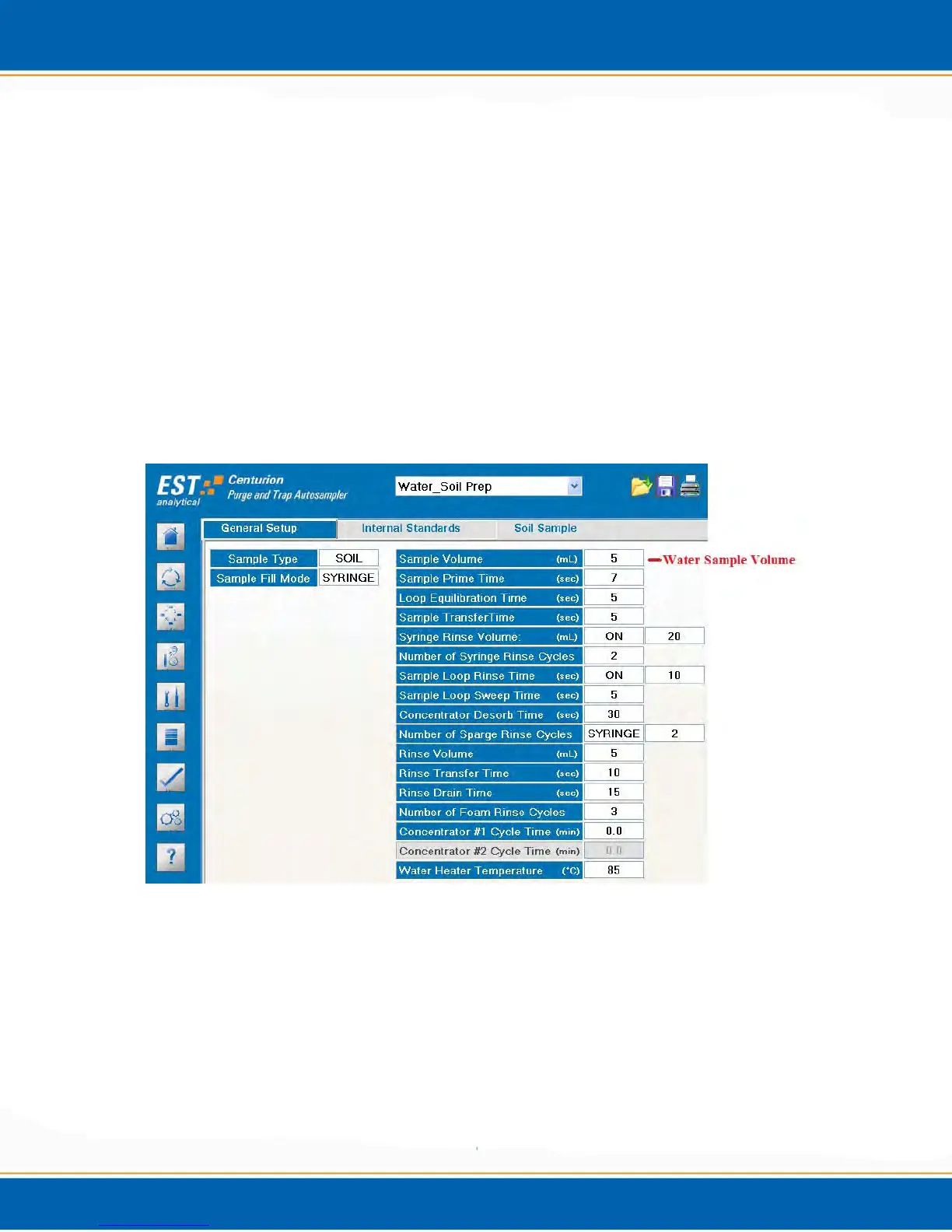
2. In the General Setup tab of the method, choose Soil as the sample type, then choose the
sample volume required. See Figure A1. NOTE: For Water/Soil preparation, the
sample is run as a soil, thus a soil method must be chosen.
Figure A1: Water/Soil Prep Mode General Setup Parameters
3. If Blank water is required, <click> the Soil Sample tab and turn ON the Blank Water
volume and set the volume needed. See Figure A2. NOTE: A 10ml total volume is
required for an adequate purge. So, if the sample volume is 5mls, a 5ml blank water
volume needs to be added.



 To Next Page