Open a Saved Method: <click> the Open icon and all previously saved
Methods are available to be loaded.
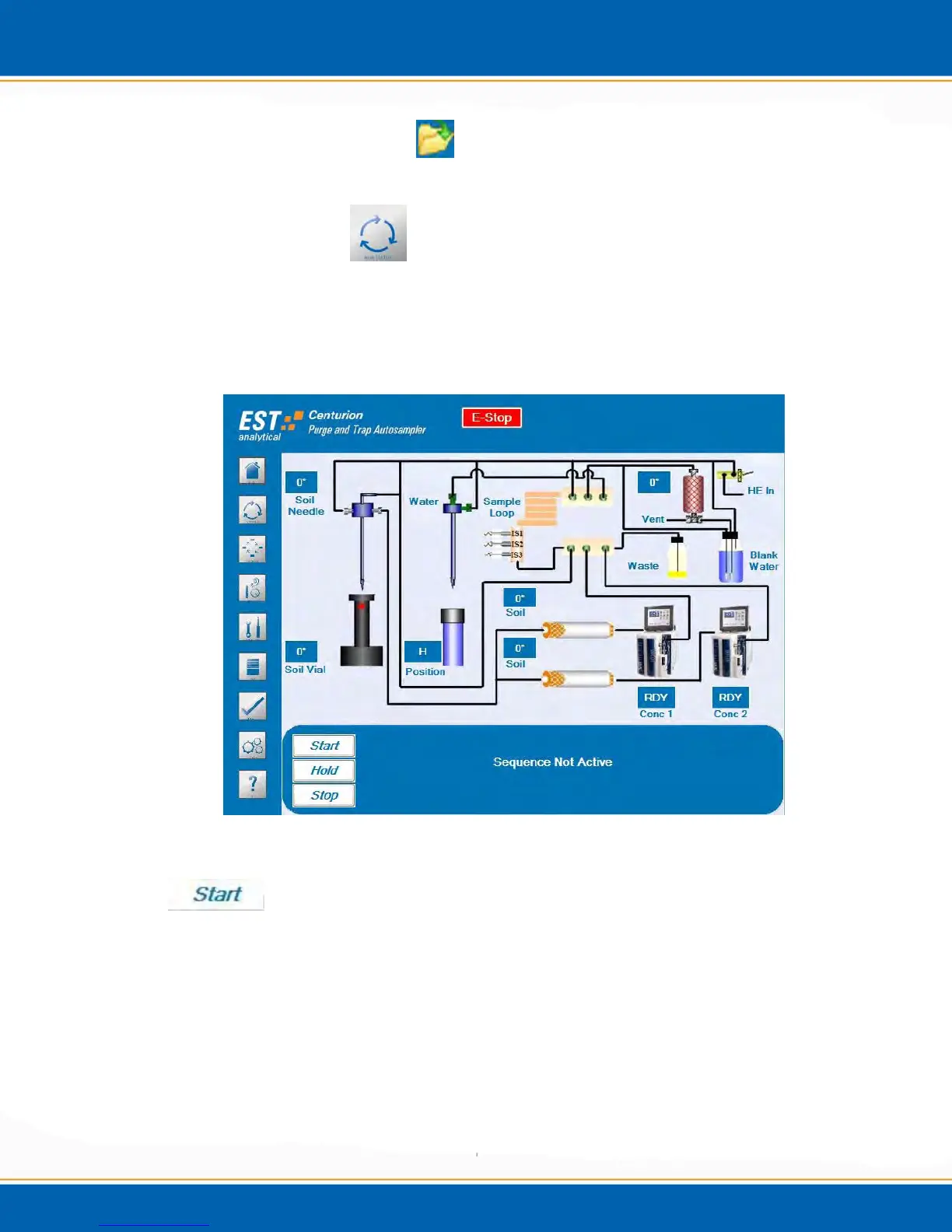
3.11 Run Status Screen
The Run Status screen contains all of the information needed to monitor the Centurion
during the sample process and contains the tabs necessary to apply the Start, Stop and
Hold functions. <click> the Run Status screen icon. The Run Status screen will be
displayed as shown in Figure 3aa.
Figure 3aa: Run Status Screen
Start: To start a sequence <click> the Start button. A popup will appear as shown in
Figure 3bb to prompt the user to clear the run log. Select No and a popup will appear a
shown in Figure 3dd to Start Sequence. Select Yes and a popup will appear as shown in
Figure 3cc. Select Yes and the user will be prompted to save the Run Log. Select No
and the run log will be cleared.



 To Next Page