2.5.3 Feed Gas Installation
Install a Tee to the end of the feed gas line and Tee in the feed gas to the
Centurion W/S with the other end of the Tee going to the concentrator.
NOTE: Make sure the pressure is between 60-80psi (414-552kPa).
2.5.4 Interface Connection
Install supplied interface cable between Centurion and Concentrator. In
Single Concentrator Mode the Centurion is equipped with a 25 pin
connector which connects to Concentrator (#1). If the Centurion is
equipped with the optional Dual Mode the interface cable will have a
second 25 pin male connector that will connect to Concentrator (#2) in
the same manner as Concentrator #1. The Centurion can be interfaced
with different manufactured concentrators and or multiple GC’s. These
configurations require a custom cable. See Appendix A for the specific
instructions on installation to other concentrators. Call EST at
(800)283-3510 if you have any question about your interface connections.
See Figure 2d.
2.5.5 Monitor Setup
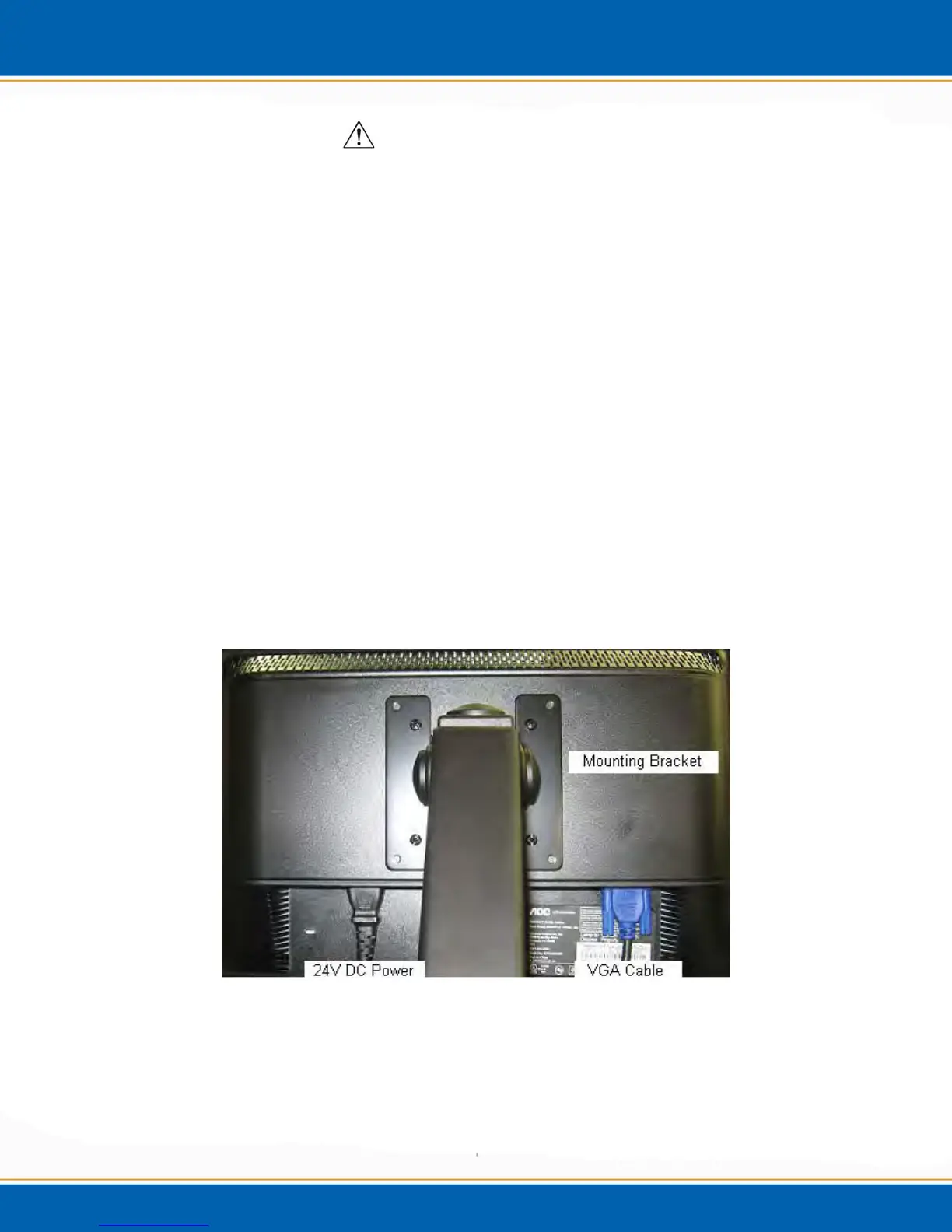
Mount the monitor to the mounting bracket with the four screws given in
the Monitor box. Plug the VGA cable to the VGA port on the back of the
monitor. Plug power cable to the 24Vdc power port on the back of the
monitor as shown below in Figure 2n.
Figure 2n: Monitor Connections



 To Next Page