Saving a Sequence - <click> on the Save icon and the sequence will be saved.
Open a Saved Sequence - <click> on the Open icon and all previously saved
sequences are available to be loaded.
3.10 Method Screen
The Method screen contains the settings and conditions necessary to create an Encon EV
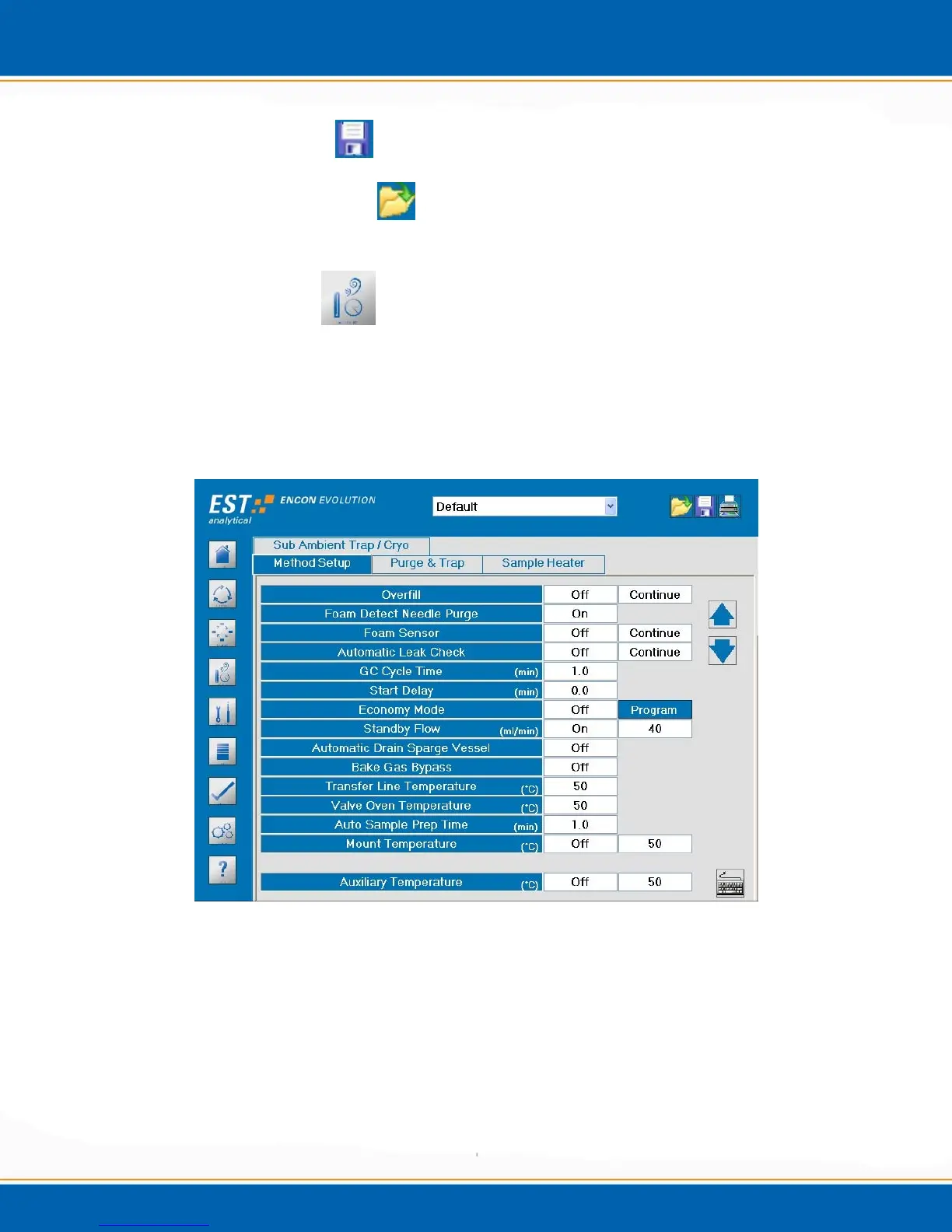
purge and trap method. <click> the Method screen icon, the Method screen will be
displayed as shown in Figure 3f. Every Encon EV Method screen will consist of two
tabs: Method Setup and Purge & Trap. Each additional option to the Encon EV will
have its own specific tab.
Figure 3f: Method screen – Method Setup tab
3.10.1 Method Setup tab - <click> the Method Setup tab, the screen will appear as
shown in figure 3f. This tab contains the parameters for the operation of the
concentrator.
Overfill – (OPTION, Included with Foam Detector) – In purge ready status, if the sample
failed to drain from the prior run, the Overfill will protect against flooding the Encon EV
with sample. If Overfill is detected, a note will be made in the Run Log.



 To Next Page