492 Ion Classic User Manual
Rotate Tool
Allows you to rotate objects around the X/Y/Z axes.
Local Tool
Toggles Move and Rotate object tools between global XYZ orientation and object
XYZorientation. Scale is always performed relative to the object's Local
XYZorientation.
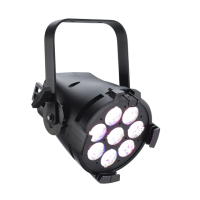
On the left barrel, Local is toggled off, so the Move tool orients itself based on the
Augment3d model.
On the right, Local is toggled on, so the Move tool orients itself relative to the position
of the barrel itself.
Performance Indicator
This color-coded dot on the toolbar indicates Augment3d's current quality and performance
level.
High - 25 FPS and higher
Medium - 20 to 24 FPS
Low - 15 to 19 FPS
Very Low - 10 to 14 FPS
Poor - 10 FPS and lower


 To Next Page