1 Installation and User Interface 23
DMX Profile
Addressing
Addresses must be set between 1 and 510.
Each Source Four LED Profile fixture must be considered a separate DMX device for
the purpose of DMX line-loading calculations.
DMX line-loading practice dictates that no more than 32 devices can be daisy-chained
together. Consequently, no combination of Source Four LED Profile fixtures totaling more
than 32 DMX devices should be configured in one DMX line. For runs of fixtures totaling
more than 32 DMX devices, split the DMX runs by using a DMX splitter.
Profiles
Source Four LED and Source Four LED Series 2 fixtures occupy 1 to 15 DMX channels
depending on the profile and which features are turned on. The tables below describe the
order and function of each channel.
Lustr+, Series 2 Lustr, Series 2 Daylight HD, Series 2 Tungsten HD, and Studio HD
Direct Control
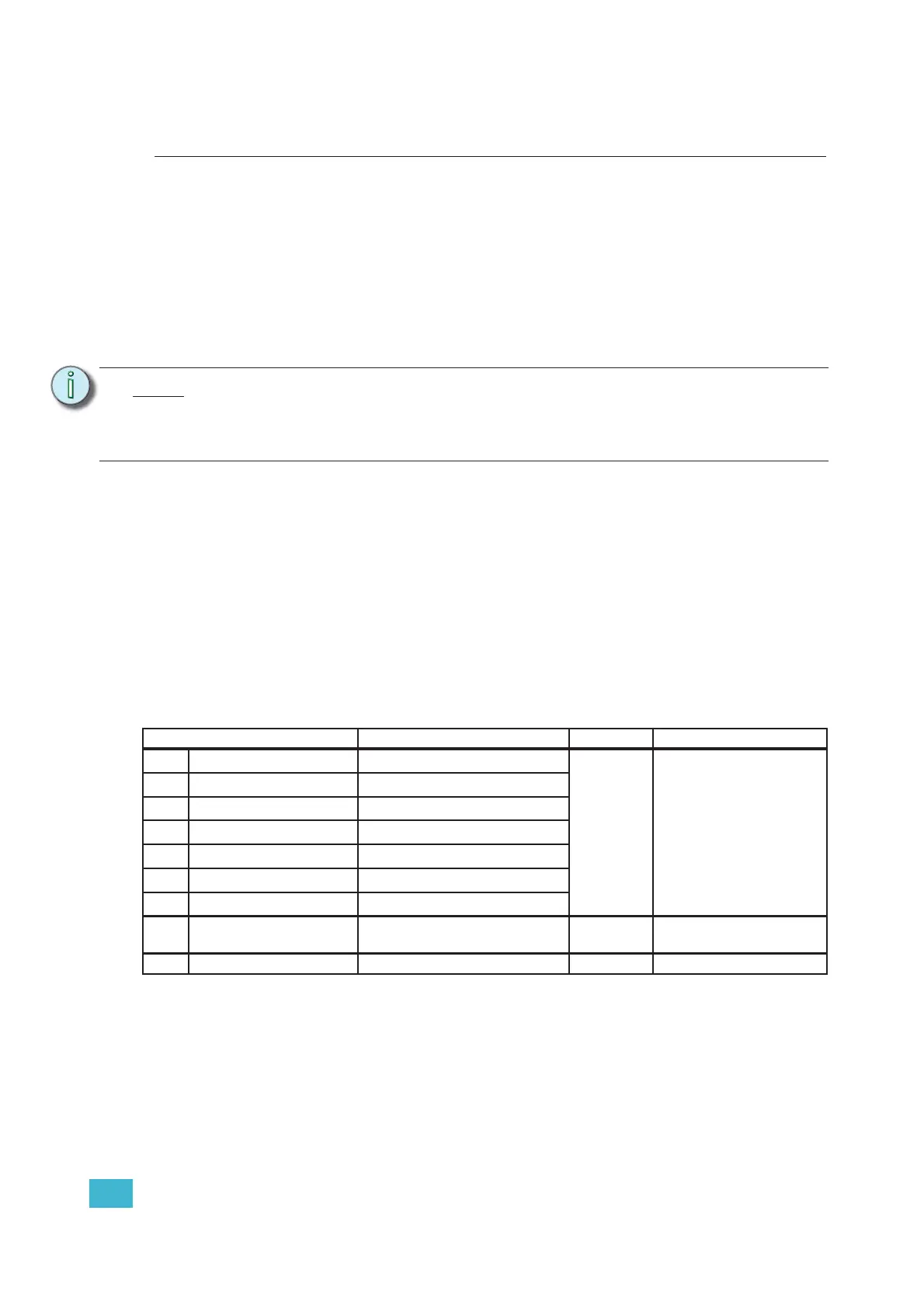
Direct Control uses one DMX channel per individual color within the LED array for a total of
seven color channels, arranged according to the Color Mixes table. Each controls the
intensity of the color from 0 to 100%. An additional, 8th DMX channel is used as a master
intensity fader for controlling the brightness of the overall fixture. Channel 9 is for strobe
when enabled.
Note:
Depending on the selected fixture profile and activated features, a fixture with a
starting address higher than 499 may not have control of all parameters, even though
the highest address shown on the user interface is 512.
Addressing is not required for standalone operation.
Data Channel Control Value Function
1 Fixture address
Color 1
a
a) See Color Mixes, page 24.
0 to 255
Color intensity 0 to100%
2 Fixture address + 1
Color 2
a
3 Fixture address + 2
Color 3
a
4 Fixture address + 3
Color 4
a
5 Fixture address + 4
Color 5
a
6 Fixture address + 5
Color 6
a
7 Fixture address + 6
Color 7
a
8 Fixture address + 7 Intensity
Overall intensity 0 to
100%
9 Fixture address + 8 Strobe Variable strobe control













 To Next Page