Quick Start 81
Quick Setups Menu
Various pre-programmed combinations of operational settings are available to quickly get
you started. These settings are specifically created for different situations and are easily
accessible on the fixture’s user interface. Individual settings within each quick setup can be
accessed via the Advanced menu in order to take advantage of all the possible control
features.
Quick Setups (excluding Daylight and Tungsten)
Step 1: On the Main Menu, scroll to Quick Setups.
Step 2: Press [].
Step 3: Scroll to the desired setup and then press [].
An asterisk (*) next to the setup name indicates that setup is active.
Step 4: Press [] to return to the home screen.
The top line of the home screen displays the name of the active setup.
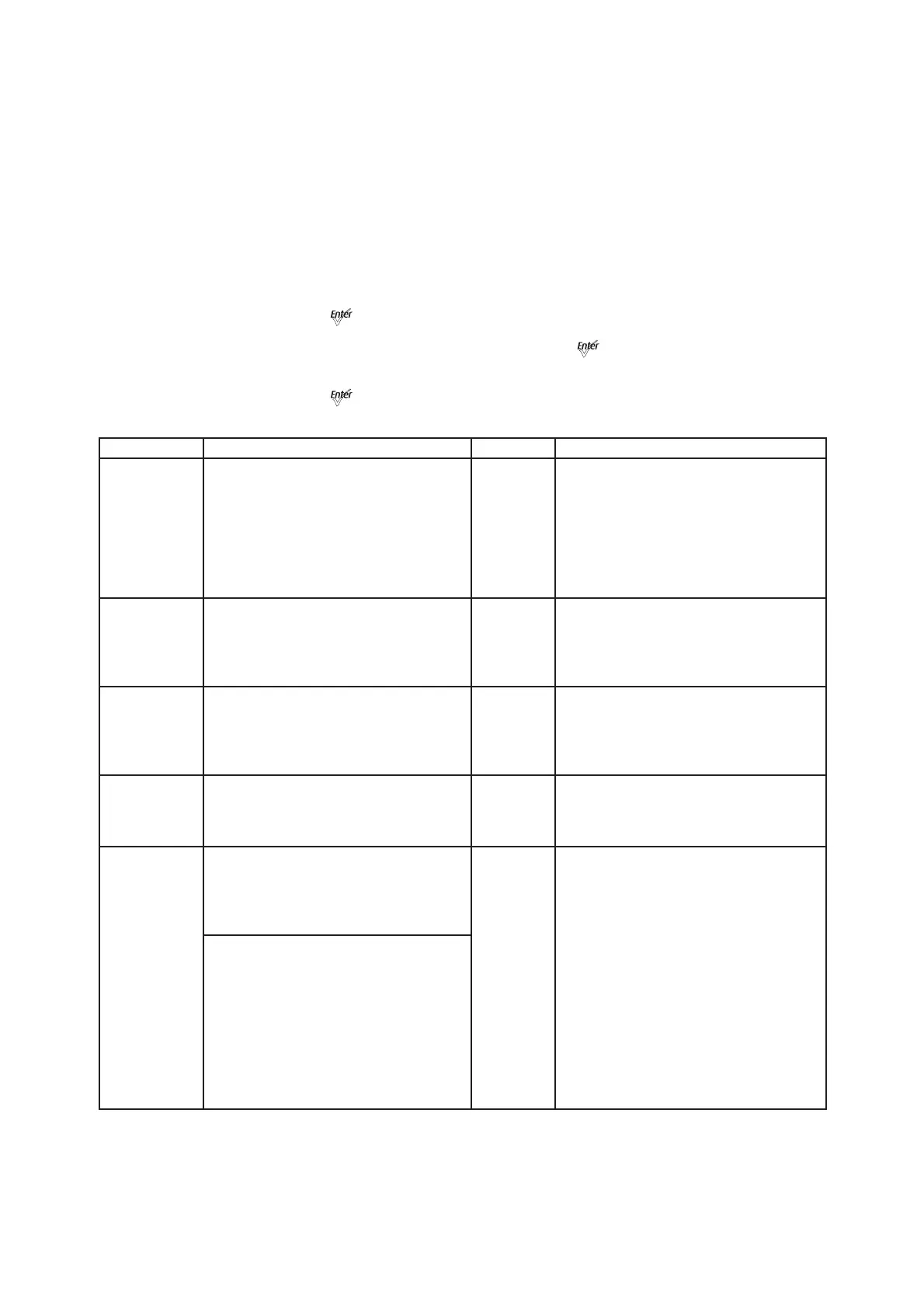
Quick Setup Description Profile Features
General
General lighting:
All-purpose settings for most lighting
applications.
The default setup for the Lustr+ and
Series 2 Lustr.
Direct
control
• Standard dimming curve
• Regulated output for brightness
consistency
• Individual color channels plus master
intensity control
• Allows for native color space
crossfades
• Output is NOT color-calibrated
Stage
Theatrical lighting:
Tungsten-like performance and precise
color-control.
Uses the most DMX channels of all quick
setups.
HSI
Plus 7
enabled
• Incandescent dimming curve
• Regulated output for brightness
consistency
• White point: 3200K
XT Arch
Longevity and reliability in applications
with limited access and extreme
environments.
High degree of output consistency and
protection against temperature swings.
HSI
• Standard dimming curve
• Protected output for high-heat
environments
• Reduced overall brightness
• White point: 3200K
High Impact
Concerts and High Impact lighting:
Enables quickest response, simple RGB
control and strobe channel for maximum
effect usage.
RGB
• Quick dimming response
• Boosted output for maximum intensity
• Reduced consistency of output
• White point: 5600K
Studio
Video or film lighting:
Enables quick, comprehensive control of
white light via DMX or the fixture’s
onboard user interface.
High-quality white-light output.
Studio
• Linear dimming curve
• Regulated output for brightness
consistency
• Variable white point 2700-6500K
• Variable + or – green (tint) with the
Lustr+, Series 2 Lustr, and Studio HD
The Studio Quick Setup is operational in
all fixtures for excellent white light
performance. It is the default setting for
Series 2 Daylight HD, Series 2 Tungsten
HD and Studio HD fixtures. In addition,
Studio Quick Setup enables stand-alone
operation from the User Interface on the
back of the fixture if no console is present.
For more information, see Studio
Settings, page 72.













 To Next Page