OPTIONAL
RIGHT SIDE SCRUBBING BRUSH
FASTENING AND RELEASING THE BRUSH OR THE ABRASIVE DISC
CHEMICAL
1.5%
2%
3%
4%
1%
ON/OFF
1
1
1
2
3
4
5
6
7
8
9
10
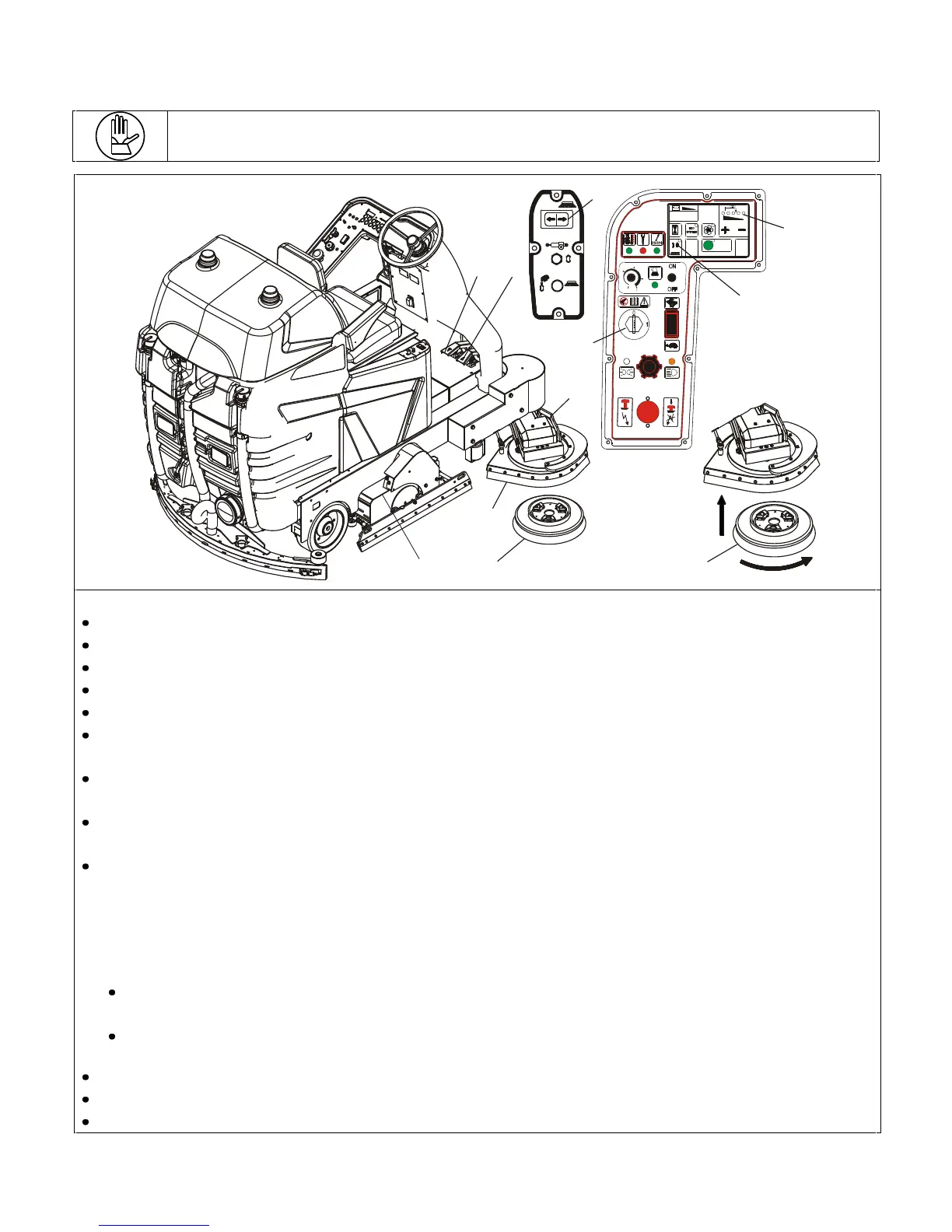
To automatically fasten the side brush or the disc pad holder with abrasive disc, proceed as follows:
Make sure there is water in the solution tank;
Stop the machine on a flat piece of floor and engage the parking brake;
Insert the key (pos. 3);
By pressing the right side of the button (pos.1) the side brush plate (pos. 2) will come out and drop;
Remove the key (pos. 3);
Using your hand, lift the splashguard (pos.5) and the brush plate (pos. 2) and position the brush or the disc pad holder
(pos.6) underneath the brush plate.
Turn the key (pos.3) to position 1 and wait for the machine to perform the entire ignition procedure until the battery
charge level appears on the screen.
Lower the brush plate (pos. 4) by means of the button (pos.7) on the panel.
NOTE – the side brush only turns when the main brushes are operating.
Press the forward movement pedal (pos.8) lightly. The brush motors will start to turn and the machine will start
moving slowly. Move forward for a short distance and then reverse the direction of movement by pressing the reverse
pedal (pos.9) and move backwards slowly until the brush has fastened on. If necessary, repeat the operation. During
fastening on operations, we suggest setting the detergent solution flow at 0 (all the LEDs pos. 10 off) to avoid any
waste.
To manually fasten the side brush or the disc pad holder with abrasive disc, operate as follows:
Stop the machine on a flat piece of floor with the brush plate (pos.2) raised and engage the parking brake and
remove the key.
Manually position the brush (pos. 11) underneath the plate and turn it anti-clockwise.
To release the side brush or the disc pad holder with abrasive disc, proceed as follows:
Stop the machine on a flat piece of floor and engage the parking brake;
Raise the brush plate by pressing on the left side of the button (pos. 1) and remove the key (pos. 3);
Manually take the brush and turn it clockwise.


 To Next Page