1
1
.
.
3
3
F
F
r
r
o
o
n
n
t
t
P
P
a
a
n
n
e
e
l
l
K
K
e
e
y
y
p
p
a
a
d
d
s
s
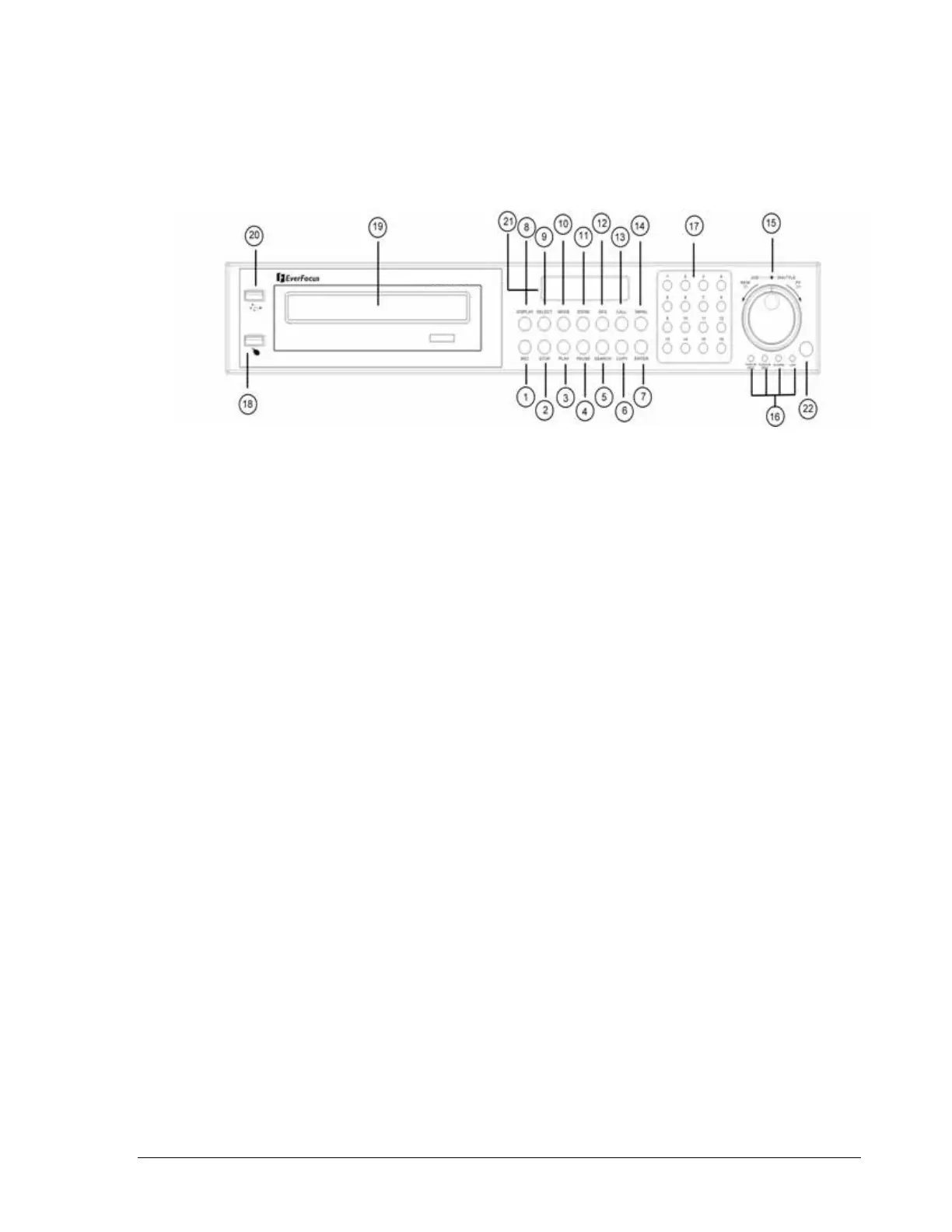
Keys:
○
1
REC
Press this key to start instant recording.
○
2
STOP
Press this key to stop recording and playing back.
○
3
PLAY
Play Back.
○
4
PAUSE
Press this key to pause the playback picture.
○
5
SEARCH
Press this key to enter the SEARCH MENU.
○
6
COPY
Pressing COPY key at live mode will enable you to enter COPY menu. In playback
mode, the current playback position is stored as image export start position.
○
7
ENTER
Press this key to enter items, or jump to next subentry in the menu setting.
○
8
DISPLAY
Press this key to switch display of channels, display color of channels (Black, Red,
Yellow, Pink, Blue and White are available as choices) and/or status bar.
4













 To Next Page