3
3
.
.
7
7
N
N
e
e
t
t
w
w
o
o
r
r
k
k
S
S
e
e
t
t
u
u
p
p
M
M
e
e
n
n
u
u
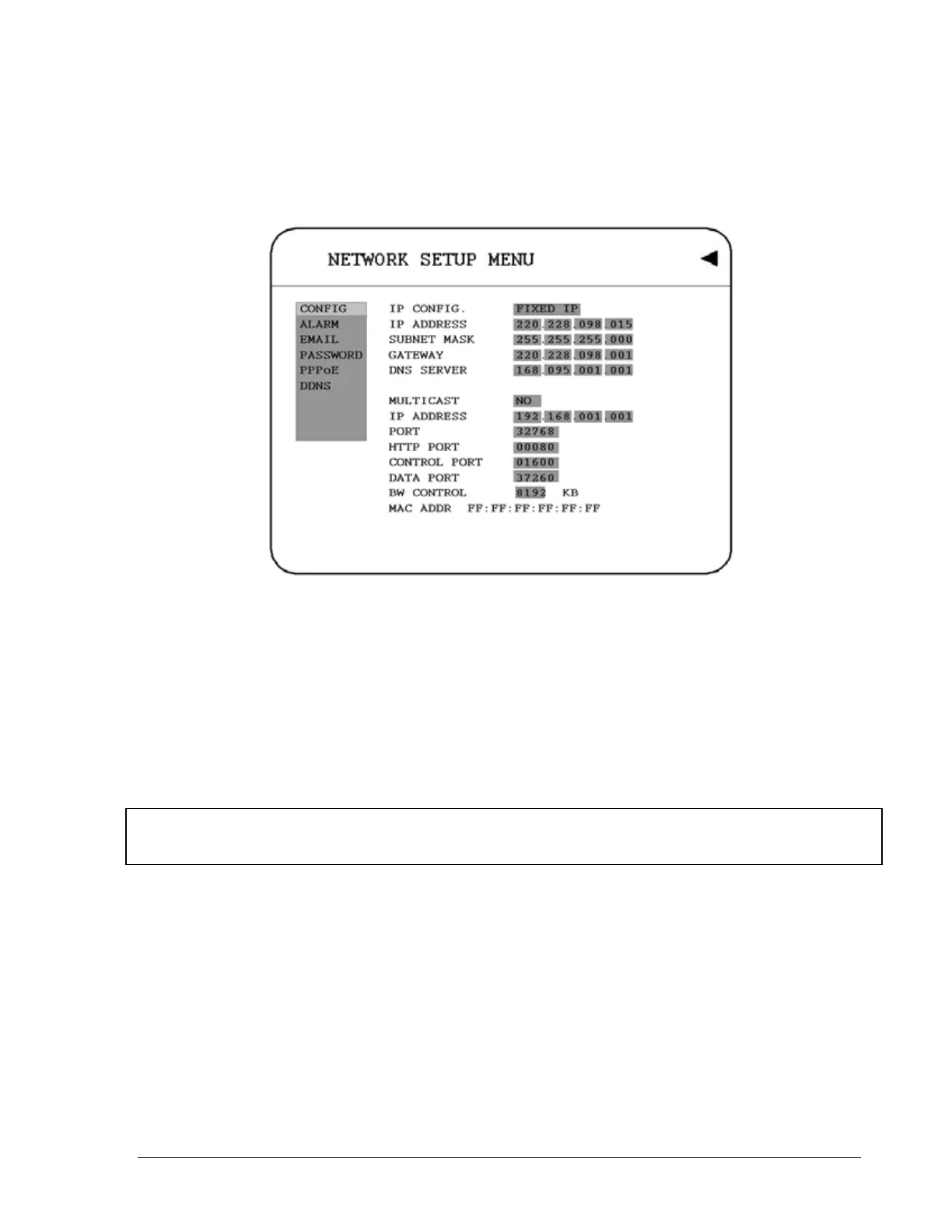
Diagram 3.10
Diagram 3.10 is a screen shot of the NETWORK SETUP MENU. This menu is for setting up
the configurations for networking to the DVR. For more detail about network setup, please
refer to CH.10~13. There are 6 subentries that are CONFIG, ALARM, EMAIL,
PASSWORD, PPPoE and DDNS in the NETWORK SETUP MENU. Each of them has to
be set up completely before the network functions. Please refer to the Networking Chapters
(CH.10~13) of this manual to fully understand how to setup your network for this DVR. In the
Network Setting Menu the following fields are defined as follows:
Note: Since every Network Configuration is different, please contact your Network
Administrator or ISP for how to assign those IP addresses and port numbers.
3.7.1 CONFIG
In the CONFIG of the NETWORK SETUP MENU, we define:
1. IP CONFIG:
38













 To Next Page