32
QUICK NAVIGATION GUIDE: GAS PURGE FUNCTION AND FLOW RATE ADJUSTMENT
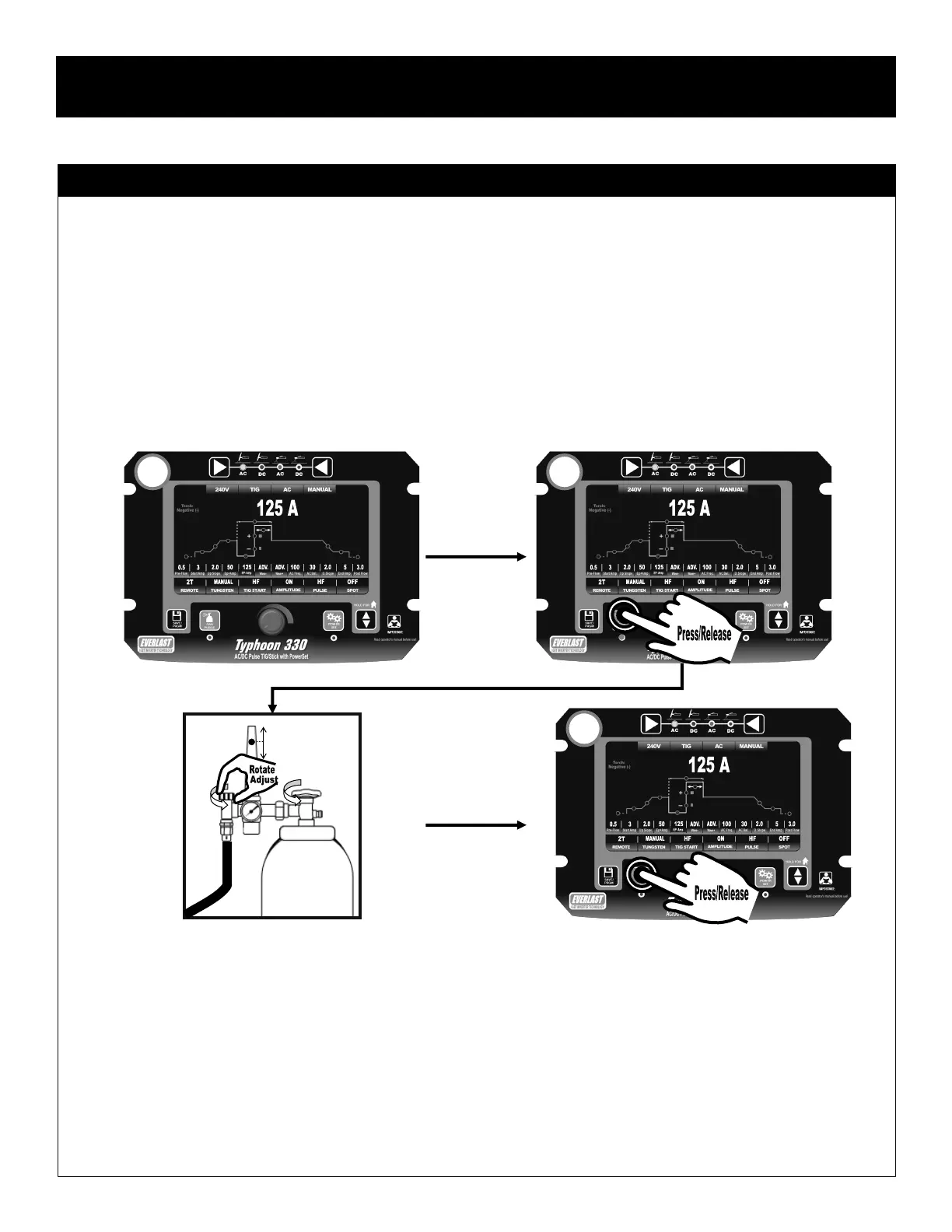
The Gas Purge function allows you to test and set the shielding gas flow rate. The Gas Purge key itself controls this, but it also serves as the lock func-
tion while saving a program, and it is used in simultaneous combination with the Save/Program key to access the hidden menu. Those functions are
explained in the related pages in the quick navigation guide. But to use the Gas Purge function itself, use the following steps.
1. Startup the machine normally. Allow the boot screen to clear.
2. When the main operating menu appears, press and release the Gas Purge key. The LED under the key will light to indicate it that the gas purge
has been activated. The solenoid should open with a slight click. If the regulator valve is open, gas should flow. If not, check the cylinder valve
and the regulator control.
3. Open the cylinder valve fully and adjust the regulator to the gas flow rate suggested in this manual for the size cup you are using. See page 20.
4. Press and release the Gas Purge key. The LED will turn off and the gas solenoid valve will close.
Component Identification and Explanation
Control Panel Operation and Navigation
1
6
1
1
2


 To Next Page