Design and function
MMA welding
099-004854-EW501
19.02.2014
5.10.4 Frequency and balance setting
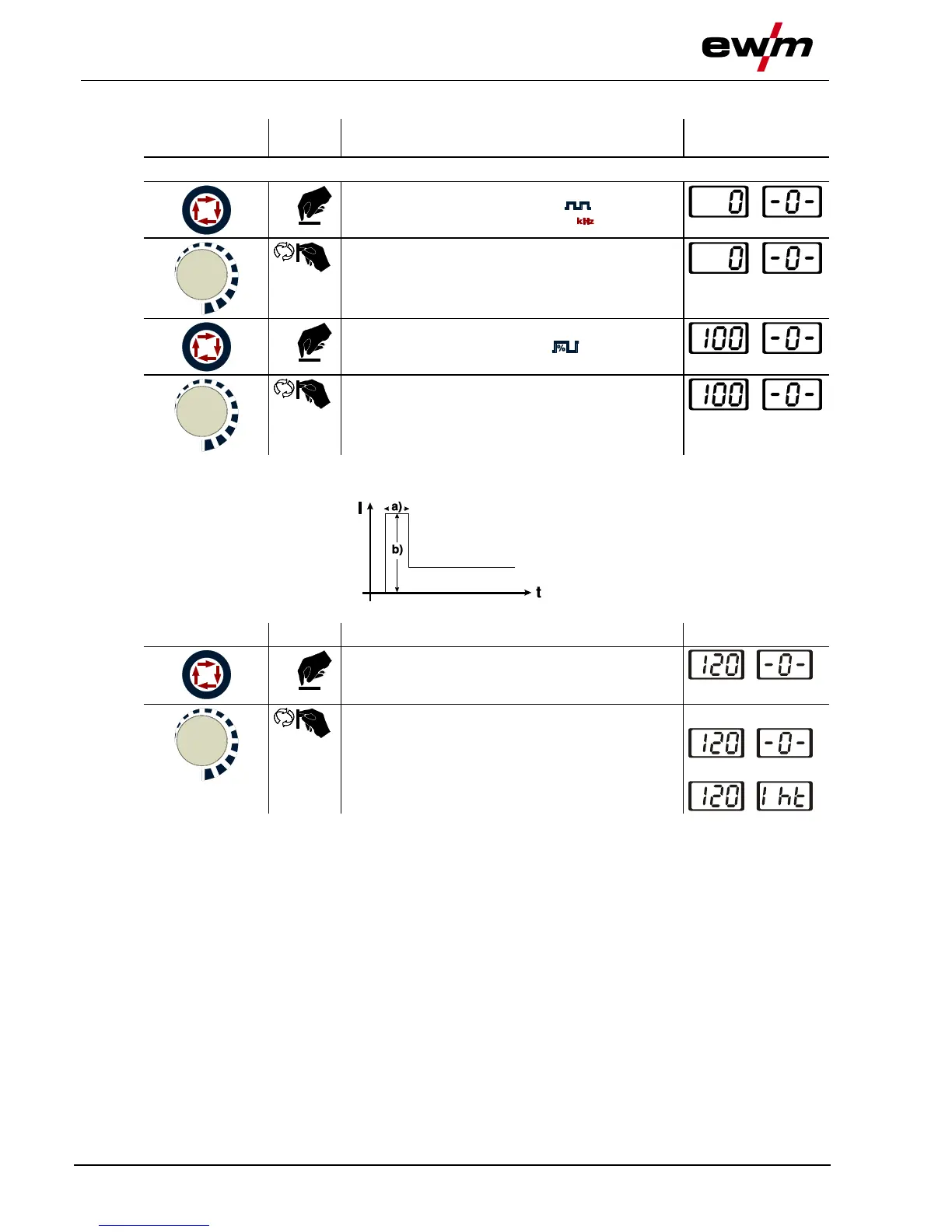
Switch on welding current polarity "AC" (see chapter "Changeover of the welding current polarity")
Select the welding parameter alternating current
frequency. Press until signal light comes on.
Set the alternating current frequency.
Factory setting, see displays
Select the welding parameter alternating current
balance. Press until signal light comes on.
Set the alternating current balance.
Factory setting, see displays
5.10.5 Hotstart
The hotstart device improves the ignition of the stick electrodes using an increased ignition current.
a) = Hotstart time
b) = Hotstart current
I = Welding current
t = Time
5.10.5.1 Hotstart current
Select hotstart current welding parameter:
Press until hotstart current signal light AMP%
comes on.
Set hotstart current.
The factory setting is a value as a percentage of
the selected main current. To set an absolute value
for the hotstart current, see the "Advanced
settings" chapter
Percentage display:
Absolute display:








 To Next Page