Design and function
Menus and sub-menus on the machine control
099-004854-EW501
19.02.2014
5.19 Menus and sub-menus on the machine control
5.19.1 Direct menus (direct access to parameters)
Functions, parameters and their values can be accessed directly, e.g. can be selected by pressing a
button once.
5.19.2 Expert menu (TIG)
The expert menu includes functions and parameters which are either not set on the machine control, or
which do not require regular setting.
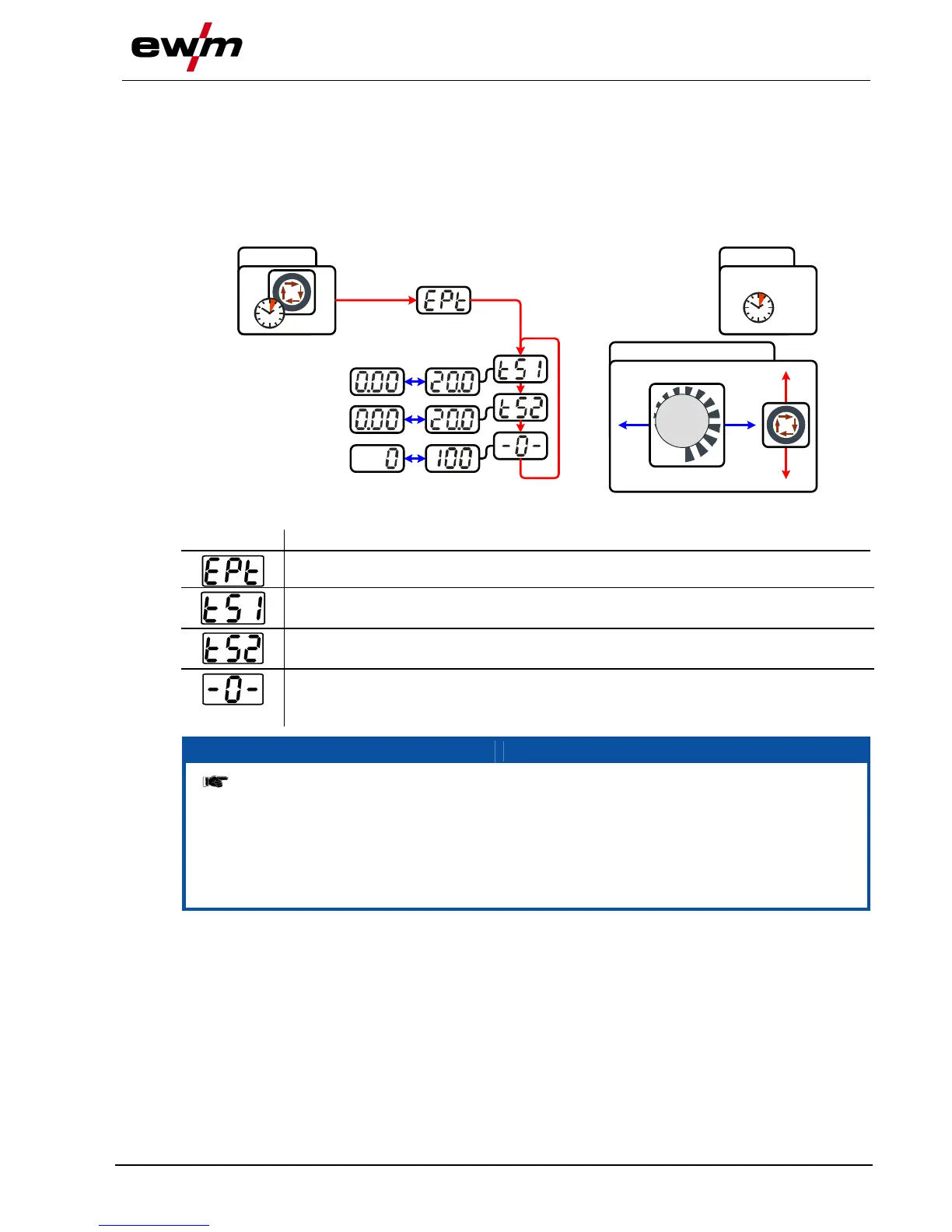
ENTER EXIT
4 s
NAVIGATION
4 s
Slope time tS1 (main current to secondary current)
Setting: 0.00 s to 20.0 s (factory setting 0.00 s)
Slope time tS2 (secondary current to main current)
Setting: 0.00 s to 20.0 s (factory setting 0.00 s)
activArc parameter
Parameter can also be set after activating TIG activArc welding.
Display shown = factory setting.
ENTER (enter the menu)
• Keep the "welding parameters" button pressed for 4 s.
Navigating in the menu
• Parameters are selected by pressing the "welding parameters" button.
• Set or change the parameters by turning the "welding parameter setting" rotary dial.
EXIT (leave the menu)
• After 4 s, the machine will return automatically to the ready-to-operate status.








 To Next Page