Design and function
Welding programs
099-004854-EW501
19.02.2014
5.11.1 Selection and adjustment
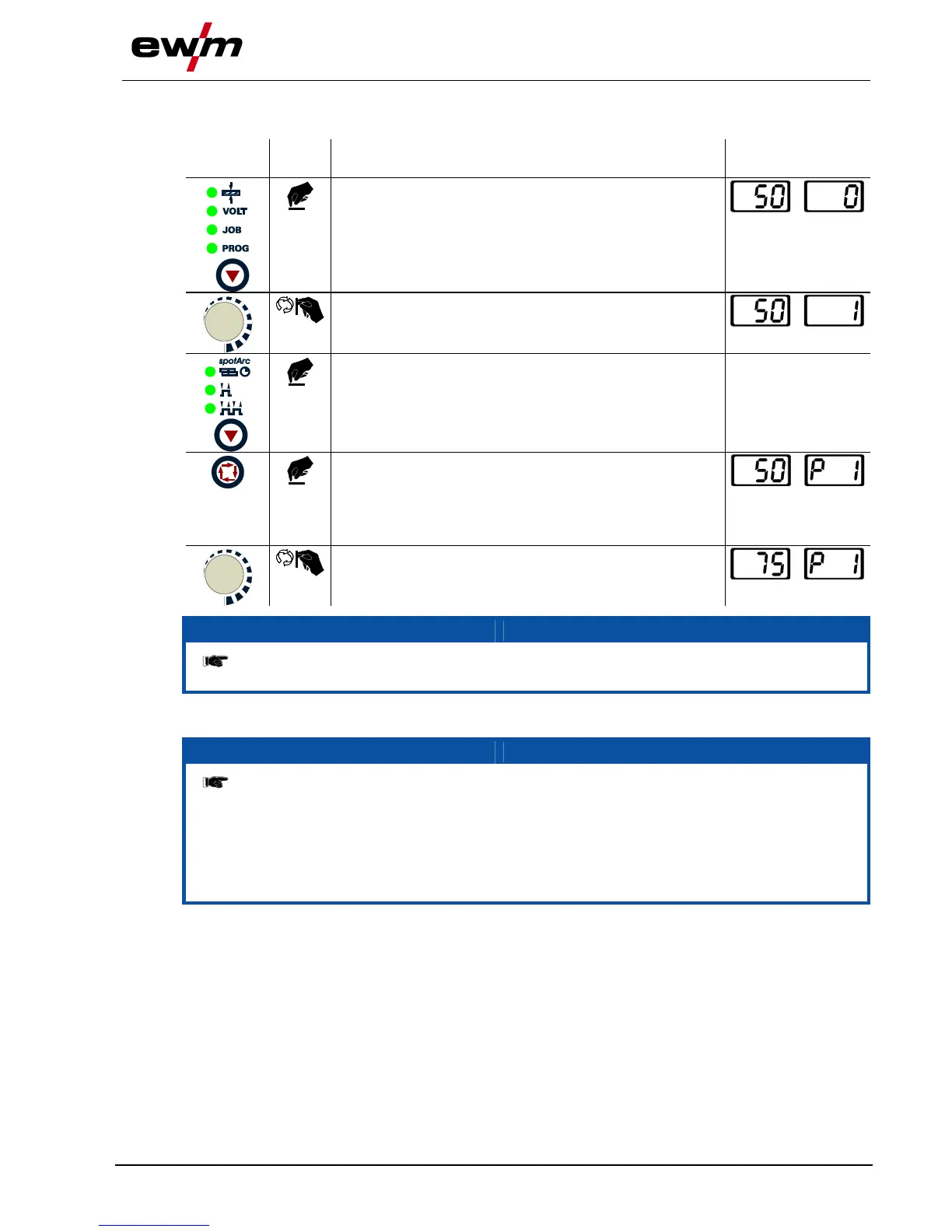
Setting welding programs using the welding machine control
Press button until signal light
PROG comes on.
Welding current
(left) and program
no. (right)
Select or retrieve program no., e.g. no. 1
Set operating mode (can be specified separately for each
program).
Press until a “P” for program no. is displayed in the left-
hand section of the right-hand display.
Any parameter can be selected and changed in the
function sequence. The changes are transferred to all
other programs in the equivalent way.
Set welding current for the corresponding program (e.g.:
75 A in program 1).
When connecting a potentiometer torch or up/down torch or operating a standard torch
in up/down mode, the program changeover to the welding machine control is blocked!
5.11.2 Specifying max. no. of accessible programs
This function can be used to specify the maximum number of programs which can be
called up (only applies to the welding torch). According to the factory setting, all 16
programs can be called up. If necessary these can be limited to a specific number.
To limit the number of programs, the welding current needs to be set to 0A for the next,
unused program. For example, if only programs 0 to 3 are being used, the welding
current is set to 0A in program 4. A maximum of programs 0 to 3 can then be called up
on the welding torch.








 To Next Page