Functional characteristics
Machine control – Operating elements
Item No.: 099-004934-EWM01 33
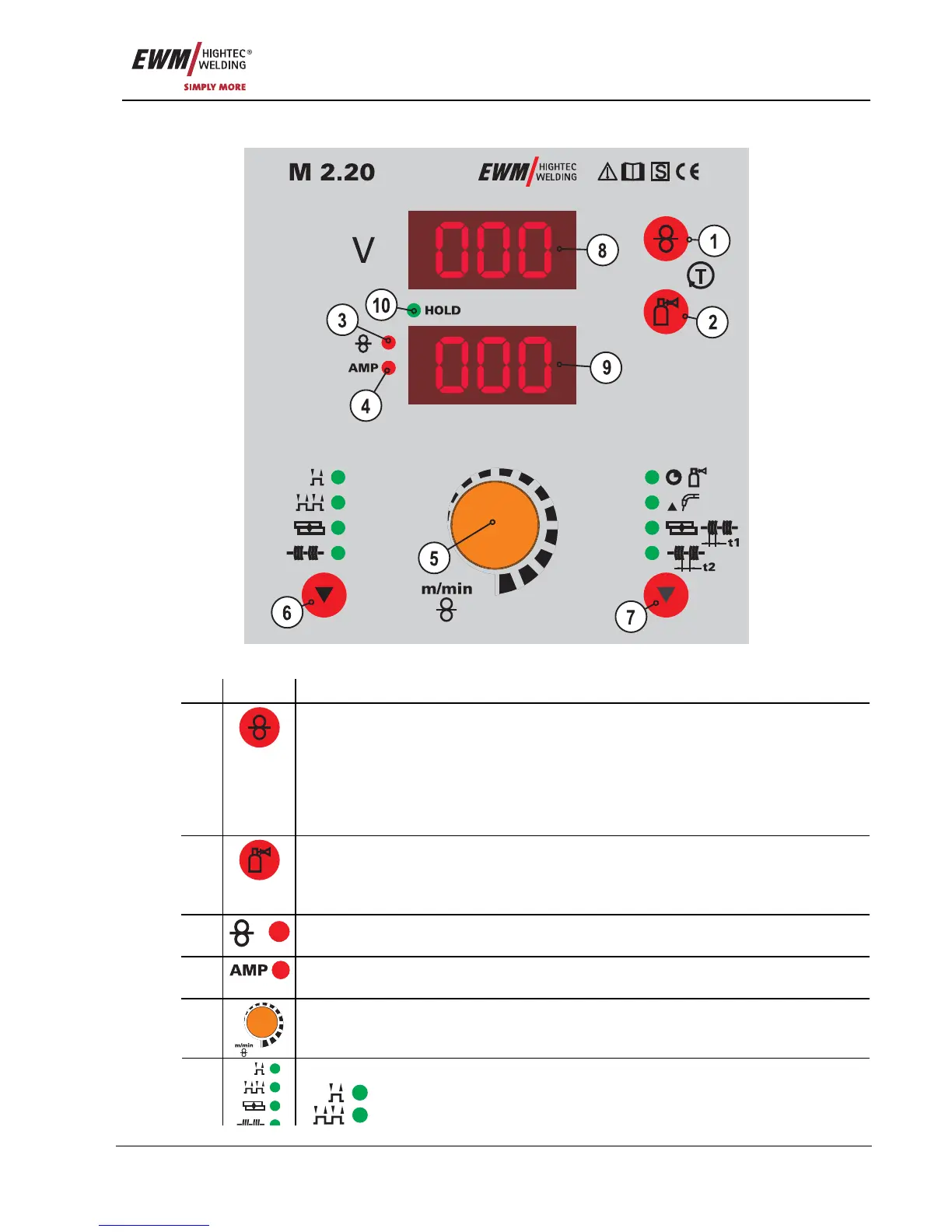
5.1.2 M2.20 welding machine control
Figure 5-4
Item Symbol Description 0
1
Button, Wire inching
For inching the wire electrode when changing the wire spool
(speed = 6.0 m/min, constant).
The welding wire is inched into the tube package with the current off and without gas
being expelled.
This ensures a high degree of safety for the welder by preventing accidental ignition of
the arc.
2
Button, Gas test
The welding voltage and wire feed remain off when testing and setting the gas flow.
Pressing the key button once causes shielding gas to flow for approx. 25 seconds. The
button can be pressed again at any time to cancel the process.
3
Signal light, Wire speed
Lights when the wire speed is shown on the display.
4
Current signal light
Lights when the current is shown on the display.
5
Rotary dial, Wire speed/welding parameter setting
Continuous adjustment of the wire speed or welding current and setting of runtime
parameters such as gas post-flows, wire burn-back, etc.
Key button, Operating mode
Non-latched
6
Latched









 To Next Page