Functional characteristics
Machine control – Operating elements
40 Item No.: 099-004934-EWM01
5.1.3.2 Setting the operating point (welding output)
NOTE
The operating point setting in JOB "0" (manual) is carried out as described in the chapter
of the same name for control M2.20. The following settings are therefore only intended
for work in JOBs 1-24.
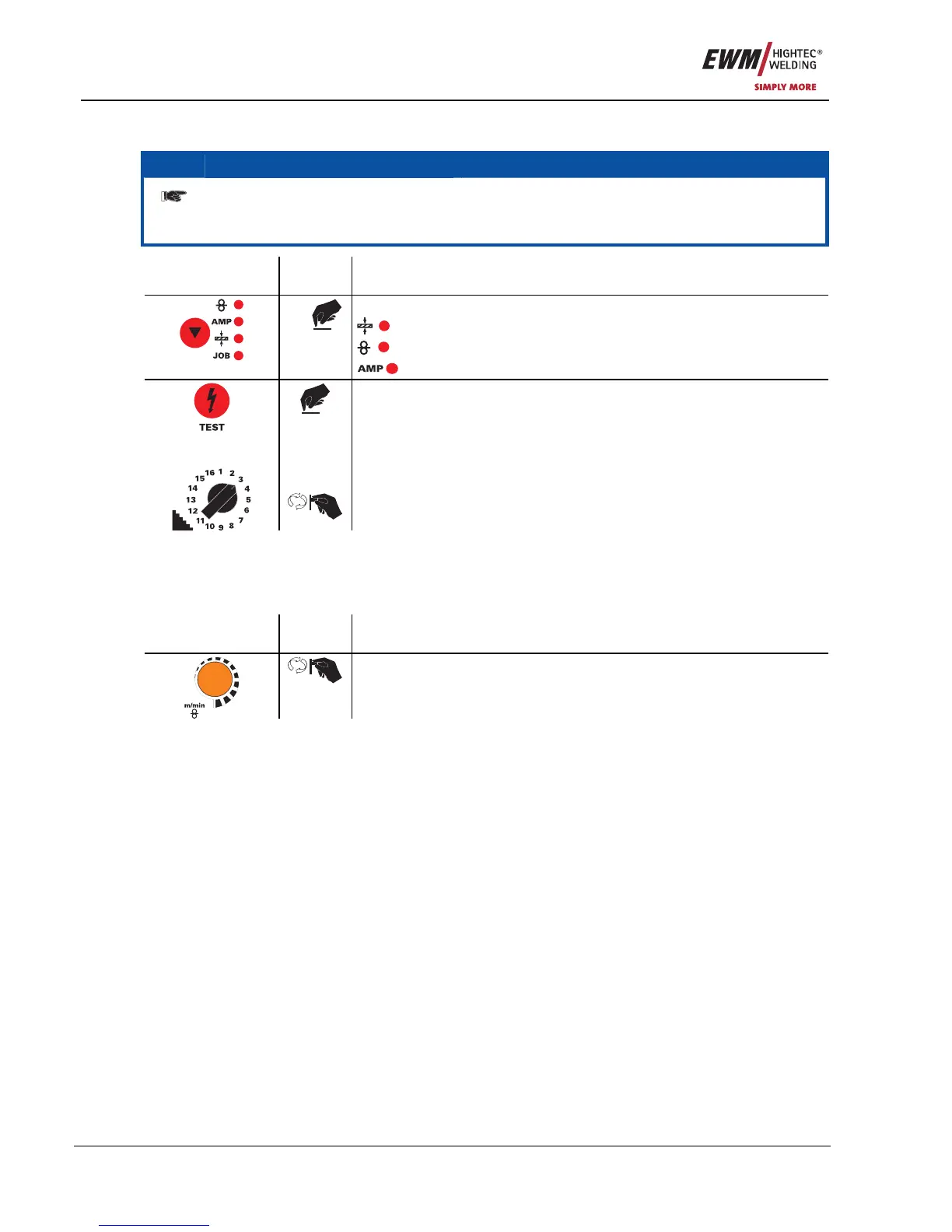
Operating
element
Action Result
n x
Select the parameter via which the welding output is to be set:
using the panel thickness
using the wire speed
using the welding current
+
+
Hold down the "TEST" button and at the same time set the operating
point on the step switch.
The display shows the required parameters and the open circuit
voltage.
If the "Volt" and "Wire feed correction" diodes are flashing, this indicates
an error (e.g. short circuit between torch and workpiece, inductivity
error, etc). To correct the error, press "TEST" again.
If the operating mode has already been selected, all the necessary settings will have been
activated and welding can be started.
5.1.3.3 Setting the wire correction
The wire speed (arc length) can be modified using the wire correction if required.
Operating
element
Action Result
Set the wire correction value









 To Next Page