EasyManua.ls Logo

EXFO FPM-600 - EXFO FPM-600;FLS-600 Troubleshooting Guide; Solving Common Problems

EXFO FPM-600
59 pages
Print Icon
To Next Page IconTo Next Page
To Previous Page IconTo Previous Page
Loading...
52
8
Troubleshooting
Solving Common Problems
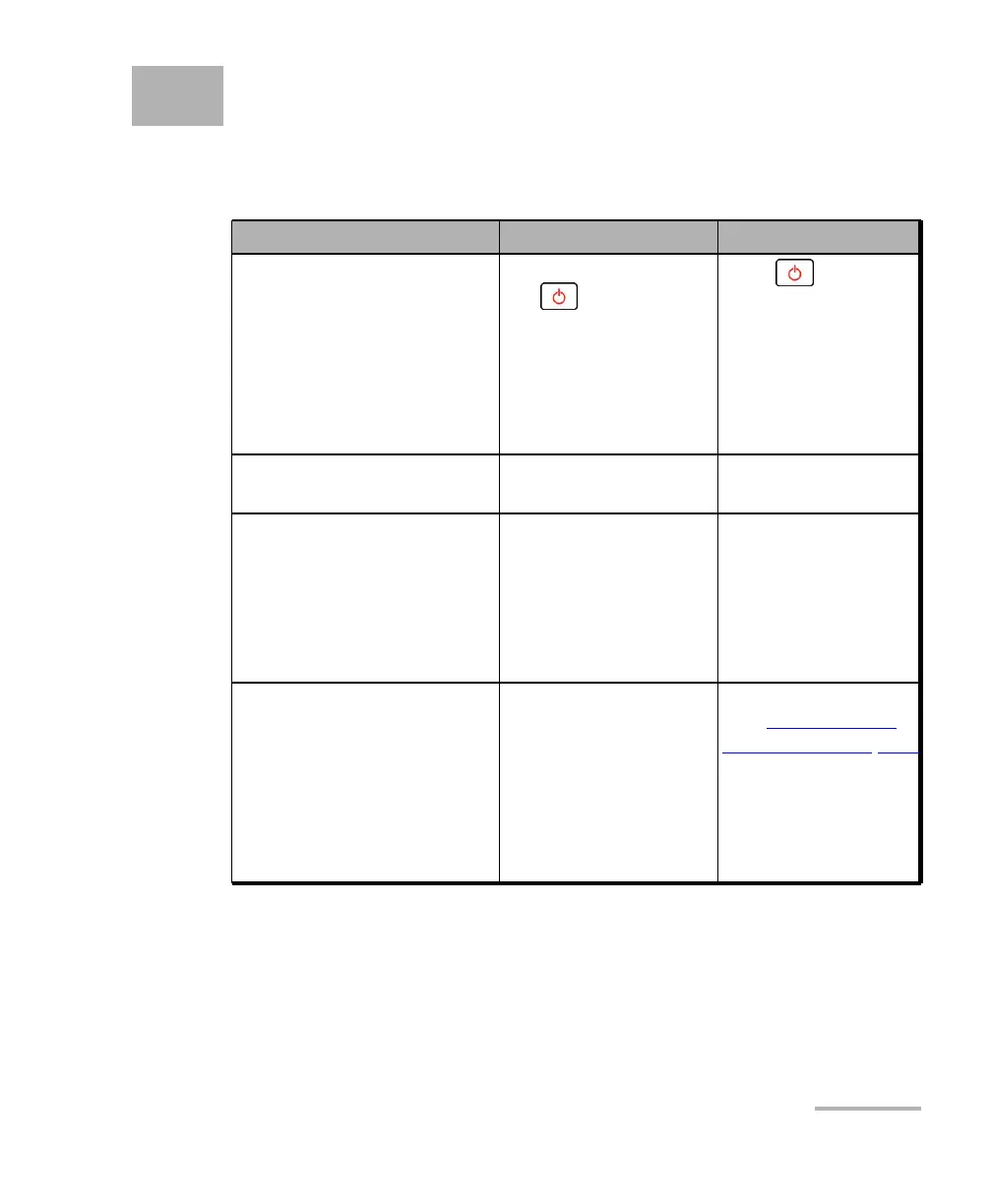
Problem
Possible Cause
Solution
The unit does not turn on.
You did not press
long enough.
AC adapter/charger
not connected.
Main battery
discharged.
Weather too cold.
Press for 2
seconds.
Connect AC
adapter/charger and
charge battery.
The unit takes very long to
turn on.
Too many values saved
in memory.
Delete all data from
the unit.
Battery does not charge as
expected.
Temperature too
high.
Battery incorrectly
connected.
Incorrect charger
used.
Ensure temperature is
within specifications.
Ensure battery is
connected properly.
Use the correct
charger.
Unable to change power
meter wavelength.
Unit receiving Auto
(or REF) signal
from source.
Change source mode
(see Modulating the
Source Signal on page
33), then retry.
Only one
wavelength in list.
Add wavelengths.

Table of Contents

Related product manuals