WEAT V2 N - V1
17GB
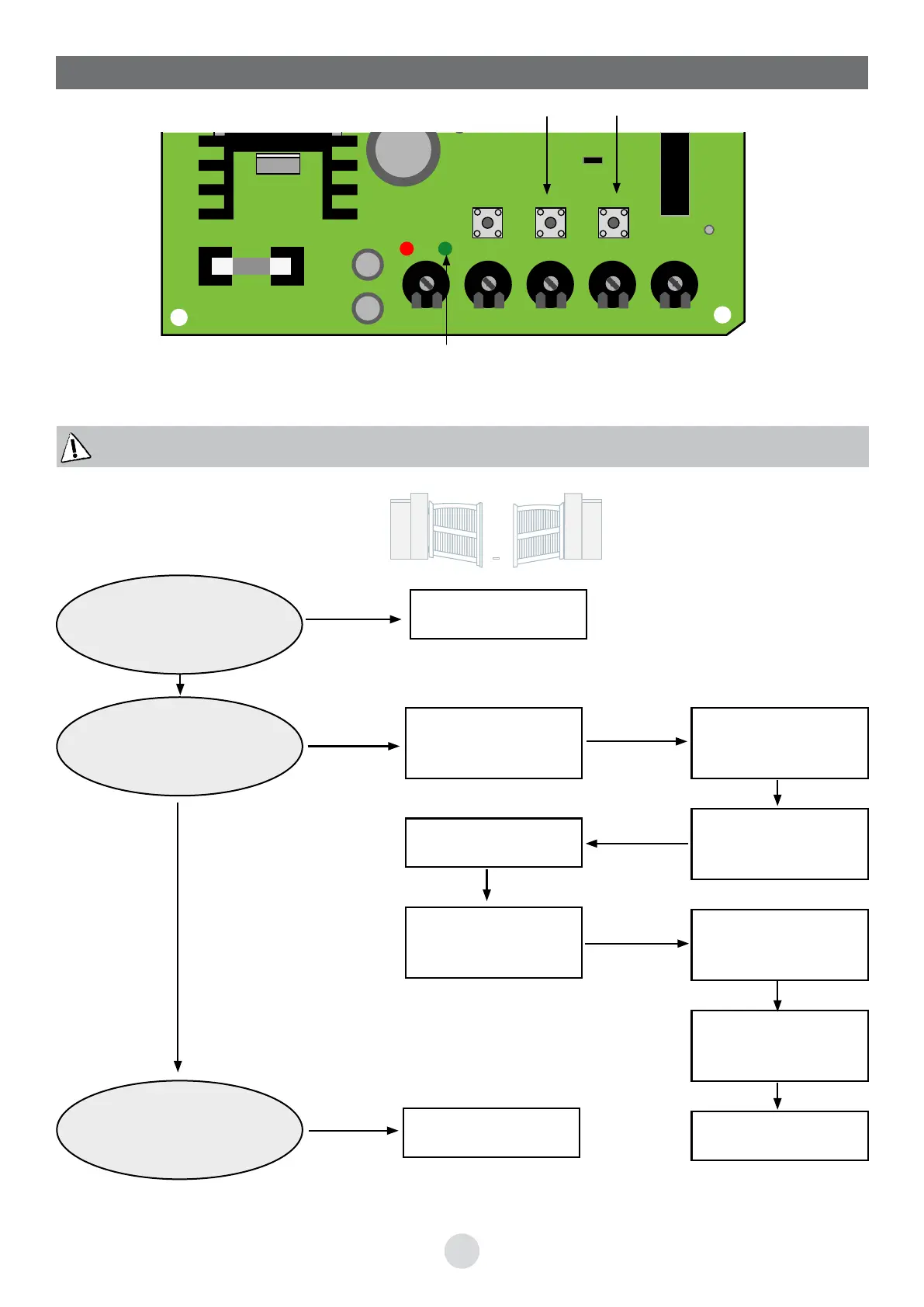
VR1 VR2 VR3 VR4 VR5
LD1 LD2
P1/SFT P2/RADIORESET
JP1
P1/SET RESET
LD1
QUICK START-UP
Connect the unit, the worm screws, the photocells, the beacon and the power supply. Leave the leaves half
open.
During quick start, it is imperative to position the trimmer VR3 (OBS) at the minimum so that slowing downs
are taken into account, and if necessary help manually the leaves or increase VR5 (OVL).
Reset to VR3 (OBS) adjustment in order the gate does not stop inopportunely in case of wind.
(before 5 sec.)
Press the P1/SET button
Until the motors start
End of auto-memorisation
procedure
Energise the unit and press
the RESET button
for 2 sec.
Leaves open for
4 seconds then close
Green LD1 flashing
Motors stopped
Green LD1 off
Motors stopped
Green LD1
lit steadily
The leaves open
to the stops
Leaves close one after
the other
Motors stopped after 3
seconds
Safety mechanisms and
motor registered


 To Next Page