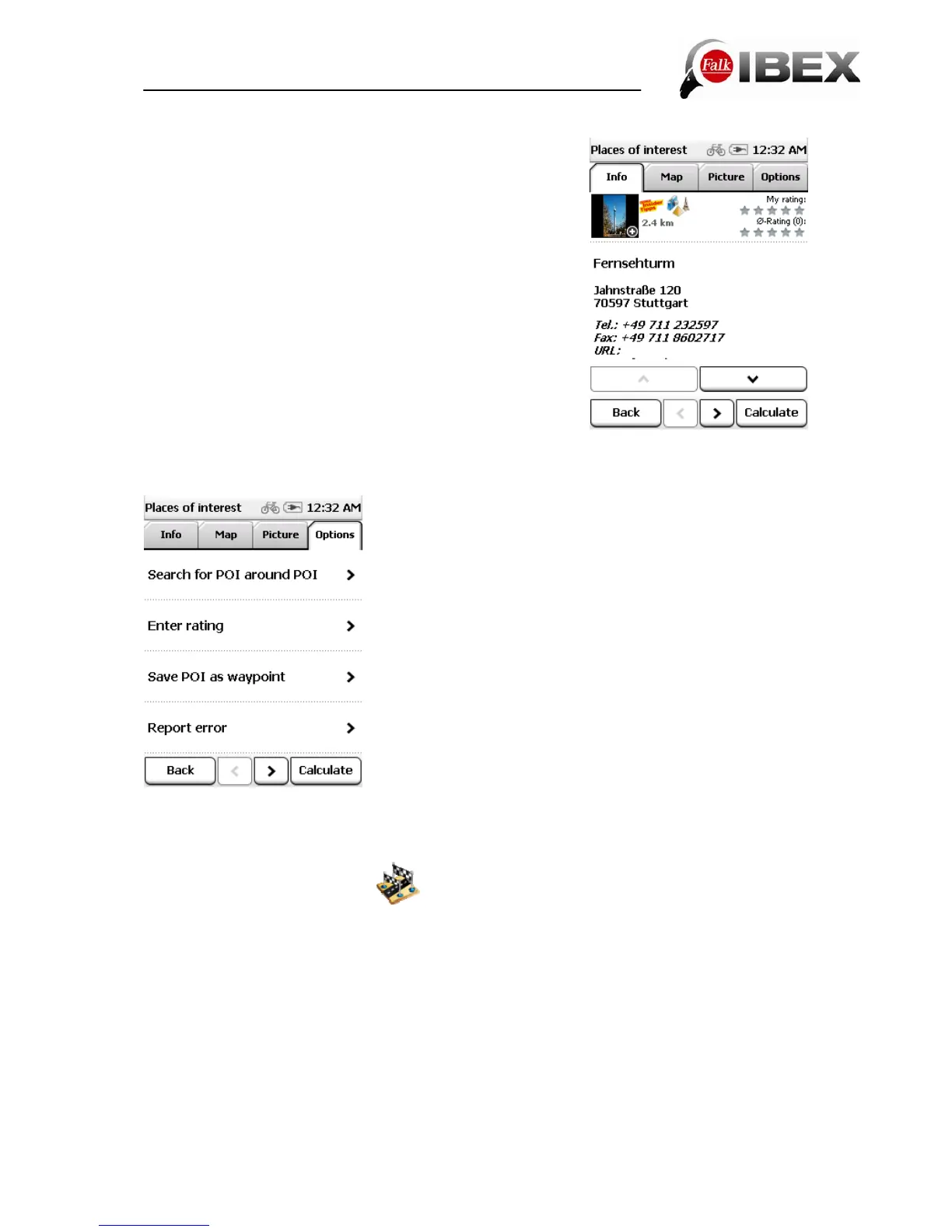
Detailed view of a POI
In the detailed view you will find all of the available
information about a POI.
At the top you can switch between the Info, Map, Picture
(optional) and Options screens by tapping on the tabs.
Info shows you the address, the distance and a descriptive
text.
"Map"shows you the POI on the map view.
Via "Picture" you can view a picture of the selected POI if
one exists.
In the Options you also have the following possibilities:
Search for POI around POI - Searches for another POI
around the current one (if for example you would like to find
a restaurant near to the hostel where you are staying).
Enter rating - Possibility of rating the POI. The rating is then
displayed at the top in the detailed view.
Save POI as waypoint - Adds the POI to your own
waypoints.
Report error – Adds a POI error to the map errors.
You can use the two arrows at the bottom to scroll to the
next or previous POI from the list.
Calculate starts the route calculation to this POI.
Back switches back to the list of POIs.
3.4 Previous destinations
This function allows you to select the previous destinations that you entered very easily.
The previous forty destinations are automatically saved.
Falk IBEX User Manual 16


 To Next Page