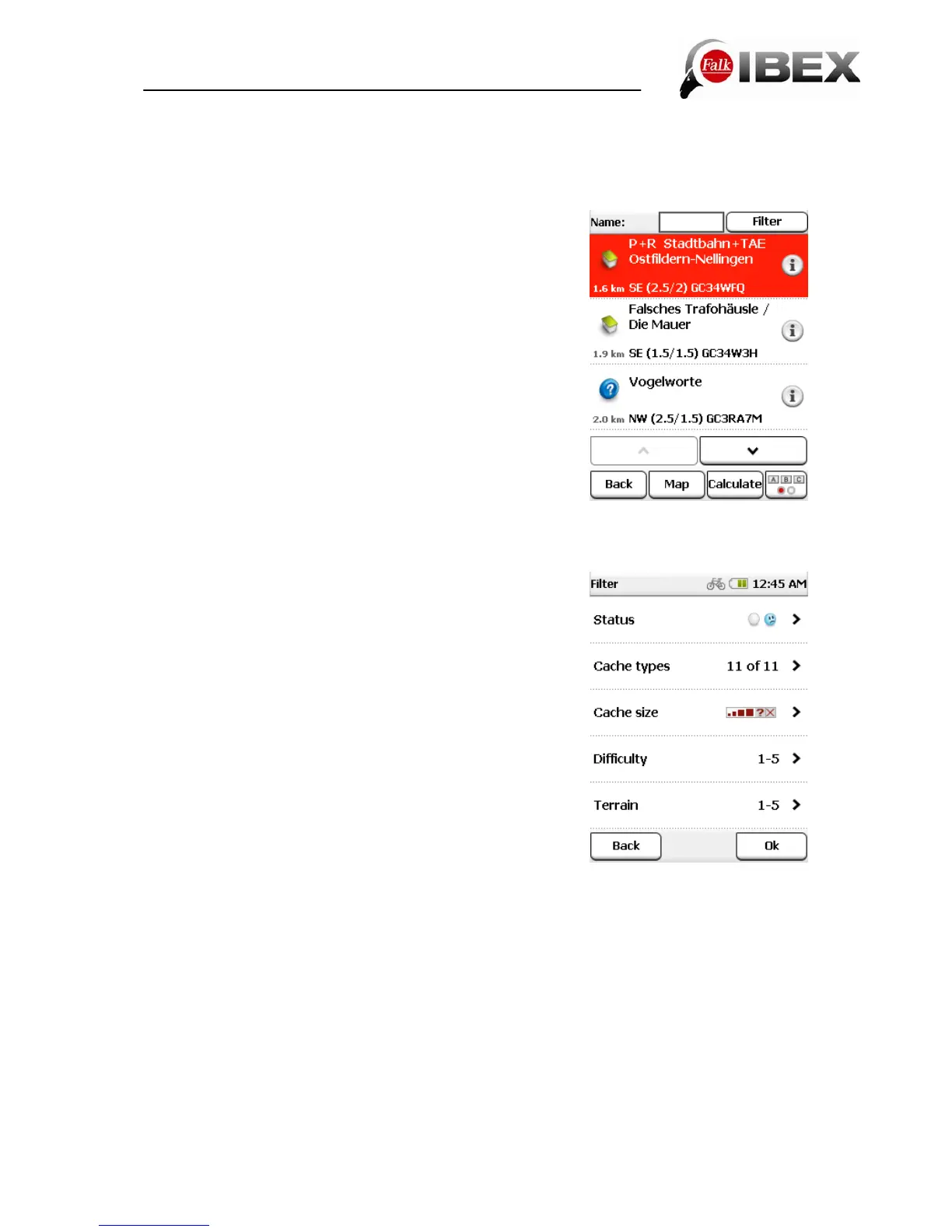
Once you have selected a geocache from the list, you can display the geocache on the map
by clicking on the map, navigate to it directly by clicking on Calculate or call up the detailed
view with a double-click.
9.2.1 Cache list
In the list view, all geocaches in the area surrounding your
search centre are displayed to you. They are sorted by
distance.
You can also search for cache names or cache codes (each
geocache has a specific name and a unique code). To do
this, start the search with ABC and enter the desired name
or code.
You can also filter the geocaches according to specific
criteria (see Chap. 9.2.2)
9.2.2 Filter
The Filter function allows you to filter out geocaches
according to specific criteria.
Status - With this filter you can search for geocaches which
are either untried, not found or where a repair is required.
Cache type - With this filter you can opt specifically for one
cache type or for several cache types.
Cache size - With this filter you can decide what size the
geocache should be.
Difficulty - With this filter you can decide how difficult it
should be to find the desired cache.
Terrain – With this filter you can decide how big the terrain
to contend with should be, or how physically strenuous it
should be, to find this cache.
Note:
The Falk LUX does not support Wherigo caches (GPS-based adventure games).
Falk IBEX User Manual 38


 To Next Page