Device description
Device
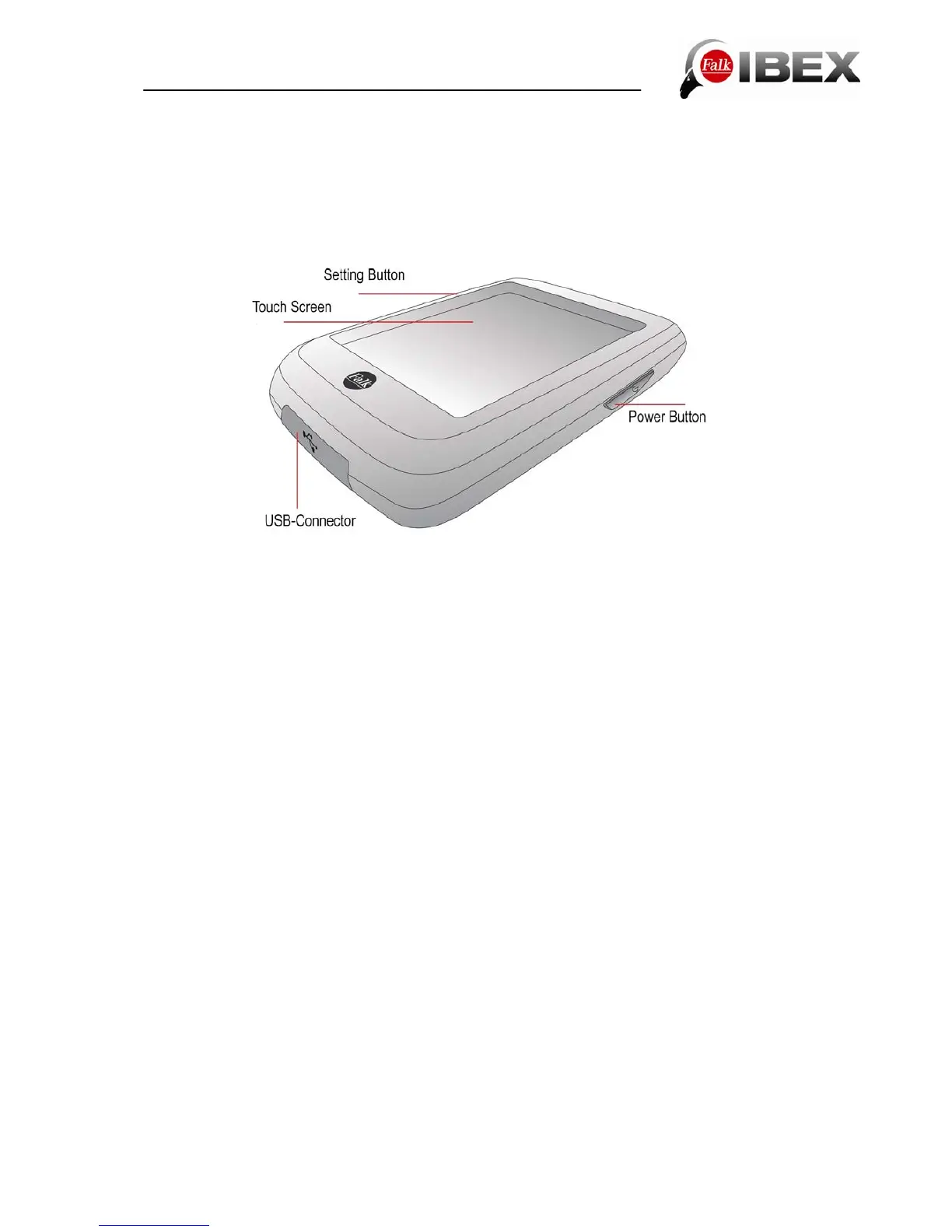
Power Button: Switches the device on. When you press the power button during use, you
have the following options:
Switch off: Switches the device off completely.
Stand-by: Switches to stand-by mode.
Screen off: The screen is switched off, ongoing navigations or track recordings remain active.
This is done to save power.
Keylock on/off: Activates or deactivates the keylock. The keylock prevents unwanted entries
being made via the screen. To deactivate the keylock, press the power button again and then
"Keylock".
“Cancel” takes you back to the application.
Setting Button: Default: For setting the volume and brightness. You can define yourself,
which setting you can access through the Setting Button (see chapter 6.3.11)
Note: If the device stops responding and can no longer be operated, press the power button
for approx. 3 seconds. The device will then restart.
Touch Screen: Displays the map and the menu. To make entries or select functions, use
your finger to tap on the appropriate point on the screen.
USB Connector: Connector for charging up the battery via the adapter or for connecting the
device to a PC via the USB cable.
The connector is located beneath a rubberised cover. Pull this up on the left-hand side to
connect a cable.
Note: The rubberised cover also provides protection against the ingress of water. Make sure
that it is always completely closed when using the device.
Speaker: The speaker is located on the back of the device. It emits navigation instructions
and system alerts.
Falk IBEX User Manual 7


 To Next Page