KML/KMZ import in the Falk Navi-Manager
The following text describes
how KML and KMZ files can
be imported to the sat nav via
the Falk Navi-Manager.
Start the Navi-Manager. On
the Navi-Manager screen
interface in the menu bar
under "Plugins", call up the
menu item "KML Import
Plugin".
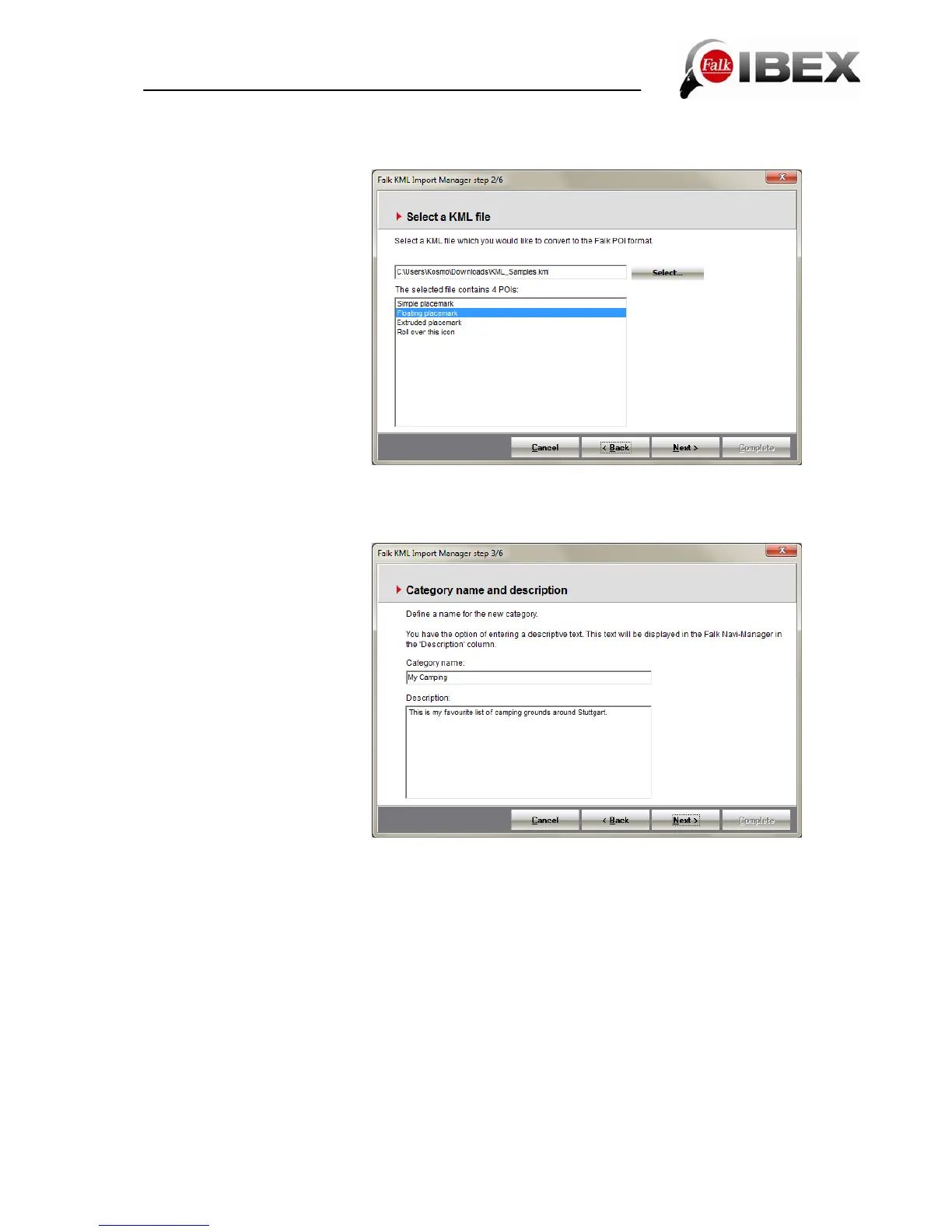
Here you will then see the
window for the import wizard.
You can acknowledge this
with the Next button. With the
aid of the "Select" button, you
can select the KML or KMZ
file on your PC which you would like to transfer to your navigation device. Once you have
selected a file, a list of the POIs in it appears beneath it. Press the Next button.
In the next window, you must
assign an individual category
name for your POI category.
You also have the option
here of providing more details
about the particular POI
category. Once you have
provided the POI category
with a name and the
information you want, confirm
your entries again with the
Next button.
In the next step, you have the
option of selecting an icon to
be displayed on the map with
the respective POIs. A small
selection of icons are suggested for you.
However, you can also select your own icon (if one exists) from your PC. This icon should
have a resolution of 72 dpi and the image size 16x16 pixels.
Finally, confirm your entry again with the "Next" button. If you do not specify your own icon,
the default icon shown will be used for displaying the POI on the map.
The final window once again summarises the information for the POI category which is to be
imported. When you press the Complete button, you start the conversion process (the KML
file is converted into the Falk format).
Note: The conversion may take a little time.
The converted POI category appears automatically after a few seconds under the "My
favourites" tab. The POI category is now located on the PC. To transfer the POI category to
the navigation device, you must click on the right-hand side of the window on the button
Copy PC > Flash or Copy PC > SD card.
Following successful transfer, your own POI category is available on the navigation device
for further use, e.g. for radius searches or navigation operations.
Falk IBEX User Manual 62


 To Next Page