14
You can select a Pad to edit by striking it or pressing the corresponding
Pad key.
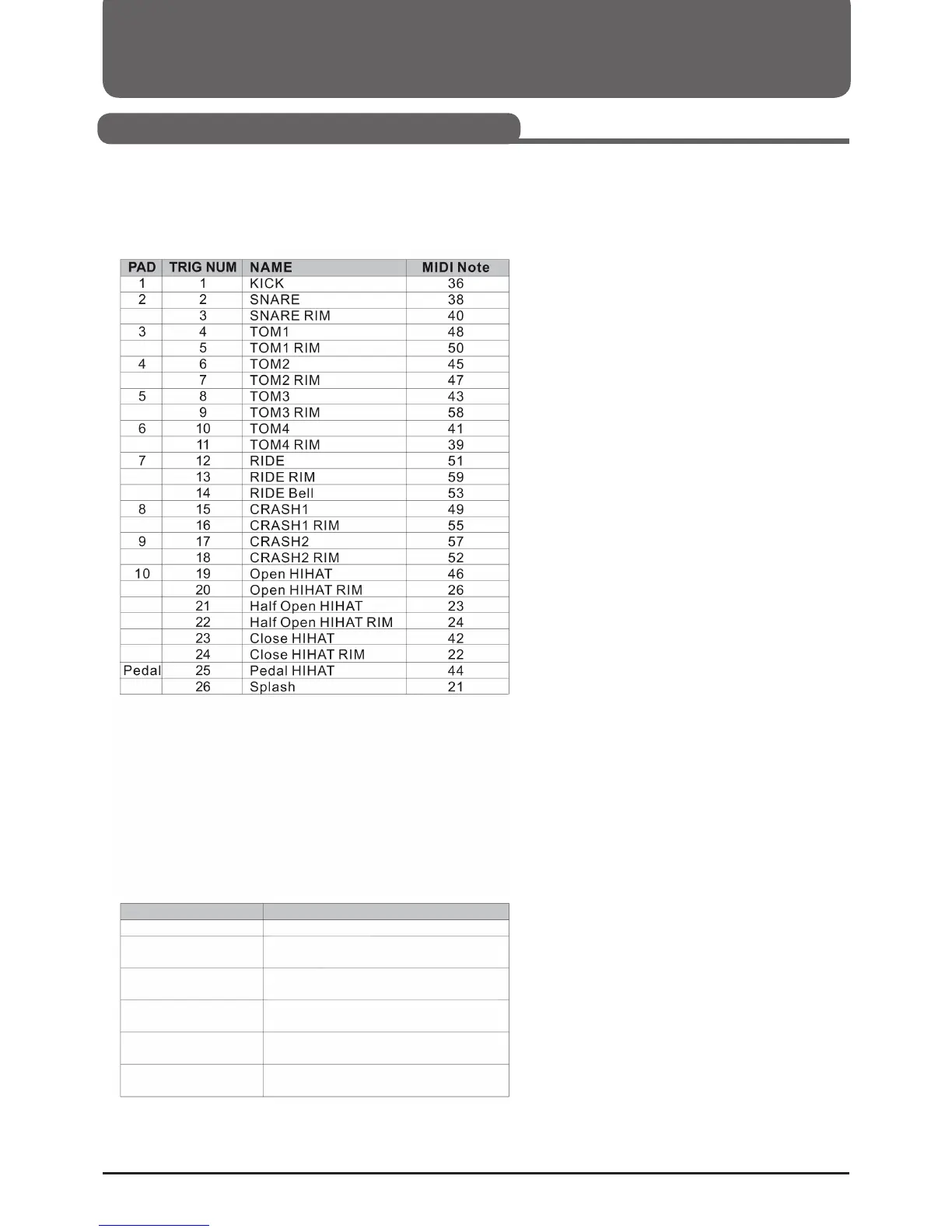
The digital set has 10 pad triggers and a pedal controller.
MIDI notes table:
Note:
1. You can select the closed hi-hat by selecting the pad selection button
(HI-HAT CONTROL) and the HI-HAT at the same time.
2. When using the pad selection keys, you cannot select some of the
triggers, such as Ride Bell, Half Open Hi-Hat Rim, and Splash: Ride
Bell, Half Open Hi-Hat, Half Open Hi-Hat Rim and Splash. To chan-
ge these settings, you must strike the Pad.
Meanings of the Pad Select buttons LEDs
optional
optional
optional
optional
Ride Bell
RIDE blinking
HI-HAT CONTROL glows, RIM blinking
HI-HAT glows,
HI-HAT CONTROL glows
HI-HAT, HI-HAT CONTROL and RIM
glows,
HI-HAT glows,
HI-HAT CONTROL blinking
HI-HAT glows,
HI-HAT CONTROL and Rim blinking
Half open hi-hat
Closed Hi-Hat
Closed
Hi-Hat Rim
Half open
Hi-Hat Rim
Splash
Selected Pad
Pad Indicator
Setting Pad Values
Selecting a Drumkit (KIT)



 To Next Page