18
DrumVoc:
With this setting you determine whether a drum set sounds when you hit
the pad used to start the pattern.
ON: Default setting. When the pad is struck, the pattern is started and
the sound of the pad also sounds.
OFF: Only the pattern is played.
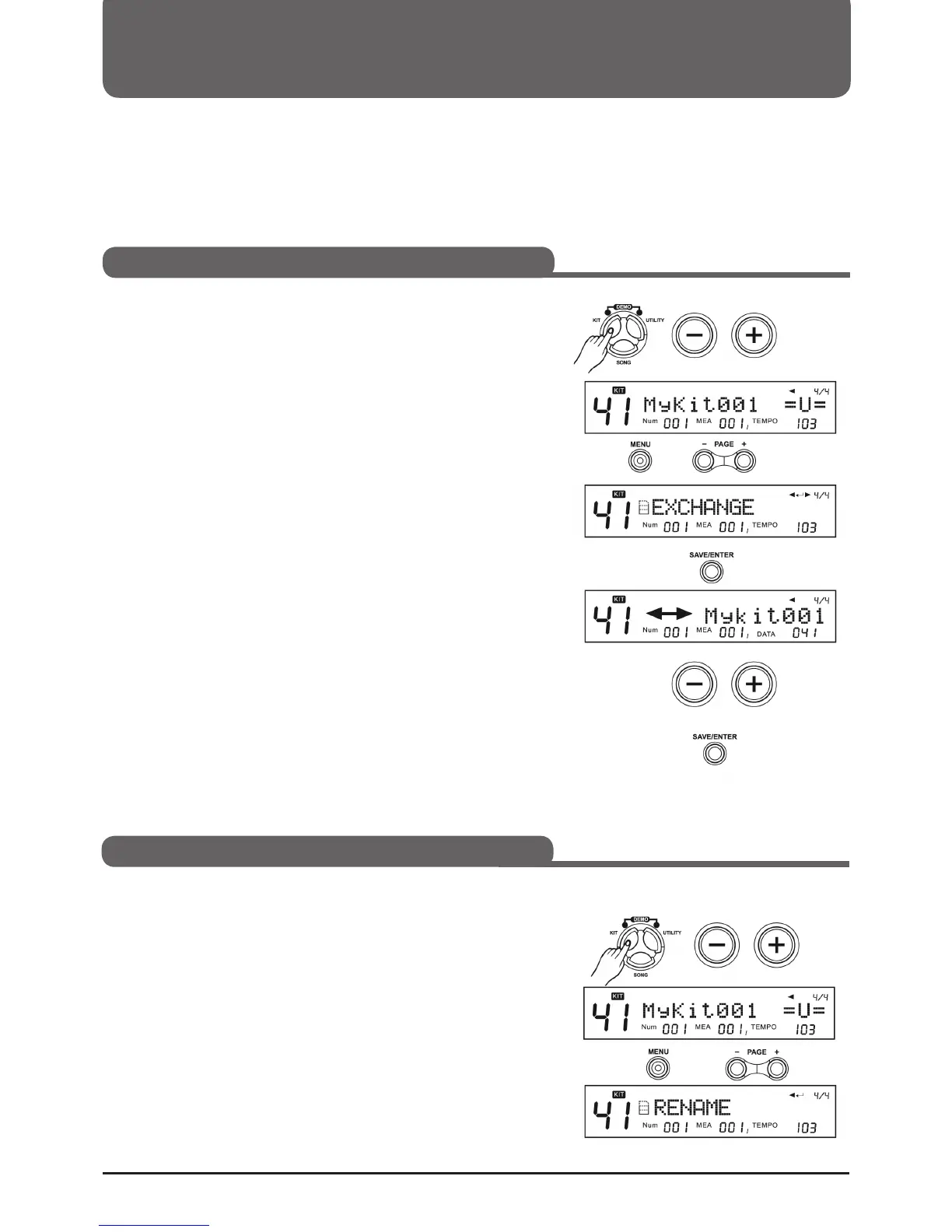
1. Press KIT, then use the +/- buttons or the selection dial to select
a User Kit.
2. Press MENU and then use the PAGE +/- buttons to select the
EXCHANGE menu.
3. Press (SAVE/ENTER) to select the replacement position.
4. Use the +/- buttons or the selection wheel to select a position.
5. Press (SAVE/ENTER) again to confirm the replacement.
Note:
When the process has been successfully completed, the display
briefly shows "EXCHANGE OK! The display will then return to KIT
mode ("MyKit001" in this example).
1. Press KIT, then use the +/- buttons or the selection dial to select
a User Kit.
2. Press the MENU button, then use the PAGE +/- buttons. um das
RENAME Menü auszuwählen
Selecting a Drumkit (KIT)
Kit Change Order
Rename Kit



 To Next Page